Kontakte, Kalender, Fotos und Videos sichern: Dixon XK1
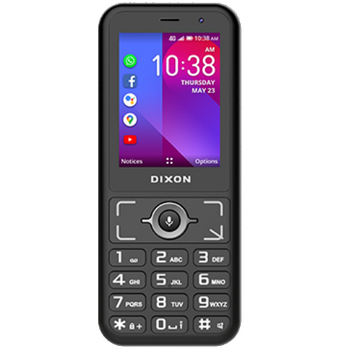
Verfügbare Anleitungen für die Synchronisierung mit der sicheren Cloud
Unterstützte Funktionen
- Kontakt-Synchronisation
- Kalender-Synchronisation
- Foto-Synchronisierung
- Video-Synchronisation
- automatisch synchronisieren


Übertragen Sie Ihre Kontakte, Kalender, Fotos und Videos von Dixon XK1 in einen Online-Speicher und zurück, um sie sicher und aktuell zu halten.
Dixon XK1 wird von PhoneCopy unterstützt.
Bitte beachten Sie, dass die folgenden Einstellungen je nach Firmware-Version leicht variieren können.
Bestätigte Modelle
Bestätigte Versionen
News
- 30.06.21
- Sogar in Südafrika haben wir einen Benutzer mit einem Dixon XK1-Telefon. Er sichert seine Kontakte.
KaiOS-Versionen auf Dixon XK1
Die PhoneCopy-App für KaiOS unterstützt verschiedene KaiOS-Versionen. Unsere Benutzer haben ihr Dixon XK1 mit KaiOS 2.5.1.1 (100.00%) synchronisiert.
Dixon XK1 Nutzer auf der ganzen Welt
Dixon XK1 wird für die Kontaktsicherung von PhoneCopy-Benutzern in mehreren Ländern auf der ganzen Welt bevorzugt - Südafrika (Suid-Afrika, iNingizimu Afrika, uMzantsi Afrika, Afrika-Borwa, Afrika Borwa, Aforika Borwa, Afurika Tshipembe, Afrika Dzonga, iSewula Afrika) - 100.00%.
Das Histogramm zeigt die Dixon XK1-Sicherung mit PhoneCopy weltweit.
Textanleitung - So sichern Sie Ihre Daten
Von Dixon XK1
- Download our PhoneCopy for KaiOS from application KaiOS Marketplace to your mobile device.
- After launching the application, create a new account from the application. If you have already created an account on web pages www.phonecopy.com, log in to this existing account in the application.
- After succesful login press "Synchronize" for complete synchronization, you can choose "This device >> Server" for one-way sync.
If you need more help with the settings, visit our step by step screenshot guide: How to synchronize contacts to phone with KaiOS
If you need more help with the settings, visit our step by step screenshot guide: How to backup contacts from phone with Kai OS
Bei Problemen mit der Synchronisierung, bitte kontaktieren Sie uns.
Zu Dixon XK1
- Download our PhoneCopy for KaiOS from application KaiOS Marketplace to your mobile device.
- After launching the application, log in to this existing account in the application.
- After succesful login press "Synchronize" for complete synchronization, you can choose "Server >> This device" for one-way sync.
If you need more help with the settings, visit our step by step screenshot guide: How to synchronize contacts to phone with KaiOS
If you need more help with the settings, visit our step by step screenshot guide: How to backup contacts from phone with Kai OS
Bei Problemen mit der Synchronisierung, bitte kontaktieren Sie uns.
Benutzer Kommentare
Um einen Kommentar zu hinterlassen, melden Sie sich an.
-
Hi, I noticed on your website that the Nokia 8000 4G is listed as supporting calendar sync. However, in my experience after testing it, the local calendar on my phone does not sync with my Google Calendar (which works in the web version). Only contact sync appears to function. Could you please clarify whether calendar sync is actually supported for this device, or if there is a workaround available? Thanks! akiesel, 28.12.25
-
Yes, you are right, the app only synchronizes contacts and media files. We have replied you in the CardDAV-related thread as well.
-
