Kontakte, Kalender, Fotos und Videos sichern: Remaxx Mobile R2471
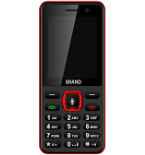
Verfügbare Anleitungen für die Synchronisierung mit der sicheren Cloud
Unterstützte Funktionen
- Kontakt-Synchronisation
- Kalender-Synchronisation
- Foto-Synchronisierung
- Video-Synchronisation
- automatisch synchronisieren


Übertragen Sie Ihre Kontakte, Kalender, Fotos und Videos von Remaxx Mobile R2471 in einen Online-Speicher und zurück, um sie sicher und aktuell zu halten.
Remaxx Mobile R2471 wird von PhoneCopy unterstützt.
Bitte beachten Sie, dass die folgenden Einstellungen je nach Firmware-Version leicht variieren können.
Bestätigte Modelle
Bestätigte Versionen
News
- 24.01.21
- Dieses Telefonmodell wurde gerade von einem PhoneCopy-Benutzer in Papua Neu-Guinea synchronisiert. Es hat Kontakte übertragen.
KaiOS-Versionen auf Remaxx Mobile R2471
Bei der Synchronisierung hatten PhoneCopy-Benutzer folgende KaiOS-Versionen auf ihrem Remaxx Mobile R2471: KaiOS 2.5.3.1 (62.50%), KaiOS 2.5.2 (37.50%).
Das folgende Diagramm zeigt Kontaktsynchronisierungen mit Remaxx Mobile R2471 unter verschiedenen KaiOS-Versionen.
Remaxx Mobile R2471 Nutzer auf der ganzen Welt
Laut unseren Statistiken verwenden PhoneCopy-Benutzer Remaxx Mobile R2471 für die Datensicherung in Ländern Papua Neu-Guinea (Papua Niugini) - 100.00%.
Die folgende Heatmap zeigt Kontaktsynchronisierungen mit Remaxx Mobile R2471 über PhoneCopy weltweit.
Textanleitung - So sichern Sie Ihre Daten
Von Remaxx Mobile R2471
- Download our PhoneCopy for KaiOS from application KaiOS Marketplace to your mobile device.
- After launching the application, create a new account from the application. If you have already created an account on web pages www.phonecopy.com, log in to this existing account in the application.
- After succesful login press "Synchronize" for complete synchronization, you can choose "This device >> Server" for one-way sync.
If you need more help with the settings, visit our step by step screenshot guide: How to synchronize contacts to phone with KaiOS
If you need more help with the settings, visit our step by step screenshot guide: How to backup contacts from phone with Kai OS
Bei Problemen mit der Synchronisierung, bitte kontaktieren Sie uns.
Zu Remaxx Mobile R2471
- Download our PhoneCopy for KaiOS from application KaiOS Marketplace to your mobile device.
- After launching the application, log in to this existing account in the application.
- After succesful login press "Synchronize" for complete synchronization, you can choose "Server >> This device" for one-way sync.
If you need more help with the settings, visit our step by step screenshot guide: How to synchronize contacts to phone with KaiOS
If you need more help with the settings, visit our step by step screenshot guide: How to backup contacts from phone with Kai OS
Bei Problemen mit der Synchronisierung, bitte kontaktieren Sie uns.
Benutzer Kommentare
Um einen Kommentar zu hinterlassen, melden Sie sich an.
-
I have a TCL Flip 3 with KaiOS 3.1. The PhoneCopy app does not appear in the app store, and I cannot get the CalDav syncing to work. I keep getting a server busy error message. Help! unbekannten Benutzer, 29.03.26
-
I tried it again and now I'm getting an incorrect username or password error message. Should the username I type on my phone be my email or my username (which is my email without the @gmail.com portion)?
-
Hello,
CalDAV shares the same username / password as your account. Yes, as username, use the name displayed in the upper right corner of this webpage (jawz02). Ensure you have used the full URL suggested by the "Add DAV device" page. We check the logs and the username/password seems to have been written improperly.
-
-
