Accent Nubia 50k dan yedeklenen kişiler, takvim, fotoğraflar ve videolar
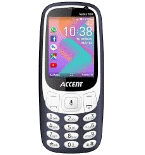
Güvenli buluta senkronizasyon için mevcut kılavuzlar
Desteklenen işlevler
- Kişiler senkronizasyonu
- Takvim senkronizasyonu
- fotoğraf senkronizasyonu
- video senkronizasyonu
- Otomatik senkronizasyon


kişiler, takvim, fotoğraflar ve videolar verilerinizi Accent Nubia 50k cihazından çevrimiçi bir depolama alanına ve geri aktararak güvende ve güncel tutun.
Accent Nubia 50k cihazını PhoneCopy desteklenmektedir.
Lütfen aşağıdaki ayarların ürün yazılımı sürümüne bağlı olarak biraz değişebileceğini unutmayın.
Onaylanan modeller
Onaylanan sürümler
Haberler
- 25.09.2024
- This phone model was just synchronized by PhoneCopy user in Amerika Birleşik Devletleri. It transferred kişiler.
- 17.02.2023
- First user from Kongo Demokratik Cumhuriyeti just synced his kişiler ve medya on Accent Nubia 50k phone.
- 1.08.2022
- Someone just used PhoneCopy for backup of Accent Nubia 50k in country Nijer. His kişiler ve medya were backed up.
- 27.10.2021
- Recently we got new user of Accent Nubia 50k also in Gabon. He is using PhoneCopy for backup of kişiler.
- 8.10.2021
- We just got first user of Accent Nubia 50k in Nijerya! Someone just backed up his kişiler from a new phone.
Accent Nubia 50k üzerinde çalışan KaiOS sürümleri
Senkronizasyon sırasında, PhoneCopy kullanıcılarının Accent Nubia 50k cihazlarında şu KaiOS sürümleri vardı: KaiOS 2.5.1.1 (100.00%).
dünya genelindeki Accent Nubia 50k kullanıcıları
Accent Nubia 50k, PhoneCopy kullanıcıları tarafından Benin (Bénin) - 63.87%, Nijer - 23.53%, Fas (Amerruk, Elmeɣrib, ⴰⵎⵔⵔⵓⴽ, ⵍⵎⵖⵔⵉⴱ, Al-maɣréb, المغرب) - 6.72%, Çad (Tchad, Tšād, تشاد) - 1.40%, Burkina Faso - 1.12%, Gabon (République gabonaise) - 1.12%, Nijerya (Nijeriya, Naigeria, Nàìjíríà) - 0.84%, Kongo Demokratik Cumhuriyeti (République démocratique du Congo, Republíki ya Kongó Demokratíki, Jamhuri ya Kidemokrasia ya Kongo) - 0.56%, Amerika Birleşik Devletleri (Estados Unidos, États-Unis, ‘Amelika Hui Pū ‘ia) - 0.56%, Kamerun (Cameroun) - 0.28% gibi ülkelerde sıklıkla kullanılmaktadır.
Aşağıdaki ısı haritası, dünya genelinde PhoneCopy kullanarak Accent Nubia 50k ile yapılan kişi senkronizasyonlarını göstermektedir.
Talimat metni - Nasıl yedekleme yapılır
Accent Nubia 50k 'dan
- Download our PhoneCopy for KaiOS from application KaiOS Marketplace to your mobile device.
- After launching the application, create a new account from the application. If you have already created an account on web pages www.phonecopy.com, log in to this existing account in the application.
- After succesful login press "Synchronize" for complete synchronization, you can choose "This device >> Server" for one-way sync.
If you need more help with the settings, visit our step by step screenshot guide: How to synchronize contacts to phone with KaiOS
If you need more help with the settings, visit our step by step screenshot guide: How to backup contacts from phone with Kai OS
Senkronizasyon esnasında herhangi bir problemle karşılaşırsanız Yardım İsteyin
Accent Nubia 50k 'a doğru
- Download our PhoneCopy for KaiOS from application KaiOS Marketplace to your mobile device.
- After launching the application, log in to this existing account in the application.
- After succesful login press "Synchronize" for complete synchronization, you can choose "Server >> This device" for one-way sync.
If you need more help with the settings, visit our step by step screenshot guide: How to synchronize contacts to phone with KaiOS
If you need more help with the settings, visit our step by step screenshot guide: How to backup contacts from phone with Kai OS
Senkronizasyon esnasında herhangi bir problemle karşılaşırsanız Yardım İsteyin
Kullanıcı yorumları
Yorum yazmak için lütfen Giriş yapın
-
Hi, I noticed on your website that the Nokia 8000 4G is listed as supporting calendar sync. However, in my experience after testing it, the local calendar on my phone does not sync with my Google Calendar (which works in the web version). Only contact sync appears to function. Could you please clarify whether calendar sync is actually supported for this device, or if there is a workaround available? Thanks! akiesel, 28.12.2025
-
Yes, you are right, the app only synchronizes contacts and media files. We have replied you in the CardDAV-related thread as well.
-
