MTN Smart T M560M3 dan yedeklenen kişiler, takvim, fotoğraflar ve videos
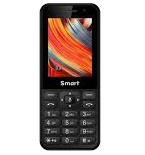
Available guides for synchronization to the secure cloud
Supported functions
- Kişiler senkronizasyonu
- Takvim senkronizasyonu
- photo synchronization
- video synchronization
- Otomatik senkronizasyon


Transfer your kişiler, takvim, fotoğraflar ve videos from MTN Smart T M560M3 to an online storage and back to keep them safe and up to date.
MTN Smart T M560M3 cihazını PhoneCopy desteklenmektedir.
Please note that following settings may vary a little depending on the firmware version.
Confirmed models
Confirmed versions
News
- 29.10.2023
- Someone just used PhoneCopy for backup of MTN Smart T M560M3 in country Afghanistan. His kişiler were backed up.
- 9.02.2023
- This phone model was just synchronized by PhoneCopy user in Botswana. It transferred kişiler ve media.
- 20.03.2022
- We just got first user of this model in Benin! Someone just backed up his kişiler.
- 11.12.2021
- This phone model was just synchronized by PhoneCopy user in Angola. It transferred kişiler.
- 20.02.2021
- We just got first user of this model in Uganda! Someone just backed up his kişiler.
KaiOS versions running on MTN Smart T M560M3
When synchronizing, PhoneCopy users had following KaiOS versions on their MTN Smart T M560M3: KaiOS 2.5.1 (100.00%).
MTN Smart T M560M3 users around the world
MTN Smart T M560M3 is preffered for contact backup by PhoneCopy users in several countries around the world - Rwanda - 41.17%, South Africa (Suid-Afrika, iNingizimu Afrika, uMzantsi Afrika, Afrika-Borwa, Afrika Borwa, Aforika Borwa, Afurika Tshipembe, Afrika Dzonga, iSewula Afrika) - 30.69%, Republic of the Congo (République du Congo, Republíki ya Kongó) - 8.68%, Angola (Ngola) - 5.84%, Democratic Republic of the Congo (République démocratique du Congo, Republíki ya Kongó Demokratíki, Jamhuri ya Kidemokrasia ya Kongo) - 5.39%, Botswana - 3.59%, Ghana (Gaana, Gana) - 1.35%, Afghanistan (Afghanestan, افغانستان) - 1.20%, Zimbabwe - 1.05%, Uganda - 0.90%, Benin (Bénin) - 0.15%.
The map shows usage of MTN Smart T M560M3 for contact backup with PhoneCopy around the world.
Talimat metni - Nasıl yedekleme yapılır
MTN Smart T M560M3 'dan
- Download our PhoneCopy for KaiOS from application KaiOS Marketplace to your mobile device.
- After launching the application, log in to this existing account in the application.
- After succesful login press "Synchronize" for complete synchronization, you can choose "Server >> This device" for one-way sync.
If you need more help with the settings, visit our step by step screenshot guide: How to synchronize contacts to phone with KaiOS
If you need more help with the settings, visit our step by step screenshot guide: How to backup contacts from phone with Kai OS
Senkronizasyon esnasında herhangi bir problemle karşılaşırsanız Yardım İsteyin
MTN Smart T M560M3 'a doğru
- Download our PhoneCopy for KaiOS from application KaiOS Marketplace to your mobile device.
- After launching the application, create a new account from the application. If you have already created an account on web pages www.phonecopy.com, log in to this existing account in the application.
- After succesful login press "Synchronize" for complete synchronization, you can choose "This device >> Server" for one-way sync.
If you need more help with the settings, visit our step by step screenshot guide: How to synchronize contacts to phone with KaiOS
If you need more help with the settings, visit our step by step screenshot guide: How to backup contacts from phone with Kai OS
Senkronizasyon esnasında herhangi bir problemle karşılaşırsanız Yardım İsteyin
Kullanıcı yorumları
Yorum yazmak için lütfen Giriş yapın
-
I have a TCL Flip 3 with KaiOS 3.1. The PhoneCopy app does not appear in the app store, and I cannot get the CalDav syncing to work. I keep getting a server busy error message. Help! bilinmeyen kullanıcı, 29.03.2026
-
I tried it again and now I'm getting an incorrect username or password error message. Should the username I type on my phone be my email or my username (which is my email without the @gmail.com portion)?
-
Hello,
CalDAV shares the same username / password as your account. Yes, as username, use the name displayed in the upper right corner of this webpage (jawz02). Ensure you have used the full URL suggested by the "Add DAV device" page. We check the logs and the username/password seems to have been written improperly.
-
-
