Nokia 6300 4G dan yedeklenen kişiler, takvim, fotoğraflar ve videolar
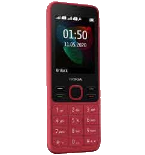
Güvenli buluta senkronizasyon için mevcut kılavuzlar
Desteklenen işlevler
- Kişiler senkronizasyonu
- Takvim senkronizasyonu
- fotoğraf senkronizasyonu
- video senkronizasyonu
- Otomatik senkronizasyon


kişiler, takvim, fotoğraflar ve videolar verilerinizi Nokia 6300 4G cihazından çevrimiçi bir depolama alanına ve geri aktararak güvende ve güncel tutun.
Nokia 6300 4G cihazını PhoneCopy desteklenmektedir.
Lütfen aşağıdaki ayarların ürün yazılımı sürümüne bağlı olarak biraz değişebileceğini unutmayın.
Onaylanan modeller
Onaylanan sürümler
Haberler
- 31.05.2024
- A new phone user has synchronized his kişiler ve medya to PhoneCopy from Cayman Adaları.
- 20.05.2024
- User from Güney Afrika has synchronized kişiler with his phone.
- 9.03.2024
- User from Tayvan has synchronized kişiler with his phone.
- 30.11.2023
- This phone model was just synchronized by PhoneCopy user in Kosta Rika. It transferred kişiler ve medya.
- 28.10.2023
- A new phone user has synchronized his kişiler ve medya to PhoneCopy from Jamaika.
Nokia 6300 4G üzerinde çalışan KaiOS sürümleri
PhoneCopy for KaiOS uygulaması çeşitli KaiOS sürümlerini desteklemektedir. Kullanıcılarımız KaiOS 2.5.4 (92.29%), KaiOS 2.5.4.1 (7.71%) çalıştıran Nokia 6300 4G cihazlarını senkronize etti.
Grafik, çeşitli KaiOS sürümlerinde çalışan Nokia 6300 4G cihazının PhoneCopy ile yedeklenmesini göstermektedir.
dünya genelindeki Nokia 6300 4G kullanıcıları
Nokia 6300 4G, PhoneCopy kullanıcıları tarafından Amerika Birleşik Devletleri (Estados Unidos, États-Unis, ‘Amelika Hui Pū ‘ia) - 21.52%, İngiltere (Y Deyrnas Unedig, Unitit Kinrick, Rìoghachd Aonaichte, Ríocht Aontaithe, An Rywvaneth Unys) - 14.06%, Çin (Zhōngguó, Zhōnghuá Rénmín Gònghéguó, 中国, 中华人民共和国) - 7.43%, Pakistan (Pākistān, پاکستان) - 6.36%, Bangladeş (বাংলাদেশ) - 5.06%, Fas (Amerruk, Elmeɣrib, ⴰⵎⵔⵔⵓⴽ, ⵍⵎⵖⵔⵉⴱ, Al-maɣréb, المغرب) - 4.20%, İsrail (Yisra'el, ישראל, Israʼiyl, إسرائيل) - 4.00%, Uganda - 3.62%, Çekya (Czech Republic, Česká republika) - 2.56%, Belarus (Bielaruś, Беларусь) - 2.39% gibi ülkelerde ve 74 başka ülkede sıklıkla kullanılmaktadır.
Histogram, dünya genelinde PhoneCopy ile Nokia 6300 4G yedeklemesini göstermektedir.
Talimat metni - Nasıl yedekleme yapılır
Nokia 6300 4G 'dan
- Download our PhoneCopy for KaiOS from application KaiOS Marketplace to your mobile device.
- After launching the application, create a new account from the application. If you have already created an account on web pages www.phonecopy.com, log in to this existing account in the application.
- After succesful login press "Synchronize" for complete synchronization, you can choose "This device >> Server" for one-way sync.
If you need more help with the settings, visit our step by step screenshot guide: How to synchronize contacts to phone with KaiOS
If you need more help with the settings, visit our step by step screenshot guide: How to backup contacts from phone with Kai OS
Senkronizasyon esnasında herhangi bir problemle karşılaşırsanız Yardım İsteyin
Nokia 6300 4G 'a doğru
- Download our PhoneCopy for KaiOS from application KaiOS Marketplace to your mobile device.
- After launching the application, log in to this existing account in the application.
- After succesful login press "Synchronize" for complete synchronization, you can choose "Server >> This device" for one-way sync.
If you need more help with the settings, visit our step by step screenshot guide: How to synchronize contacts to phone with KaiOS
If you need more help with the settings, visit our step by step screenshot guide: How to backup contacts from phone with Kai OS
Senkronizasyon esnasında herhangi bir problemle karşılaşırsanız Yardım İsteyin
Kullanıcı yorumları
Yorum yazmak için lütfen Giriş yapın
-
How does one download PhoneCopy? I don't see anywhere "download". dj83659, 12.05.2021
-
Hi, you have to find KaiStore in your KaiOS mobile phone and you will find PhoneCopy under Utilities. You can download it only from there.
-
