Kontakte, Fotos, Videos, SMS-Nachrichten und Anrufprotokolle sichern: Vivo Y21T (v2135)
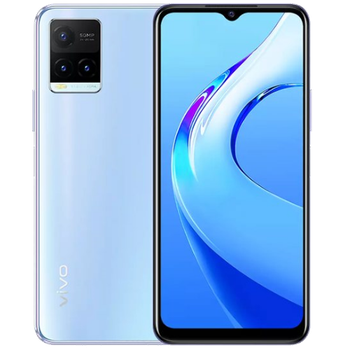
Verfügbare Anleitungen für die Synchronisierung mit der sicheren Cloud
Unterstützte Funktionen
- Kontakt-Synchronisation
- sms-Sicherung
- Sicherung des Anrufprotokolls
- Foto-Synchronisierung
- Video-Synchronisation
- automatisch synchronisieren


Übertragen Sie Ihre Kontakte, Fotos, Videos, SMS-Nachrichten und Anrufprotokolle von Vivo Y21T (v2135) in einen Online-Speicher und zurück, um sie sicher und aktuell zu halten.
Vivo Y21T (v2135) wird von PhoneCopy unterstützt.
Bitte beachten Sie, dass die folgenden Einstellungen je nach Firmware-Version leicht variieren können.
Bestätigte Modelle
Bestätigte Versionen
- Android 13
- Android 12
- Android 11
News
- 01.06.23
- Android 13 can be officially updated even on Vivo Y21T (v2135).
- 31.10.22
- Vivo Y21T (v2135) now offers Android 12 update.
- 02.08.22
- PhoneCopy app is fully supported on Vivo Y21T (v2135) with Android version 11.
- 19.04.22
- Jemand hat gerade PhoneCopy zur Sicherung von Vivo Y21T (v2135) im Land Indien verwendet. Seine Kontakte wurden gesichert.
Android-Versionen auf Vivo Y21T (v2135)
Bei der Synchronisierung hatten PhoneCopy-Benutzer folgende Android-Versionen auf ihrem Vivo Y21T (v2135): Android 12 (50.00%), Android 13 (37.50%), Android 11 (12.50%).
Das folgende Diagramm zeigt Kontaktsynchronisierungen mit Vivo Y21T (v2135) unter verschiedenen Android-Versionen.
Vivo Y21T (v2135) Nutzer auf der ganzen Welt
Vivo Y21T (v2135) wird häufig von PhoneCopy-Benutzern in Ländern wie Indien (Bharôt, ভাৰত, ভারত, Bhārat, ભારત, भारत, Bhārata, ಭಾರತ, Bhāratam, ഭാരതം, Bharôtô, ଭାରତ, ਭਾਰਤ, भारतम्, Bārata, பாரதம், Bhāratadēsam, భారత దేశం) - 100.00% verwendet.
Die folgende Heatmap zeigt Kontaktsynchronisierungen mit Vivo Y21T (v2135) über PhoneCopy weltweit.
Textanleitung - So sichern Sie Ihre Daten
Mit Vivo Y21T (v2135)
- Laden Sie unsere PhoneCopy für Android-Anwendung auf Ihr Mobilgerät herunter.
- Erstellen Sie nach dem Start der Anwendung ein neues Konto in der Anwendung. Wenn Sie bereits ein Konto auf der Webseite www.phonecopy.com erstellt haben, melden Sie sich in der Anwendung mit diesem bestehenden Konto an.
- Nach erfolgreicher Anmeldung durchlaufen Sie den Einrichtungsassistenten der Anwendung und wählen Sie dann Synchronize (für ein Konto mit einer bestehenden Sicherung) / Backup (für ein leeres Konto) aus, oder drücken Sie die Schaltfläche Later und wählen Sie dann im Seitenmenü die Option Back up contacts / Restore contacts für eine einseitige Synchronisierung.
Weitere Informationen zu unserer App finden Sie auf unserer PhoneCopy für Android-Seite.
Bei Problemen mit der Synchronisierung, bitte kontaktieren Sie uns.
Benutzer Kommentare
Um einen Kommentar zu hinterlassen, melden Sie sich an.
-
-
Hello, 96,486 is really big count of SMS. It is possible that the processing of such a number of items takes a long time and it is possible that server terminate the communication due to a long time without response from the device.
We are curently working on optimalization of application, which may solve issue like yours. We will release new version of app asap, within a few days at the latest. We will contact you. Please, be patient.
Thank you-
Hello,
we developed a promised new beta version (3.4.3) of app. This optimized version should solve your reported issue. Please, download and install new version and try to sync again with it.
I recommend, plug in charger during sync, because sync of big count of items take long time and it is possible that Android system will try to limit the app due to battery life.
Download link: https://www.phonecopy.com/android/download/phonecopy.apk
Please, send us feedback, if it works now or not.
Thank you for your patience and cooperation.
-
-

My phone has 96,486 SMS that has to be backed up but the process keeps terminating due to "internet connection lost". My fiber internet access is quite stable so I don't think disruption is the cause. Is there a way I can back up the sms in parts? mebacal1960, 19.10.20