Kontakte, Fotos, Videos, SMS-Nachrichten und Anrufprotokolle sichern: Xiaomi Redmi 12 5G
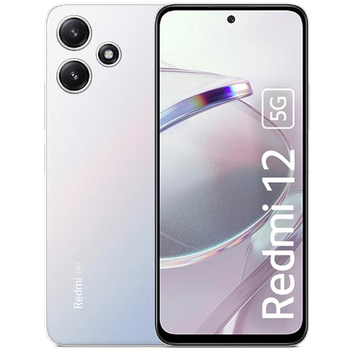
Verfügbare Anleitungen für die Synchronisierung mit der sicheren Cloud
Unterstützte Funktionen
- Kontakt-Synchronisation
- sms-Sicherung
- Sicherung des Anrufprotokolls
- Foto-Synchronisierung
- Video-Synchronisation
- automatisch synchronisieren


Übertragen Sie Ihre Kontakte, Fotos, Videos, SMS-Nachrichten und Anrufprotokolle von Xiaomi Redmi 12 5G in einen Online-Speicher und zurück, um sie sicher und aktuell zu halten.
Xiaomi Redmi 12 5G wird von PhoneCopy unterstützt.
Bitte beachten Sie, dass die folgenden Einstellungen je nach Firmware-Version leicht variieren können.
Bestätigte Modelle
Bestätigte Versionen
- Android 15
- Android 14
- Android 13
News
- 23.08.26
- Wir haben die PhoneCopy-App auf einem Xiaomi Redmi 12 5G-Telefon in Bangladesch erkannt. Alle Kontakte wurden gesichert.
- 24.01.26
- Wir haben gerade den ersten Benutzer dieses Modells in Kanada bekommen! Jemand hat gerade seine Kontakte, SMS-Nachrichten und Anrufprotokolle gesichert.
- 05.04.25
- Wir haben gerade den ersten Benutzer von Xiaomi Redmi 12 5G in Hongkong bekommen! Jemand hat gerade seine Kontakte, SMS-Nachrichten und Anrufprotokolle von einem neuen Telefon gesichert.
- 11.03.25
- Dieses Telefonmodell wurde gerade von einem PhoneCopy-Benutzer in Saudi-Arabien synchronisiert. Es hat Kontakte übertragen.
- 12.02.25
- Ein Benutzer aus Ungarn hat seine Kontakte mit seinem Telefon synchronisiert.
- 17.01.25
- Android 15 can be officially updated even on Xiaomi Redmi 12 5G.
- 29.10.24
- Wir haben Xiaomi Redmi 12 5G zu den unterstützten Geräten mit Android-Betriebssystem und Huawei Mobile Services hinzugefügt.
- 06.02.24
- We tested the functionality of the PhoneCopy app on Xiaomi Redmi 12 5G device after the Android 14 update.
- 20.09.23
- Personal data backup from Xiaomi Redmi 12 5G with Android 13 is now officially supported with our PhoneCopy mobile app.
Android-Versionen auf Xiaomi Redmi 12 5G
Bei der Synchronisierung hatten PhoneCopy-Benutzer folgende Android-Versionen auf ihrem Xiaomi Redmi 12 5G: Android 14 (56.78%), Android 13 (26.10%), Android 15 (17.12%).
Das Diagramm zeigt die Nutzung von Xiaomi Redmi 12 5G- und Android-Versionen für die Kontaktsicherung mit PhoneCopy weltweit.
Xiaomi Redmi 12 5G Nutzer auf der ganzen Welt
Laut unseren Statistiken verwenden PhoneCopy-Benutzer Xiaomi Redmi 12 5G für die Datensicherung in den Ländern Tschechien (Czech Republic, Česká republika) - 44.65%, Indien (Bharôt, ভাৰত, ভারত, Bhārat, ભારત, भारत, Bhārata, ಭಾರತ, Bhāratam, ഭാരതം, Bharôtô, ଭାରତ, ਭਾਰਤ, भारतम्, Bārata, பாரதம், Bhāratadēsam, భారత దేశం) - 40.49%, Frankreich - 10.55%, Polen (Polska) - 0.77%, Indonesien - 0.77%, Vereinigtes Königreich (Y Deyrnas Unedig, Unitit Kinrick, Rìoghachd Aonaichte, Ríocht Aontaithe, An Rywvaneth Unys) - 0.38%, Brasilien (Brasil) - 0.38%, Ungarn (Magyarország) - 0.31%, Bangladesch (বাংলাদেশ) - 0.23%, Japan (Nihon, Nippon, 日本) - 0.15% und 14 mehr.
Die Karte zeigt die Nutzung von Xiaomi Redmi 12 5G für die Kontaktsicherung mit PhoneCopy weltweit.
Textanleitung - So sichern Sie Ihre Daten
Von Xiaomi Redmi 12 5G
- Download our PhoneCopy for Huawei application to your mobile device.
- After launching the application, create a new account from the application. If you have already created an account on web pages www.phonecopy.com, log in to this existing account in the application.
- After succesful login press "Synchronize" for complete synchronization, or press "Advanced & Account", select "One-way sync" and after choose "This device >> server" for one-way sync.
More detailed information and instructions include screenshots: how to backup and synchronize contacts from Huawei
For more information about our app, visit our PhoneCopy for Huawei page.
Let us just remind you, that for now PhoneCopy for Android transfers to server contacts, photos, videos, Call Logs and SMS.
Bei Problemen mit der Synchronisierung, bitte kontaktieren Sie uns.
Zu Xiaomi Redmi 12 5G
- Download our PhoneCopy for Huawei application to your mobile device.
- After launching the application, create a new account from the application. If you have already created an account on web pages www.phonecopy.com, log in to this existing account in the application.
- After succesful login press "Synchronize" for complete synchronization, or press "Advanced & Account", select "One-way sync" and after choose "Server >> this device" for one-way sync.
More detailed information and instructions include screenshots: how transfer contacts to Huawei
For more information about our app, visit our PhoneCopy for Huawei page.
Let us just remind you, that for now PhoneCopy for Android transfers to server contacts, photos, videos, Call Logs and SMS.
Bei Problemen mit der Synchronisierung, bitte kontaktieren Sie uns.
Benutzer Kommentare
Um einen Kommentar zu hinterlassen, melden Sie sich an.
-
Hi, please since the day I have been using my Tecno spark 3 I yve not enjoy my personal video coverage, I mean whenever I make videos coverage then when I try to play the video, the video won't play very well, the picture in the video won't move the way a normal video suppose to move(skipping) please what can I do? abiolaolatubosun16, 08.06.21
-
Sorry, we are a backup and synchronization service and not Tecno support.
-
