Backup contacts, photos, videos, sms messages and call logs from Xiaomi Poco X5 5G
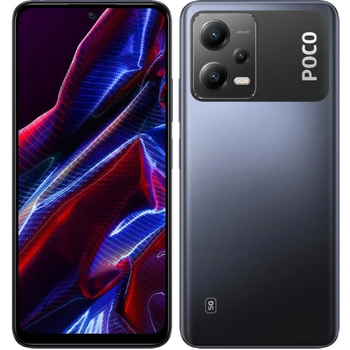
Available guides for synchronization to the secure cloud
Supported functions
- contact synchronization
- sms backup
- call log backup
- photo synchronization
- video synchronization
- automatic sync


Transfer your contacts, photos, videos, sms messages and call logs from Xiaomi Poco X5 5G to an online storage and back to keep them safe and up to date.
Xiaomi Poco X5 5G is supported on PhoneCopy.
Please note that following settings may vary a little depending on the firmware version.
Confirmed models
Confirmed versions
- Android 15
- Android 14
- Android 13
- Android 12
News
- 03/06/2025
- We noticed the update possibility of Xiaomi Poco X5 5G to a new Android operating system version 15.
- We just got first user of this model in France! Someone just backed up his contacts, media and sms messages.
- 16/10/2024
- We detected PhoneCopy app on Xiaomi Poco X5 5G phone in United States. All contacts, sms messages and call logs were backed up.
- 23/09/2024
- We detected PhoneCopy app on Xiaomi Poco X5 5G phone in Russia. All contacts, sms messages and call logs were backed up.
- 19/03/2024
- We just got first user of Xiaomi Poco X5 5G in Ethiopia! Someone just backed up his contacts from a new phone.
- 01/03/2024
- PhoneCopy app is fully working after updating the Xiaomi Poco X5 5G to Android 14.
- 29/01/2024
- Xiaomi Poco X5 5G phone was synchronized by PhoneCopy user in Czechia. His contacts were transferred.
- 11/12/2023
- We tested new Android 12 on Xiaomi Poco X5 5G with our PhoneCopy app and it's completely working.
- 06/11/2023
- Update Xiaomi Poco X5 5G to Android 13 is available including the fully working contact, SMS, photo, and video backup to PhoneCopy Cloud.
Android versions running on Xiaomi Poco X5 5G
PhoneCopy for Android app supports various Android versions. Our users synchronized their Xiaomi Poco X5 5G running Android 14 (78.87%), Android 13 (11.27%), Android 15 (7.04%), Android 12 (2.82%).
Following pie chart illustrates share between Android versions on Xiaomi Poco X5 5G when syncing with PhoneCopy.
Xiaomi Poco X5 5G users around the world
According to our statistics, PhoneCopy users use Xiaomi Poco X5 5G for data backup in countries Czechia (Czech Republic, Česká republika) - 78.79%, Indonesia - 9.09%, Russia (Rossiya, Rossiâ, Россия) - 3.03%, France - 3.03%, United States (Estados Unidos, États-Unis, ‘Amelika Hui Pū ‘ia) - 1.52%, Bulgaria (Bulgariya, Bălgarija, България) - 1.52%, Ethiopia (Ityop'ia, ኢትዮጵያ) - 1.52%, Singapore (Singapura, Xīnjiāpō, 新加坡, Singapur, சிங்கப்பூர்) - 1.52%.
Following heat map illustrates share between users around the world synchronizing their Xiaomi Poco X5 5G using PhoneCopy.
Text guideline - How to backup
With Xiaomi Poco X5 5G
- Download our PhoneCopy for Android application to your mobile device.
- After launching the application, create a new account from the application. If you have already created an account on web pages www.phonecopy.com, log in to this existing account in the application.
- After successful login, go through the application setup wizard and then select Synchronize (for an account with an existing backup) / Backup (for an empty account) or press the Later button and then select option in the side menu Back up contacts / Restore contacts for one-way synchronization.
For more information about our app, visit our PhoneCopy for Android page.
In the case of problems with synchronization, please contact us.
User comments
To leave a comment please sign in.
-
For some strange reason, app cannot access phone contacts stored on device - after granting proper permission it will show 0 contacts. Checked with other contact app, and they can be accessed. Android 11 (Lineage OS 18.1), Sony Xperia ZX 1 Compact gladykov, 03/01/2022
-
Answered via private email.
-
Nuruseyd842@gmail.com
-
-
