Sauvegarder contacts, calendrier, photos et vidéos depuis AT&T Cingular Flip 3 (q28a)
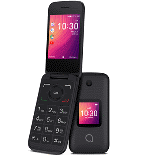
Guides disponibles pour la synchronisation vers le cloud sécurisé
Fonctions prises en charge
- synchronisation des contacts
- synchronisation du calendrier
- synchronisation des photos
- synchronisation des vidéos
- synchronisation automatique


Transférez vos contacts, calendrier, photos et vidéos de AT&T Cingular Flip 3 (q28a) vers un espace de stockage en ligne et inversement pour les garder en sécurité et à jour.
AT&T Cingular Flip 3 (q28a) est pris en charge avec PhoneCopy.
Veuillez noter que les paramètres suivants peuvent varier légèrement en fonction de la version du micrologiciel.
Modèles confirmés
Versions confirmées
Nouvelles
- 30/10/2019
- Même dans le pays États-Unis, nous avons un utilisateur avec un téléphone AT&T Cingular Flip 3 (q28a). Il sauvegarde ses contacts.
versions KaiOS fonctionnant sur AT&T Cingular Flip 3 (q28a)
Lors de la synchronisation, les utilisateurs de PhoneCopy disposaient des versions KaiOS suivantes sur leur AT&T Cingular Flip 3 (q28a): KaiOS 2.5.2 (100.00%).
AT&T Cingular Flip 3 (q28a) utilisateurs dans le monde
D'après nos statistiques, les utilisateurs de PhoneCopy utilisent AT&T Cingular Flip 3 (q28a) pour la sauvegarde des données dans les pays États-Unis (Estados Unidos, États-Unis, ‘Amelika Hui Pū ‘ia) - 100.00%.
La carte de chaleur suivante montre les synchronisations des contacts avec AT&T Cingular Flip 3 (q28a) à l'aide de PhoneCopy dans le monde entier.
Guide textuel - Comment sauvegarder
À partir de AT&T Cingular Flip 3 (q28a)
- Download our PhoneCopy for KaiOS from application KaiOS Marketplace to your mobile device.
- After launching the application, create a new account from the application. If you have already created an account on web pages www.phonecopy.com, log in to this existing account in the application.
- After succesful login press "Synchronize" for complete synchronization, you can choose "This device >> Server" for one-way sync.
If you need more help with the settings, visit our step by step screenshot guide: How to synchronize contacts to phone with KaiOS
If you need more help with the settings, visit our step by step screenshot guide: How to backup contacts from phone with Kai OS
En cas de problèmes dans la synchronisation, veuillez nous contacter.
Vers AT&T Cingular Flip 3 (q28a)
- Download our PhoneCopy for KaiOS from application KaiOS Marketplace to your mobile device.
- After launching the application, log in to this existing account in the application.
- After succesful login press "Synchronize" for complete synchronization, you can choose "Server >> This device" for one-way sync.
If you need more help with the settings, visit our step by step screenshot guide: How to synchronize contacts to phone with KaiOS
If you need more help with the settings, visit our step by step screenshot guide: How to backup contacts from phone with Kai OS
En cas de problèmes dans la synchronisation, veuillez nous contacter.
Commentaires des utilisateurs
Pour laisser un commentaire identifiez-vous.
-
Hi, I found and tried your workaround for KaiOS calendar sync using CalDAV (as described on previous comment), and it works well. However, I noticed that changes made in my Google Calendar don’t sync automatically, I have to press a button in the web version each time to update. Is there a way to enable automatic syncing, or is this a current limitation! Thanks! akiesel, 28/12/2025
-
Hello,
we have deployed experimental invocation of Google Calendar sync when syncing device via CalDAV. Hopefully it will work for you. -
Hello,
currently Google Calendar sync is invoked only when syncing other device either via SyncML, our apps, or Activesync. We will look into possibility of invoking sync via CardDAV as well. Please stay tuned, we will inform you as soon as we will know whether it is possible.
-
