Fazer cópia de segurança de contactos, fotografias, vídeos, mensagens SMS e registos de chamadas de Alcatel TCL A3 (a509dl)
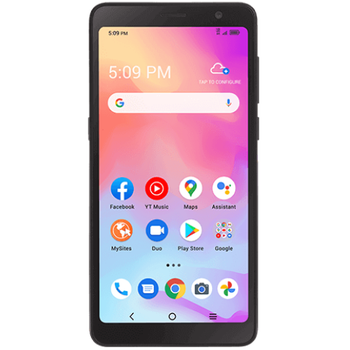
Guias disponíveis para sincronização com a nuvem segura
Funções suportadas
- sincronização de contactos
- cópia de segurança de SMS
- cópia de segurança do registo de chamadas
- sincronização de fotografias
- sincronização de vídeos
- sincronização automática


Transfira os seus contactos, fotografias, vídeos, mensagens SMS e registos de chamadas de Alcatel TCL A3 (a509dl) para um armazenamento online e vice-versa para os manter seguros e atualizados.
Alcatel TCL A3 (a509dl) é suportado pelo PhoneCopy.
Por favor, tenha em conta que as definições seguintes podem variar ligeiramente consoante a versão do firmware.
Modelos confirmados
Versões confirmadas
- Android 11
Novidades
- 13/12/21
- We freshly support Alcatel TCL A3 (a509dl) with Android 11 OS for photo, video, call logs, SMS and contact backup.
- 05/12/21
- Recentemente tivemos também um novo utilizador do Alcatel TCL A3 (a509dl) em Estados Unidos. Está a usar o PhoneCopy para fazer cópia de segurança de contactos.
versões do Android a executar no Alcatel TCL A3 (a509dl)
Ao sincronizar, os utilizadores do PhoneCopy tinham as seguintes versões do Android no seu Alcatel TCL A3 (a509dl): Android 11 (100.00%).
utilizadores do Alcatel TCL A3 (a509dl) em todo o mundo
O Alcatel TCL A3 (a509dl) é preferido para a cópia de segurança de contactos pelos utilizadores do PhoneCopy em vários países do mundo - Estados Unidos (Estados Unidos, États-Unis, ‘Amelika Hui Pū ‘ia) - 100.00%.
O mapa de calor seguinte mostra as sincronizações de contactos com o Alcatel TCL A3 (a509dl) usando o PhoneCopy em todo o mundo.
Guia de texto - Como fazer a cópia de segurança
Com Alcatel TCL A3 (a509dl)
- Descarregue a nossa aplicação PhoneCopy for Android para o seu dispositivo móvel.
- Depois de iniciar a aplicação, crie uma nova conta a partir da aplicação. Se já criou uma conta nas páginas web www.phonecopy.com, inicie sessão nesta conta existente na aplicação.
- Após um início de sessão bem-sucedido, siga o assistente de configuração da aplicação e depois selecione Synchronize (para uma conta com uma cópia de segurança existente) / Backup (para uma conta vazia) ou clique no botão Later e depois selecione a opção no menu lateral Back up contacts / Restore contacts para sincronização unidirecional.
Para mais informações sobre a nossa aplicação, visite a nossa página do PhoneCopy for Android.
Em caso de problemas com a sincronização, contacte-nos.
Comentários de utilizadores
Para deixar um comentário, inicie sessão.
-
For some strange reason, app cannot access phone contacts stored on device - after granting proper permission it will show 0 contacts. Checked with other contact app, and they can be accessed. Android 11 (Lineage OS 18.1), Sony Xperia ZX 1 Compact gladykov, 03/01/22
-
Answered via private email.
-
Nuruseyd842@gmail.com
-
-
