Fazer cópia de segurança de contactos, calendário, fotografias e vídeos de Itel it9200 4G
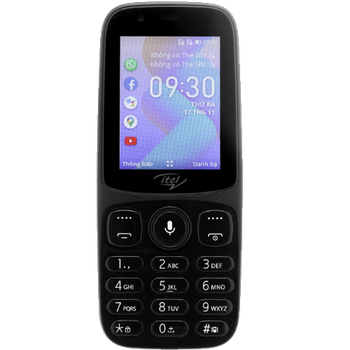
Guias disponíveis para sincronização com a nuvem segura
Funções suportadas
- sincronização de contactos
- sincronização de calendário
- sincronização de fotografias
- sincronização de vídeos
- sincronização automática


Transfira os seus contactos, calendário, fotografias e vídeos de Itel it9200 4G para um armazenamento online e vice-versa para os manter seguros e atualizados.
Itel it9200 4G é suportado pelo PhoneCopy.
Por favor, tenha em conta que as definições seguintes podem variar ligeiramente consoante a versão do firmware.
Modelos confirmados
Versões confirmadas
Novidades
- 12/10/26
- Acabámos de ter o primeiro utilizador deste modelo em Bangladeche! Alguém acabou de fazer cópia de segurança dos seus contactos e multimédia.
- 18/10/24
- Recentemente tivemos também um novo utilizador do Itel it9200 4G em Paquistão. Está a usar o PhoneCopy para fazer cópia de segurança de contactos e multimédia.
- 13/10/24
- Recentemente tivemos também um novo utilizador do Itel it9200 4G em Somália. Está a usar o PhoneCopy para fazer cópia de segurança de contactos e multimédia.
- 01/10/24
- O primeiro utilizador de China acabou de sincronizar os seus contactos e multimédia no telemóvel Itel it9200 4G.
- 17/02/24
- Mesmo em República do Congo temos um utilizador com um telemóvel Itel it9200 4G. Faz cópia de segurança dos seus contactos.
versões do KaiOS a executar no Itel it9200 4G
A aplicação PhoneCopy para KaiOS suporta várias versões do KaiOS. Os nossos utilizadores sincronizaram os seus Itel it9200 4G com KaiOS 2.5.1.2 (100.00%).
utilizadores do Itel it9200 4G em todo o mundo
O Itel it9200 4G é frequentemente usado pelos utilizadores do PhoneCopy em países como Tanzânia - 77.38%, Uganda - 11.75%, Zâmbia - 3.55%, Vietname (Việt Nam) - 3.10%, Burúndi (Uburundi) - 1.55%, Arábia Saudita (Al-Mamlaka Al-‘Arabiyyah as Sa‘ūdiyyah, المملكة العربية السعودية) - 0.89%, Somália (Soomaaliya, aş-Şūmāl, الصومال) - 0.44%, Paquistão (Pākistān, پاکستان) - 0.44%, Bangladeche (বাংলাদেশ) - 0.22%, República Democrática do Congo (République démocratique du Congo, Republíki ya Kongó Demokratíki, Jamhuri ya Kidemokrasia ya Kongo) - 0.22%, República do Congo (République du Congo, Republíki ya Kongó) - 0.22%, China (Zhōngguó, Zhōnghuá Rénmín Gònghéguó, 中国, 中华人民共和国) - 0.22%.
O mapa de calor seguinte ilustra a proporção entre utilizadores em todo o mundo que sincronizam o seu Itel it9200 4G usando o PhoneCopy.
Guia de texto - Como fazer a cópia de segurança
De Itel it9200 4G
- Download our PhoneCopy for KaiOS from application KaiOS Marketplace to your mobile device.
- After launching the application, create a new account from the application. If you have already created an account on web pages www.phonecopy.com, log in to this existing account in the application.
- After succesful login press "Synchronize" for complete synchronization, you can choose "This device >> Server" for one-way sync.
If you need more help with the settings, visit our step by step screenshot guide: How to synchronize contacts to phone with KaiOS
If you need more help with the settings, visit our step by step screenshot guide: How to backup contacts from phone with Kai OS
Em caso de problemas com a sincronização, contacte-nos.
Para Itel it9200 4G
- Download our PhoneCopy for KaiOS from application KaiOS Marketplace to your mobile device.
- After launching the application, log in to this existing account in the application.
- After succesful login press "Synchronize" for complete synchronization, you can choose "Server >> This device" for one-way sync.
If you need more help with the settings, visit our step by step screenshot guide: How to synchronize contacts to phone with KaiOS
If you need more help with the settings, visit our step by step screenshot guide: How to backup contacts from phone with Kai OS
Em caso de problemas com a sincronização, contacte-nos.
Comentários de utilizadores
Para deixar um comentário, inicie sessão.
-
Hi, I found and tried your workaround for KaiOS calendar sync using CalDAV (as described on previous comment), and it works well. However, I noticed that changes made in my Google Calendar don’t sync automatically, I have to press a button in the web version each time to update. Is there a way to enable automatic syncing, or is this a current limitation! Thanks! akiesel, 28/12/25
-
Hello,
we have deployed experimental invocation of Google Calendar sync when syncing device via CalDAV. Hopefully it will work for you. -
Hello,
currently Google Calendar sync is invoked only when syncing other device either via SyncML, our apps, or Activesync. We will look into possibility of invoking sync via CardDAV as well. Please stay tuned, we will inform you as soon as we will know whether it is possible.
-
