Sauvegarder contacts, calendrier, photos et vidéos depuis Itel it9200 4G
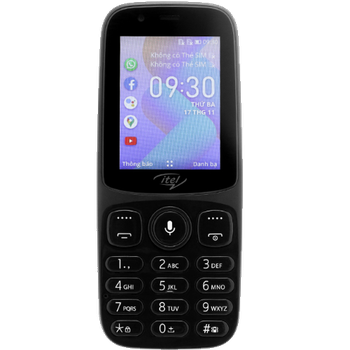
Guides disponibles pour la synchronisation vers le cloud sécurisé
Fonctions prises en charge
- synchronisation des contacts
- synchronisation du calendrier
- synchronisation des photos
- synchronisation des vidéos
- synchronisation automatique


Transférez vos contacts, calendrier, photos et vidéos de Itel it9200 4G vers un espace de stockage en ligne et inversement pour les garder en sécurité et à jour.
Itel it9200 4G est pris en charge avec PhoneCopy.
Veuillez noter que les paramètres suivants peuvent varier légèrement en fonction de la version du micrologiciel.
Modèles confirmés
Versions confirmées
Nouvelles
- 18/10/2024
- Récemment, nous avons également eu un nouvel utilisateur de Itel it9200 4G dans le pays Pakistan. Il utilise PhoneCopy pour sauvegarder ses contacts et fichiers multimédias.
- 13/10/2024
- Récemment, nous avons également eu un nouvel utilisateur de Itel it9200 4G dans le pays Somalie. Il utilise PhoneCopy pour sauvegarder ses contacts et fichiers multimédias.
- 01/10/2024
- Le premier utilisateur dans le pays Chine vient de synchroniser ses contacts et fichiers multimédias sur son téléphone Itel it9200 4G.
- 17/02/2024
- Même dans le pays République du Congo, nous avons un utilisateur avec un téléphone Itel it9200 4G. Il sauvegarde ses contacts.
- 12/01/2024
- Quelqu'un a utilisé PhoneCopy pour sauvegarder ce modèle de téléphone dans le pays République Démocratique du Congo. Ses contacts et fichiers multimédias ont été transférés.
versions KaiOS fonctionnant sur Itel it9200 4G
L'application PhoneCopy pour KaiOS prend en charge diverses versions de KaiOS. Nos utilisateurs ont synchronisé leur Itel it9200 4G avec KaiOS 2.5.1.2 (100.00%).
Itel it9200 4G utilisateurs dans le monde
Itel it9200 4G est souvent utilisé par les utilisateurs de PhoneCopy dans des pays comme Tanzanie - 77.56%, Ouganda - 11.78%, Zambie - 3.56%, Vietnam (Việt Nam) - 3.11%, Burundi (Uburundi) - 1.56%, Arabie Saoudite (Al-Mamlaka Al-‘Arabiyyah as Sa‘ūdiyyah, المملكة العربية السعودية) - 0.89%, Somalie (Soomaaliya, aş-Şūmāl, الصومال) - 0.44%, Pakistan (Pākistān, پاکستان) - 0.44%, Chine (Zhōngguó, Zhōnghuá Rénmín Gònghéguó, 中国, 中华人民共和国) - 0.22%, République Démocratique du Congo (République démocratique du Congo, Republíki ya Kongó Demokratíki, Jamhuri ya Kidemokrasia ya Kongo) - 0.22%, République du Congo (République du Congo, Republíki ya Kongó) - 0.22%.
La carte de chaleur suivante illustre le partage entre les utilisateurs du monde entier synchronisant leur Itel it9200 4G à l'aide de PhoneCopy.
Guide textuel - Comment sauvegarder
À partir de Itel it9200 4G
- Download our PhoneCopy for KaiOS from application KaiOS Marketplace to your mobile device.
- After launching the application, create a new account from the application. If you have already created an account on web pages www.phonecopy.com, log in to this existing account in the application.
- After succesful login press "Synchronize" for complete synchronization, you can choose "This device >> Server" for one-way sync.
If you need more help with the settings, visit our step by step screenshot guide: How to synchronize contacts to phone with KaiOS
If you need more help with the settings, visit our step by step screenshot guide: How to backup contacts from phone with Kai OS
En cas de problèmes dans la synchronisation, veuillez nous contacter.
Vers Itel it9200 4G
- Download our PhoneCopy for KaiOS from application KaiOS Marketplace to your mobile device.
- After launching the application, log in to this existing account in the application.
- After succesful login press "Synchronize" for complete synchronization, you can choose "Server >> This device" for one-way sync.
If you need more help with the settings, visit our step by step screenshot guide: How to synchronize contacts to phone with KaiOS
If you need more help with the settings, visit our step by step screenshot guide: How to backup contacts from phone with Kai OS
En cas de problèmes dans la synchronisation, veuillez nous contacter.
Commentaires des utilisateurs
Pour laisser un commentaire identifiez-vous.
-
Hi, I found and tried your workaround for KaiOS calendar sync using CalDAV (as described on previous comment), and it works well. However, I noticed that changes made in my Google Calendar don’t sync automatically, I have to press a button in the web version each time to update. Is there a way to enable automatic syncing, or is this a current limitation! Thanks! akiesel, 28/12/2025
-
Hello,
we have deployed experimental invocation of Google Calendar sync when syncing device via CalDAV. Hopefully it will work for you. -
Hello,
currently Google Calendar sync is invoked only when syncing other device either via SyncML, our apps, or Activesync. We will look into possibility of invoking sync via CardDAV as well. Please stay tuned, we will inform you as soon as we will know whether it is possible.
-
