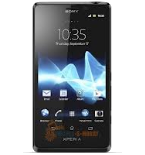
Transfer your контакты, photos, videos, sms messages and call logs from Sony Xperia J ST26i to an online storage and back to keep them safe and up to date.
Sony Xperia J ST26i is supported on PhoneCopy.
Please note that following settings may vary a little depending on the firmware version.
Confirmed models
st25i: st25i_1262-5330/st25i (st-ericsson/montblanc)
st26a: st26a_1266-0918/st26a (sony/7x27)
st26a: st26a_1266-8001/st26a (sony/7x27)
st26a: st26a_1266-8012/st26a (sony/7x27)
st26a: st26a_1266-9314/st26a (sony/7x27)
st26a: st26a_1267-0305/st26a (sony/7x27)
st26a: st26a_1267-0922/st26a (sony/7x27)
st26a: st26a_1267-0924/st26a (sony/7x27)
st26a: st26a_1270-0747/st26a (sony/7x27)
st26a: st26a_1271-2986/st26a (sony/7x27)
st26a: st26a_1271-7703/st26a (sony/7x27)
st26i: st26i_1265-2625/st26i (sony/7x27)
st26i: st26i_1266-7569/st26i (sony/7x27)
st26i: st26i_1266-7839/st26i (sony/7x27)
st26i: st26i_1266-7873/st26i (sony/7x27)
st26i: st26i_1266-7951/st26i (sony/7x27)
st26i: st26i_1266-7964/st26i (sony/7x27)
st26i: st26i_1266-7966/st26i (sony/7x27)
st26i: st26i_1266-7968/st26i (sony/7x27)
st26i: st26i_1266-7976/st26i (sony/7x27)
st26i: st26i_1266-7980/st26i (sony/7x27)
st26i: st26i_1266-7982/st26i (sony/7x27)
st26i: st26i_1266-7984/st26i (sony/7x27)
st26i: st26i_1266-7991/st26i (sony/7x27)
st26i: st26i_1266-7993/st26i (sony/7x27)
st26i: st26i_1266-7999/st26i (sony/7x27)
st26i: st26i_1266-8003/st26i (sony/7x27)
st26i: st26i_1266-8008/st26i (sony/7x27)
st26i: st26i_1266-8010/st26i (sony/7x27)
st26i: st26i_1266-8020/st26i (sony/7x27)
st26i: st26i_1266-8027/st26i (sony/7x27)
st26i: st26i_1266-8053/st26i (sony/7x27)
st26i: st26i_1266-8061/st26i (sony/7x27)
st26i: st26i_1266-8066/st26i (sony/7x27)
st26i: st26i_1266-8068/st26i (sony/7x27)
st26i: st26i_1266-8070/st26i (sony/7x27)
st26i: st26i_1266-8075/st26i (sony/7x27)
st26i: st26i_1266-8077/st26i (sony/7x27)
st26i: st26i_1266-8086/st26i (sony/7x27)
st26i: st26i_1266-8099/st26i (sony/7x27)
st26i: st26i_1266-9191/st26i (sony/7x27)
st26i: st26i_1266-9990/st26i (sony/7x27)
st26i: st26i_1266-9994/st26i (sony/7x27)
st26i: st26i_1266-9996/st26i (sony/7x27)
st26i: st26i_1266-9999/st26i (sony/7x27)
st26i: st26i_1267-0001/st26i (sony/7x27)
st26i: st26i_1267-0009/st26i (sony/7x27)
st26i: st26i_1267-0309/st26i (sony/7x27)
st26i: st26i_1267-2096/st26i (sony/7x27)
st26i: st26i_1267-2104/st26i (sony/7x27)
st26i: st26i_1267-2106/st26i (sony/7x27)
st26i: st26i_1267-2109/st26i (sony/7x27)
st26i: st26i_1267-3758/st26i (sony/7x27)
st26i: st26i_1267-3760/st26i (sony/7x27)
st26i: st26i_1267-3768/st26i (sony/7x27)
st26i: st26i_1267-3770/st26i (sony/7x27)
st26i: st26i_1267-4192/st26i (sony/7x27)
st26i: st26i_1267-4194/st26i (sony/7x27)
st26i: st26i_1267-4196/st26i (sony/7x27)
st26i: st26i_1267-4200/st26i (sony/7x27)
st26i: st26i_1267-4676/st26i (sony/7x27)
st26i: st26i_1267-4689/st26i (sony/7x27)
st26i: st26i_1267-4691/st26i (sony/7x27)
st26i: st26i_1267-4750/st26i (sony/7x27)
st26i: st26i_1267-4818/st26i (sony/7x27)
st26i: st26i_1267-4820/st26i (sony/7x27)
st26i: st26i_1267-5503/st26i (sony/7x27)
st26i: st26i_1267-8031/st26i (sony/7x27)
st26i: st26i_1267-8037/st26i (sony/7x27)
st26i: st26i_1267-8598/st26i (sony/7x27)
st26i: st26i_1267-8599/st26i (sony/7x27)
st26i: st26i_1267-9559/st26i (sony/7x27)
st26i: st26i_1267-9917/st26i (sony/7x27)
st26i: st26i_1268-1097/st26i (sony/7x27)
st26i: st26i_1268-1799/st26i (sony/7x27)
st26i: st26i_1268-3028/st26i (sony/7x27)
st26i: st26i_1268-3375/st26i (sony/7x27)
st26i: st26i_1268-4831/st26i (sony/7x27)
st26i: st26i_1268-7959/st26i (sony/7x27)
st26i: st26i_1269-3643/st26i (sony/7x27)
st26i: st26i_1269-8768/st26i (sony/7x27)
st26i: st26i_1270-4132/st26i (sony/7x27)
st26i: st26i_1270-7015/st26i (sony/7x27)
st26i: st26i_1270-8017/st26i (sony/7x27)
st26i: st26i_1271-1966/st26i (sony/7x27)
st26i: st26i_1271-1970/st26i (sony/7x27)
st26i: st26i_1271-9654/st26i (sony/7x27)
st26i: st26i_1272-0788/st26i (sony/7x27)
st26i: st26i_1273-5606/st26i (sony/7x27)
st26i: st26i_1274-2041/st26i (sony/7x27)
st26i: st26i_1274-5706/st26i (sony/7x27)
st26i: st26i_1275-1874/st26i (sony/7x27)
xperia s: lt26i_1257-4009/nozomi (semc/fuji)
xperia s: lt26i_1257-5499/nozomi (semc/fuji)
show all
Confirmed versions
- Android 4.4 KitKat
ktu84q (unknown/unknown)
ktu84p (unknown/unknown)
kot49h (unknown/unknown)
pureslim-kitkat r1 for nozomi (unknown/unknown)
show all
- Android 4.2 Jelly Bean
jdq39e (unknown/unknown)
jdq39 (unknown/unknown)
show all
- Android 4.1 Jelly Bean
jzo54k (unknown/unknown)
11.2.a.0.33 (unknown/unknown)
11.2.a.0.31 (unknown/unknown)
11.2.a.0.24 (unknown/unknown)
11.2.a.0.21 (unknown/unknown)
show all
- Android 4.0 Ice Cream Sandwich
imm76l (unknown/unknown)
11.0.a.7.10 (unknown/unknown)
11.0.a.7.8 (unknown/unknown)
11.0.a.7.5 (unknown/unknown)
11.0.a.3.28 (unknown/unknown)
11.0.a.3.22 (unknown/unknown)
11.0.a.3.18 (unknown/unknown)
11.0.a.1.4 (unknown/unknown)
6.1.1.b.1.54 (unknown/s1)
show all
News
- 02.11.2019
- Someone just used PhoneCopy for backup of Sony Xperia J ST26i in country Pakistan. His контакты were backed up.
Android versions running on Sony Xperia J ST26i
PhoneCopy for Android app supports various Android versions. Our users synchronized their Sony Xperia J ST26i running Android 4.1 Jelly Bean (80.91%), Android 4.0 Ice Cream Sandwich (18.70%), Android 4.4 KitKat (0.31%), Android 4.2 Jelly Bean (0.09%).
Following pie chart illustrates share between Android versions on Sony Xperia J ST26i when syncing with PhoneCopy.
Sony Xperia J ST26i users around the world
According to our statistics, PhoneCopy users use Sony Xperia J ST26i for data backup in countries Pakistan (Pākistān, پاکستان) - 100.00%.
Following heat map illustrates share between users around the world synchronizing their Sony Xperia J ST26i using PhoneCopy.
Text guideline - How to backup
Комментарии пользователей
See whole discussion



Phonecopy App on Android phone sees only Phone contacts and Google Account contacts. But if the phone has Exchange Account (and contacts), Phonecopy App does not see this account and cannot add it as source of data (contacts). comsync, 08.07.2022