AT&T Cingular Flip 2 (4044O) dan yedeklenen kişiler, takvim, fotoğraflar ve videolar
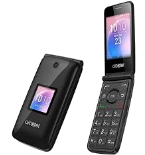
Güvenli buluta senkronizasyon için mevcut kılavuzlar
Desteklenen işlevler
- Kişiler senkronizasyonu
- Takvim senkronizasyonu
- fotoğraf senkronizasyonu
- video senkronizasyonu
- Otomatik senkronizasyon


kişiler, takvim, fotoğraflar ve videolar verilerinizi AT&T Cingular Flip 2 (4044O) cihazından çevrimiçi bir depolama alanına ve geri aktararak güvende ve güncel tutun.
AT&T Cingular Flip 2 (4044O) cihazını PhoneCopy desteklenmektedir.
Lütfen aşağıdaki ayarların ürün yazılımı sürümüne bağlı olarak biraz değişebileceğini unutmayın.
Onaylanan modeller
Onaylanan sürümler
Haberler
- 25.08.2020
- First user from Uganda just synced his kişiler on AT&T Cingular Flip 2 (4044O) phone.
- 27.10.2019
- This phone model was just synchronized by PhoneCopy user in Amerika Birleşik Devletleri. It transferred kişiler.
dünya genelindeki AT&T Cingular Flip 2 (4044O) kullanıcıları
AT&T Cingular Flip 2 (4044O), dünya genelindeki birçok ülkede PhoneCopy kullanıcıları tarafından kişi yedeklemesi için tercih edilmektedir - Amerika Birleşik Devletleri (Estados Unidos, États-Unis, ‘Amelika Hui Pū ‘ia) - 85.00%, Uganda - 15.00%.
Haritada
Histogram, dünya genelinde PhoneCopy ile AT&T Cingular Flip 2 (4044O) yedeklemesini göstermektedir.
Talimat metni - Nasıl yedekleme yapılır
AT&T Cingular Flip 2 (4044O) 'dan
- Download our PhoneCopy for KaiOS from application KaiOS Marketplace to your mobile device.
- After launching the application, create a new account from the application. If you have already created an account on web pages www.phonecopy.com, log in to this existing account in the application.
- After succesful login press "Synchronize" for complete synchronization, you can choose "This device >> Server" for one-way sync.
If you need more help with the settings, visit our step by step screenshot guide: How to synchronize contacts to phone with KaiOS
If you need more help with the settings, visit our step by step screenshot guide: How to backup contacts from phone with Kai OS
Senkronizasyon esnasında herhangi bir problemle karşılaşırsanız Yardım İsteyin
AT&T Cingular Flip 2 (4044O) 'a doğru
- Download our PhoneCopy for KaiOS from application KaiOS Marketplace to your mobile device.
- After launching the application, log in to this existing account in the application.
- After succesful login press "Synchronize" for complete synchronization, you can choose "Server >> This device" for one-way sync.
If you need more help with the settings, visit our step by step screenshot guide: How to synchronize contacts to phone with KaiOS
If you need more help with the settings, visit our step by step screenshot guide: How to backup contacts from phone with Kai OS
Senkronizasyon esnasında herhangi bir problemle karşılaşırsanız Yardım İsteyin
Kullanıcı yorumları
Yorum yazmak için lütfen Giriş yapın
-
Kann ich mit 1 PhoneCopy-Konto (Premium) mehrere KAIOS-Handys mit Synchronisation von Terminen (CalDav) und Kontakten bedienen? roescheisen60, 7.03.2026
-
Hello, we have a guide for KaiOS calendar sync. To sync two phones, create new device (as mentioned in the guide) for each phone to make the sync seamless.
https://www.phonecopy.com/en/pages/how_to_keep_updated_kaios_calendar_using_caldav
-
