Sauvegarder contacts, calendrier, photos et vidéos depuis AT&T Cingular Flip 2 (4044O)
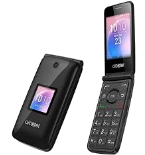
Guides disponibles pour la synchronisation vers le cloud sécurisé
Fonctions prises en charge
- synchronisation des contacts
- synchronisation du calendrier
- synchronisation des photos
- synchronisation des vidéos
- synchronisation automatique


Transférez vos contacts, calendrier, photos et vidéos de AT&T Cingular Flip 2 (4044O) vers un espace de stockage en ligne et inversement pour les garder en sécurité et à jour.
AT&T Cingular Flip 2 (4044O) est pris en charge avec PhoneCopy.
Veuillez noter que les paramètres suivants peuvent varier légèrement en fonction de la version du micrologiciel.
Modèles confirmés
Versions confirmées
Nouvelles
- 25/08/2020
- Le premier utilisateur dans le pays Ouganda vient de synchroniser ses contacts sur son téléphone AT&T Cingular Flip 2 (4044O).
- 27/10/2019
- Ce modèle de téléphone vient d'être synchronisé par un utilisateur de PhoneCopy dans le pays États-Unis. Il a transféré contacts.
AT&T Cingular Flip 2 (4044O) utilisateurs dans le monde
AT&T Cingular Flip 2 (4044O) est privilégié pour la sauvegarde des contacts par les utilisateurs de PhoneCopy dans plusieurs pays du monde - États-Unis (Estados Unidos, États-Unis, ‘Amelika Hui Pū ‘ia) - 85.00%, Ouganda - 15.00%.
Sur la carte
L'histogramme illustre la sauvegarde de AT&T Cingular Flip 2 (4044O) avec PhoneCopy dans le monde entier.
Guide textuel - Comment sauvegarder
À partir de AT&T Cingular Flip 2 (4044O)
- Download our PhoneCopy for KaiOS from application KaiOS Marketplace to your mobile device.
- After launching the application, create a new account from the application. If you have already created an account on web pages www.phonecopy.com, log in to this existing account in the application.
- After succesful login press "Synchronize" for complete synchronization, you can choose "This device >> Server" for one-way sync.
If you need more help with the settings, visit our step by step screenshot guide: How to synchronize contacts to phone with KaiOS
If you need more help with the settings, visit our step by step screenshot guide: How to backup contacts from phone with Kai OS
En cas de problèmes dans la synchronisation, veuillez nous contacter.
Vers AT&T Cingular Flip 2 (4044O)
- Download our PhoneCopy for KaiOS from application KaiOS Marketplace to your mobile device.
- After launching the application, log in to this existing account in the application.
- After succesful login press "Synchronize" for complete synchronization, you can choose "Server >> This device" for one-way sync.
If you need more help with the settings, visit our step by step screenshot guide: How to synchronize contacts to phone with KaiOS
If you need more help with the settings, visit our step by step screenshot guide: How to backup contacts from phone with Kai OS
En cas de problèmes dans la synchronisation, veuillez nous contacter.
Commentaires des utilisateurs
Pour laisser un commentaire identifiez-vous.
-
Kann ich mit 1 PhoneCopy-Konto (Premium) mehrere KAIOS-Handys mit Synchronisation von Terminen (CalDav) und Kontakten bedienen? roescheisen60, 07/03/2026
-
Hello, we have a guide for KaiOS calendar sync. To sync two phones, create new device (as mentioned in the guide) for each phone to make the sync seamless.
https://www.phonecopy.com/en/pages/how_to_keep_updated_kaios_calendar_using_caldav
-
