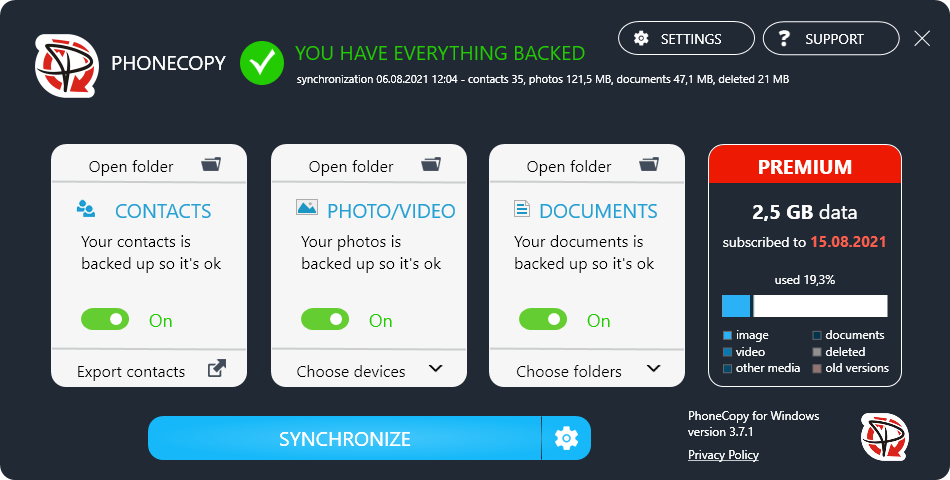

Easy and safe backup, synchronization and sharing contacts, photos or videos between your computer and mobile devices. Advanced backup of documents from your laptop including protection from ransomware. Download PhoneCopy application for FREE and start with your backup.

Every day, every hour, often every minute you use your mobile phone. You take pictures, record videos, read messages, access the contacts in it, and keep your phone in the hand everywhere you go. Your life is increasingly dependent on the information you have in your mobile device. Your life becomes increasingly digital. Now imagine that your phone breaks down, falls into water, or breaks the display. Whether it's an iPhone or Samsung Galaxy which costs hundreds or even a simple phone, at such a moment you're always interested in data, not the price of your device. And that's why there's a personal PhoneCopy cloud. It is secure storage on the internet that is reserved for your data. And in the case of the PhoneCopy cloud, it's actually a dedicated place on a physical server that runs fully under our management in a secure data center. No anonymous space, but a specific disk in a particular storage device, and all this is still backed up to another storage if the first had some problems.
You can choose which data you want to save, back up it manually, or set up automatic sync when you come home or work. You don't need to care about anything and you know that your personal data is always safe. The price of a few Euros or Dollars per month gives you space to fit the contents of your entire phone and in addition, you can access your data anytime and from anywhere. You need just an internet browser. And if you're still not convinced, PhoneCopy is one of the few cloud services which backs up your cloud data to your laptop. Just install PhoneCopy for Windows and don't worry about the rest.
And if you are backing up all the data from your mobile phone to the cloud and from there to your laptop, why not set up a backup of your documents. Documents are a lot smaller than mobile photos and videos, so you can store documents in your already paid storage. PhoneCopy can also store individual versions of documents, offers advanced protection against hacker's attacks and ransomware, and of course, you always have access to your data even through an internet browser, unless you don't have a laptop at your hand. For example, imagine that you can check the latest version of the contract you are about to negotiate in the next few minutes directly on the screen of your mobile phone even in the case when your laptop remained in the office at the moment.
Do you find it interesting? Register on PhoneCopy.com and let's try it together.
Do you think that ransomware affects large companies only? Unfortunately, it affects everyone, but just the news about large company attacks is published, other attacks are not talked about enough. You may think that protection from such cyber attacks is expensive but it is not. A few EUR / USD per month will ensure that your data will be safe! Watch our video. It’s no longer enough to just back up, you need a solution that actively protects your data.
PhoneCopy Cloud.
Look at our screenshot guide for PC or notebook with Windows 10!
(This guide can be used for Windows 98, ME, 2000, XP, Vista, 2003, 2008, 7, 8, 8.1 or 10 as well)