Kontakte, Fotos, Videos, SMS-Nachrichten und Anrufprotokolle sichern: Motorola Edge 60
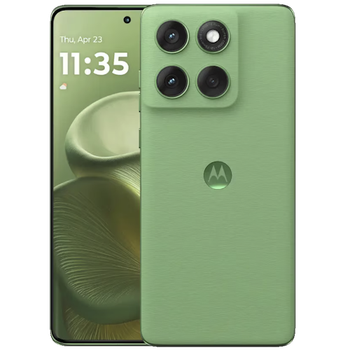
Verfügbare Anleitungen für die Synchronisierung mit der sicheren Cloud
Unterstützte Funktionen
- Kontakt-Synchronisation
- sms-Sicherung
- Sicherung des Anrufprotokolls
- Foto-Synchronisierung
- Video-Synchronisation
- automatisch synchronisieren


Übertragen Sie Ihre Kontakte, Fotos, Videos, SMS-Nachrichten und Anrufprotokolle von Motorola Edge 60 in einen Online-Speicher und zurück, um sie sicher und aktuell zu halten.
Motorola Edge 60 wird von PhoneCopy unterstützt.
Bitte beachten Sie, dass die folgenden Einstellungen je nach Firmware-Version leicht variieren können.
Bestätigte Modelle
Bestätigte Versionen
- Android 16
- Android 15
News
- 23.01.26
- Android 16 kann sogar auf Motorola Edge 60 offiziell aktualisiert werden.
- Jemand hat gerade PhoneCopy zur Sicherung von Motorola Edge 60 im Land Saudi-Arabien verwendet. Seine Kontakte und Medien wurden gesichert.
- 09.01.26
- Jemand hat gerade PhoneCopy zur Sicherung von Motorola Edge 60 im Land Spanien verwendet. Seine Kontakte wurden gesichert.
- 01.12.25
- We freshly support Motorola Edge 60 with Android 15 OS for photo, video, SMS, call log and contact backup.
Android-Versionen auf Motorola Edge 60
Die PhoneCopy-App für Android unterstützt verschiedene Android-Versionen. Unsere Benutzer haben ihr Motorola Edge 60 mit Android 16 (69.23%), Android 15 (30.77%) synchronisiert.
Das folgende Kreisdiagramm zeigt den Anteil der Android-Versionen auf Motorola Edge 60 bei der Synchronisierung mit PhoneCopy.
Motorola Edge 60 Nutzer auf der ganzen Welt
Laut unseren Statistiken verwenden PhoneCopy-Benutzer Motorola Edge 60 für die Datensicherung in Ländern Spanien (España, Espanya, Espainia, Espanha) - 60.00%, Saudi-Arabien (Al-Mamlaka Al-‘Arabiyyah as Sa‘ūdiyyah, المملكة العربية السعودية) - 40.00%.
Die folgende Heatmap zeigt den Anteil der Benutzer weltweit, die ihr Motorola Edge 60 mit PhoneCopy synchronisieren.
Textanleitung - So sichern Sie Ihre Daten
Mit Motorola Edge 60
- Laden Sie unsere PhoneCopy für Android-Anwendung auf Ihr Mobilgerät herunter.
- Erstellen Sie nach dem Start der Anwendung ein neues Konto in der Anwendung. Wenn Sie bereits ein Konto auf der Webseite www.phonecopy.com erstellt haben, melden Sie sich in der Anwendung mit diesem bestehenden Konto an.
- Nach erfolgreicher Anmeldung durchlaufen Sie den Einrichtungsassistenten der Anwendung und wählen Sie dann Synchronize (für ein Konto mit einer bestehenden Sicherung) / Backup (für ein leeres Konto) aus, oder drücken Sie die Schaltfläche Later und wählen Sie dann im Seitenmenü die Option Back up contacts / Restore contacts für eine einseitige Synchronisierung.
Weitere Informationen zu unserer App finden Sie auf unserer PhoneCopy für Android-Seite.
Bei Problemen mit der Synchronisierung, bitte kontaktieren Sie uns.
Benutzer Kommentare
Um einen Kommentar zu hinterlassen, melden Sie sich an.

ntuenabraham2, 09.09.26