Kontakte, Fotos, Videos, SMS-Nachrichten und Anrufprotokolle sichern: Xiaomi 13T 5G
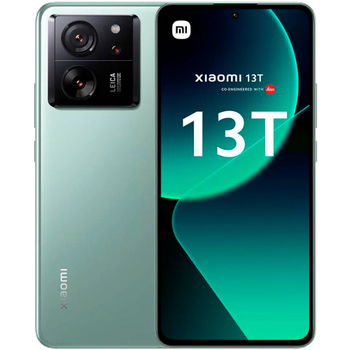
Verfügbare Anleitungen für die Synchronisierung mit der sicheren Cloud
Unterstützte Funktionen
- Kontakt-Synchronisation
- sms-Sicherung
- Sicherung des Anrufprotokolls
- Foto-Synchronisierung
- Video-Synchronisation
- automatisch synchronisieren


Übertragen Sie Ihre Kontakte, Fotos, Videos, SMS-Nachrichten und Anrufprotokolle von Xiaomi 13T 5G in einen Online-Speicher und zurück, um sie sicher und aktuell zu halten.
Xiaomi 13T 5G wird von PhoneCopy unterstützt.
Bitte beachten Sie, dass die folgenden Einstellungen je nach Firmware-Version leicht variieren können.
Bestätigte Modelle
Bestätigte Versionen
- Android 16
- Android 15
- Android 14
- Android 13
News
- 07.02.26
- Wir haben festgestellt, dass Xiaomi 13T 5G auf eine neue Android-Betriebssystemversion 16 aktualisiert werden kann.
- 06.11.25
- Jemand hat gerade PhoneCopy zur Sicherung von Xiaomi 13T 5G im Land Italien verwendet. Seine Kontakte wurden gesichert.
- 02.11.25
- Die PhoneCopy-App wird auf Xiaomi 13T 5G mit dem Betriebssystem Android und Huawei Mobile Services vollständig unterstützt.
- 02.08.25
- Der erste Benutzer aus Spanien hat gerade seine Kontakte auf seinem Xiaomi 13T 5G-Telefon synchronisiert.
- 09.05.25
- Wir haben gerade den ersten Benutzer dieses Modells in Algerien bekommen! Jemand hat gerade seine Kontakte gesichert.
- 07.02.25
- Sogar in Vereinigte Staaten haben wir einen Benutzer mit einem Xiaomi 13T 5G-Telefon. Er sichert seine Kontakte, Medien, SMS-Nachrichten und Anrufprotokolle.
- 12.01.25
- Wir haben gerade den ersten Benutzer dieses Modells in Frankreich bekommen! Jemand hat gerade seine Kontakte gesichert.
- 16.11.24
- We noticed the update possibility of Xiaomi 13T 5G to a new Android operating system version 15.
- 15.01.24
- Update Xiaomi 13T 5G to Android 14 is available including the fully working contact, SMS, photo, and video backup to PhoneCopy Cloud.
- 18.12.23
- We freshly support Xiaomi 13T 5G with Android 13 OS for photo, video, call log, SMS and contact backup.
Android-Versionen auf Xiaomi 13T 5G
Die PhoneCopy-App für Android unterstützt verschiedene Android-Versionen. Unsere Benutzer haben ihr Xiaomi 13T 5G mit Android 15 (37.21%), Android 14 (36.43%), Android 16 (25.58%), Android 13 (0.78%) synchronisiert.
Das Diagramm zeigt die Xiaomi 13T 5G-Sicherung mit PhoneCopy unter verschiedenen Android-Versionen.
Xiaomi 13T 5G Nutzer auf der ganzen Welt
Xiaomi 13T 5G wird für die Kontaktsicherung von PhoneCopy-Benutzern in mehreren Ländern auf der ganzen Welt bevorzugt - Tschechien (Czech Republic, Česká republika) - 87.99%, Algerien (Dzayer, ⴷⵣⴰⵢⴻⵔ, Al-Jazā'ir, الجزائر) - 7.31%, Frankreich - 2.09%, Indonesien - 1.04%, Vereinigte Staaten (Estados Unidos, États-Unis, ‘Amelika Hui Pū ‘ia) - 0.26%, Marokko (Amerruk, Elmeɣrib, ⴰⵎⵔⵔⵓⴽ, ⵍⵎⵖⵔⵉⴱ, Al-maɣréb, المغرب) - 0.26%, Slowakei (Slovensko) - 0.26%, Spanien (España, Espanya, Espainia, Espanha) - 0.26%, Italien (Italia) - 0.26%, Portugal - 0.26%.
Das Histogramm zeigt die Xiaomi 13T 5G-Sicherung mit PhoneCopy weltweit.
Textanleitung - So sichern Sie Ihre Daten
Von Xiaomi 13T 5G
- Download our PhoneCopy for Huawei application to your mobile device.
- After launching the application, create a new account from the application. If you have already created an account on web pages www.phonecopy.com, log in to this existing account in the application.
- After succesful login press "Synchronize" for complete synchronization, or press "Advanced & Account", select "One-way sync" and after choose "This device >> server" for one-way sync.
More detailed information and instructions include screenshots: how to backup and synchronize contacts from Huawei
For more information about our app, visit our PhoneCopy for Huawei page.
Let us just remind you, that for now PhoneCopy for Android transfers to server contacts, photos, videos, Call Logs and SMS.
Bei Problemen mit der Synchronisierung, bitte kontaktieren Sie uns.
Zu Xiaomi 13T 5G
- Download our PhoneCopy for Huawei application to your mobile device.
- After launching the application, create a new account from the application. If you have already created an account on web pages www.phonecopy.com, log in to this existing account in the application.
- After succesful login press "Synchronize" for complete synchronization, or press "Advanced & Account", select "One-way sync" and after choose "Server >> this device" for one-way sync.
More detailed information and instructions include screenshots: how transfer contacts to Huawei
For more information about our app, visit our PhoneCopy for Huawei page.
Let us just remind you, that for now PhoneCopy for Android transfers to server contacts, photos, videos, Call Logs and SMS.
Bei Problemen mit der Synchronisierung, bitte kontaktieren Sie uns.
Benutzer Kommentare
Um einen Kommentar zu hinterlassen, melden Sie sich an.
-
-
Hello, PhoneCopy backs up all SMS on the phone, there is no need to set anything else. Our records show a backup of 1818 SMS firstly and then adding of two more SMS (one by one) during consequent backups. Are you sure that the other messages that were not backed up are also SMS?
-

I don't see where to add more. Can anyone help me figure this out?
adolph1960, 01.08.22