Sauvegarder contacts, photos, vidéos, SMS et journaux d'appels depuis Xiaomi 13T 5G
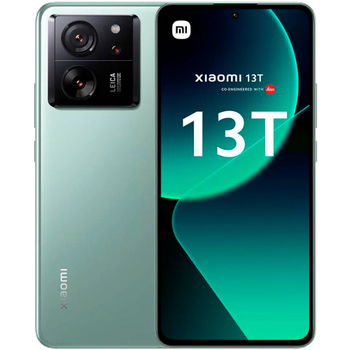
Guides disponibles pour la synchronisation vers le cloud sécurisé
Fonctions prises en charge
- synchronisation des contacts
- synchronisation des sms
- sauvegarde du journal d'appels
- synchronisation des photos
- synchronisation des vidéos
- synchronisation automatique


Transférez vos contacts, photos, vidéos, SMS et journaux d'appels de Xiaomi 13T 5G vers un espace de stockage en ligne et inversement pour les garder en sécurité et à jour.
Xiaomi 13T 5G est pris en charge avec PhoneCopy.
Veuillez noter que les paramètres suivants peuvent varier légèrement en fonction de la version du micrologiciel.
Modèles confirmés
Versions confirmées
- Android 16
- Android 15
- Android 14
- Android 13
Nouvelles
- 07/02/2026
- Nous avons remarqué la possibilité de mise à jour de Xiaomi 13T 5G vers la nouvelle version 16 du système d'exploitation Android.
- 06/11/2025
- Quelqu'un vient d'utiliser PhoneCopy pour sauvegarder Xiaomi 13T 5G dans le pays Italie. Ses contacts ont été sauvegardés.
- 02/11/2025
- L'application PhoneCopy est entièrement prise en charge sur Xiaomi 13T 5G avec le système d'exploitation Android et les Huawei Mobile Services.
- 02/08/2025
- Le premier utilisateur dans le pays Espagne vient de synchroniser ses contacts sur son téléphone Xiaomi 13T 5G.
- 09/05/2025
- Nous venons d'avoir le premier utilisateur de ce modèle dans le pays Algérie ! Quelqu'un vient de sauvegarder ses contacts.
- 07/02/2025
- Même dans le pays États-Unis, nous avons un utilisateur avec un téléphone Xiaomi 13T 5G. Il sauvegarde ses contacts, fichiers multimédias, SMS et journaux d'appels.
- 12/01/2025
- Nous venons d'avoir le premier utilisateur de ce modèle dans le pays France ! Quelqu'un vient de sauvegarder ses contacts.
- 16/11/2024
- We noticed the update possibility of Xiaomi 13T 5G to a new Android operating system version 15.
- 15/01/2024
- Update Xiaomi 13T 5G to Android 14 is available including the fully working contact, SMS, photo, and video backup to PhoneCopy Cloud.
- 18/12/2023
- We freshly support Xiaomi 13T 5G with Android 13 OS for photo, video, call log, SMS and contact backup.
versions Android fonctionnant sur Xiaomi 13T 5G
L'application PhoneCopy pour Android prend en charge diverses versions de Android. Nos utilisateurs ont synchronisé leur Xiaomi 13T 5G avec Android 15 (37.21%), Android 14 (36.43%), Android 16 (25.58%), Android 13 (0.78%).
Le graphique illustre la sauvegarde de Xiaomi 13T 5G avec PhoneCopy, exécutée sur différentes versions de Android.
Xiaomi 13T 5G utilisateurs dans le monde
Xiaomi 13T 5G est privilégié pour la sauvegarde des contacts par les utilisateurs de PhoneCopy dans plusieurs pays du monde - Tchéquie (Czech Republic, Česká republika) - 87.99%, Algérie (Dzayer, ⴷⵣⴰⵢⴻⵔ, Al-Jazā'ir, الجزائر) - 7.31%, France - 2.09%, Indonésie - 1.04%, États-Unis (Estados Unidos, États-Unis, ‘Amelika Hui Pū ‘ia) - 0.26%, Maroc (Amerruk, Elmeɣrib, ⴰⵎⵔⵔⵓⴽ, ⵍⵎⵖⵔⵉⴱ, Al-maɣréb, المغرب) - 0.26%, Slovaquie (Slovensko) - 0.26%, Espagne (España, Espanya, Espainia, Espanha) - 0.26%, Italie (Italia) - 0.26%, Portugal - 0.26%.
L'histogramme illustre la sauvegarde de Xiaomi 13T 5G avec PhoneCopy dans le monde entier.
Guide textuel - Comment sauvegarder
À partir de Xiaomi 13T 5G
- Download our PhoneCopy for Huawei application to your mobile device.
- After launching the application, create a new account from the application. If you have already created an account on web pages www.phonecopy.com, log in to this existing account in the application.
- After succesful login press "Synchronize" for complete synchronization, or press "Advanced & Account", select "One-way sync" and after choose "This device >> server" for one-way sync.
More detailed information and instructions include screenshots: how to backup and synchronize contacts from Huawei
For more information about our app, visit our PhoneCopy for Huawei page.
Let us just remind you, that for now PhoneCopy for Android transfers to server contacts, photos, videos, Call Logs and SMS.
En cas de problèmes dans la synchronisation, veuillez nous contacter.
Vers Xiaomi 13T 5G
- Download our PhoneCopy for Huawei application to your mobile device.
- After launching the application, create a new account from the application. If you have already created an account on web pages www.phonecopy.com, log in to this existing account in the application.
- After succesful login press "Synchronize" for complete synchronization, or press "Advanced & Account", select "One-way sync" and after choose "Server >> this device" for one-way sync.
More detailed information and instructions include screenshots: how transfer contacts to Huawei
For more information about our app, visit our PhoneCopy for Huawei page.
Let us just remind you, that for now PhoneCopy for Android transfers to server contacts, photos, videos, Call Logs and SMS.
En cas de problèmes dans la synchronisation, veuillez nous contacter.
Commentaires des utilisateurs
Pour laisser un commentaire identifiez-vous.
-
-
Hello, PhoneCopy backs up all SMS on the phone, there is no need to set anything else. Our records show a backup of 1818 SMS firstly and then adding of two more SMS (one by one) during consequent backups. Are you sure that the other messages that were not backed up are also SMS?
-

I don't see where to add more. Can anyone help me figure this out?
adolph1960, 01/08/2022