Realizar copia de seguridad de contactos, fotos, vídeos, mensajes SMS y registros de llamadas desde Honor 200 Pro (elp-nx9)
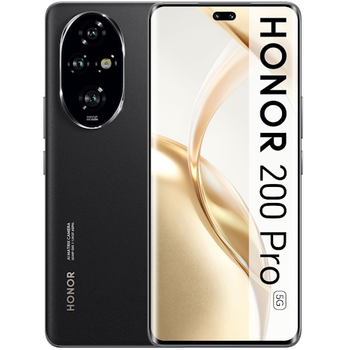
Guías disponibles para la sincronización con la nube segura
Funciones compatibles
- sincronización de contactos
- copia de seguridad de SMS
- copia de seguridad del registro de llamadas
- sincronización de fotos
- sincronización de vídeos
- sincronización automática


Transfiera sus contactos, fotos, vídeos, mensajes SMS y registros de llamadas desde Honor 200 Pro (elp-nx9) a un almacenamiento en línea y viceversa para mantenerlos seguros y actualizados.
Honor 200 Pro (elp-nx9) es compatible con PhoneCopy.
Tenga en cuenta que la siguiente configuración puede variar ligeramente según la versión del firmware.
Modelos confirmados
Versiones confirmadas
- Android 16
- Android 15
Noticias
- 22/8/26
- Este modelo de teléfono acaba de ser sincronizado por un usuario de PhoneCopy en Austria. Transfirió contactos.
- 2/7/26
- Recientemente también obtuvimos un nuevo usuario de Honor 200 Pro (elp-nx9) en Grecia. Está usando PhoneCopy para hacer copia de seguridad de contactos y multimedia.
- 28/4/26
- Alguien acaba de usar PhoneCopy para hacer una copia de seguridad de Honor 200 Pro (elp-nx9) en el país Brasil. Sus contactos fueron respaldados.
- 16/3/26
- Ya está disponible la actualización de Honor 200 Pro (elp-nx9) a Android 16, incluyendo la copia de seguridad totalmente funcional de contactos, SMS, fotos y vídeos en PhoneCopy Cloud.
- 15/3/26
- El primer usuario de Rumanía acaba de sincronizar sus contactos en su teléfono Honor 200 Pro (elp-nx9).
- 26/9/25
- Este modelo de teléfono acaba de ser sincronizado por un usuario de PhoneCopy en Eslovaquia. Transfirió contactos, mensajes SMS y registros de llamadas.
- 20/4/25
- We added Honor 200 Pro (elp-nx9) to supported devices with Android 15.
versiones de Android ejecutándose en Honor 200 Pro (elp-nx9)
Al sincronizar, los usuarios de PhoneCopy tenían las siguientes versiones de Android en su Honor 200 Pro (elp-nx9): Android 16 (89.66%), Android 15 (10.34%).
El gráfico muestra el uso de versiones de Honor 200 Pro (elp-nx9) y Android para la copia de seguridad de contactos con PhoneCopy en todo el mundo.
usuarios de Honor 200 Pro (elp-nx9) en todo el mundo
Honor 200 Pro (elp-nx9) es utilizado a menudo por usuarios de PhoneCopy en países como Eslovaquia (Slovensko) - 91.53%, Grecia (Hellas, Ελλάς, Ellada, Ελλάδα) - 3.39%, Rumanía (România) - 1.69%, Austria (Österreich) - 1.69%, Mauricio (Maurice, Moris) - 0.85%, Brasil (Brasil) - 0.85%.
El mapa muestra el uso de Honor 200 Pro (elp-nx9) para la copia de seguridad de contactos con PhoneCopy en todo el mundo.
Guía de texto - Cómo hacer copias de seguridad
Con Honor 200 Pro (elp-nx9)
- Descargue nuestra aplicación PhoneCopy para Android en su dispositivo móvil.
- Después de abrir la aplicación, cree una nueva cuenta desde la aplicación. Si ya ha creado una cuenta en la página web www.phonecopy.com, inicie sesión con esa cuenta existente en la aplicación.
- Tras iniciar sesión correctamente, siga el asistente de configuración de la aplicación y, a continuación, seleccione Synchronize (para una cuenta con una copia de seguridad existente) / Backup (para una cuenta vacía), o pulse el botón Later y luego seleccione la opción correspondiente en el menú lateral Back up contacts / Restore contacts para una sincronización unidireccional.
Para obtener más información sobre nuestra aplicación, visite nuestra página de PhoneCopy para Android.
En el caso de problemas con la sincronización, contacte con nosotros.
Comentarios de usuarios
Para dejar un comentario, por favor inicie sesión.
-
-
Hello, answered via private email.
-

Phonecopy App on Android phone sees only Phone contacts and Google Account contacts. But if the phone has Exchange Account (and contacts), Phonecopy App does not see this account and cannot add it as source of data (contacts). comsync, 8/7/22