Realizar copia de seguridad de contactos, fotos, vídeos, mensajes SMS y registros de llamadas desde Itel A37 (a571w)
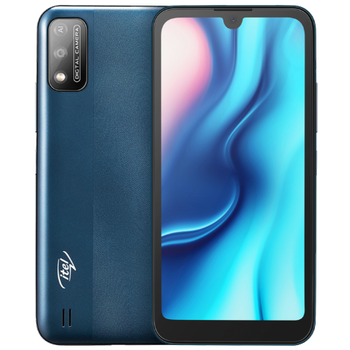
Guías disponibles para la sincronización con la nube segura
Funciones compatibles
- sincronización de contactos
- copia de seguridad de SMS
- copia de seguridad del registro de llamadas
- sincronización de fotos
- sincronización de vídeos
- sincronización automática


Transfiera sus contactos, fotos, vídeos, mensajes SMS y registros de llamadas desde Itel A37 (a571w) a un almacenamiento en línea y viceversa para mantenerlos seguros y actualizados.
Itel A37 (a571w) es compatible con PhoneCopy.
Tenga en cuenta que la siguiente configuración puede variar ligeramente según la versión del firmware.
Modelos confirmados
Versiones confirmadas
- Android 10
Noticias
- 15/6/26
- ¡Acabamos de conseguir el primer usuario de Itel A37 (a571w) en Kenia! Alguien acaba de hacer una copia de seguridad de sus contactos desde un nuevo teléfono.
- 30/4/25
- Un usuario de Uganda ha sincronizado sus contactos, mensajes SMS y registros de llamadas con su teléfono.
- 2/10/24
- Un teléfono Itel A37 (a571w) fue sincronizado por un usuario de PhoneCopy en Angola. Sus contactos, mensajes SMS y registros de llamadas fueron transferidos.
- 31/10/22
- Un nuevo usuario de teléfono ha sincronizado sus contactos y mensajes SMS con PhoneCopy desde Malaui.
- 3/7/22
- Incluso en Nigeria tenemos un usuario con un teléfono Itel A37 (a571w). Hace copia de seguridad de sus contactos y mensajes SMS.
- 11/5/22
- We freshly support Itel A37 (a571w) with Android 10 OS for call logs, photo, video, SMS and contact backup.
versiones de Android ejecutándose en Itel A37 (a571w)
Al sincronizar, los usuarios de PhoneCopy tenían las siguientes versiones de Android en su Itel A37 (a571w): Android 10 (100.00%).
usuarios de Itel A37 (a571w) en todo el mundo
Según nuestras estadísticas, los usuarios de PhoneCopy utilizan Itel A37 (a571w) para la copia de seguridad de datos en los países Sudáfrica (Suid-Afrika, iNingizimu Afrika, uMzantsi Afrika, Afrika-Borwa, Afrika Borwa, Aforika Borwa, Afurika Tshipembe, Afrika Dzonga, iSewula Afrika) - 25.00%, Kenia - 25.00%, Malaui (Malaŵi) - 16.67%, Nigeria (Nijeriya, Naigeria, Nàìjíríà) - 16.67%, Angola (Ngola) - 8.33%, Uganda - 8.33%.
El siguiente mapa de calor muestra las sincronizaciones de contactos con Itel A37 (a571w) utilizando PhoneCopy en todo el mundo.
Guía de texto - Cómo hacer copias de seguridad
Con Itel A37 (a571w)
- Descargue nuestra aplicación PhoneCopy para Android en su dispositivo móvil.
- Después de abrir la aplicación, cree una nueva cuenta desde la aplicación. Si ya ha creado una cuenta en la página web www.phonecopy.com, inicie sesión con esa cuenta existente en la aplicación.
- Tras iniciar sesión correctamente, siga el asistente de configuración de la aplicación y, a continuación, seleccione Synchronize (para una cuenta con una copia de seguridad existente) / Backup (para una cuenta vacía), o pulse el botón Later y luego seleccione la opción correspondiente en el menú lateral Back up contacts / Restore contacts para una sincronización unidireccional.
Para obtener más información sobre nuestra aplicación, visite nuestra página de PhoneCopy para Android.
En el caso de problemas con la sincronización, contacte con nosotros.
Comentarios de usuarios
Para dejar un comentario, por favor inicie sesión.
-
-
Hello, 96,486 is really big count of SMS. It is possible that the processing of such a number of items takes a long time and it is possible that server terminate the communication due to a long time without response from the device.
We are curently working on optimalization of application, which may solve issue like yours. We will release new version of app asap, within a few days at the latest. We will contact you. Please, be patient.
Thank you-
Hello,
we developed a promised new beta version (3.4.3) of app. This optimized version should solve your reported issue. Please, download and install new version and try to sync again with it.
I recommend, plug in charger during sync, because sync of big count of items take long time and it is possible that Android system will try to limit the app due to battery life.
Download link: https://www.phonecopy.com/android/download/phonecopy.apk
Please, send us feedback, if it works now or not.
Thank you for your patience and cooperation.
-
-

My phone has 96,486 SMS that has to be backed up but the process keeps terminating due to "internet connection lost". My fiber internet access is quite stable so I don't think disruption is the cause. Is there a way I can back up the sms in parts? mebacal1960, 19/10/20