Sauvegarder contacts, calendrier, photos et vidéos depuis Apple iPhone Air
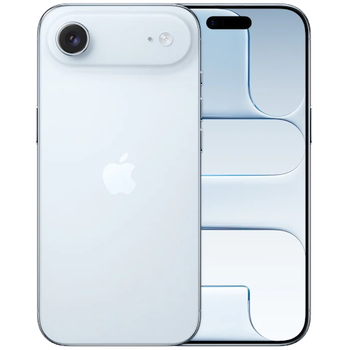
Guides disponibles pour la synchronisation vers le cloud sécurisé
Fonctions prises en charge
- synchronisation des contacts
- synchronisation du calendrier
- synchronisation des photos
- synchronisation des vidéos
- synchronisation automatique

Transférez vos contacts, calendrier, photos et vidéos de Apple iPhone Air vers un espace de stockage en ligne et inversement pour les garder en sécurité et à jour.
Apple iPhone Air est pris en charge avec PhoneCopy.
Veuillez noter que les paramètres suivants peuvent varier légèrement en fonction de la version du micrologiciel.
Nouvelles
- 22/09/2026
- Nous venons d'avoir le premier utilisateur de ce modèle dans le pays Roumanie ! Quelqu'un vient de sauvegarder ses contacts.
- 03/07/2026
- Le premier utilisateur dans le pays Royaume-Uni vient de synchroniser ses contacts sur son téléphone Apple iPhone Air.
- 18/04/2026
- Ce modèle de téléphone vient d'être synchronisé par un utilisateur de PhoneCopy dans le pays Canada. Il a transféré contacts et fichiers multimédias.
- 21/03/2026
- Même dans le pays Arabie Saoudite, nous avons un utilisateur avec un téléphone Apple iPhone Air. Il sauvegarde ses contacts.
- 19/03/2026
- Même dans le pays Espagne, nous avons un utilisateur avec un téléphone Apple iPhone Air. Il sauvegarde ses contacts.
Apple iPhone Air utilisateurs dans le monde
Apple iPhone Air est souvent utilisé par les utilisateurs de PhoneCopy dans des pays comme Tchéquie (Czech Republic, Česká republika) - 48.50%, Espagne (España, Espanya, Espainia, Espanha) - 22.25%, Allemagne (Deutschland) - 12.50%, Arabie Saoudite (Al-Mamlaka Al-‘Arabiyyah as Sa‘ūdiyyah, المملكة العربية السعودية) - 9.75%, États-Unis (Estados Unidos, États-Unis, ‘Amelika Hui Pū ‘ia) - 2.88%, Pays-Bas (Nederland, Nederlân) - 2.12%, Royaume-Uni (Y Deyrnas Unedig, Unitit Kinrick, Rìoghachd Aonaichte, Ríocht Aontaithe, An Rywvaneth Unys) - 1.38%, Canada - 0.38%, Roumanie (România) - 0.12%, Hong Kong (Heung Gong, 香港) - 0.12%.
Sur la carte
La carte de chaleur suivante montre les synchronisations des contacts avec Apple iPhone Air à l'aide de PhoneCopy dans le monde entier.
Guide textuel - Comment sauvegarder
Avec Apple iPhone Air
- Installez PhoneCopy pour iPhone / iPad depuis l'App Store.
- Lancez l'application et suivez l'assistant qui apparaît. Connectez-vous si vous avez déjà un compte PhoneCopy, ou inscrivez-vous si vous souhaitez en créer un nouveau.
- Autorisez l'accès aux contacts, puis sélectionnez les sources (comptes) que vous souhaitez synchroniser. Autorisez ensuite l'accès aux médias, puis choisissez si vous souhaitez synchroniser les photos et/ou les vidéos. Si vous n'autorisez pas PhoneCopy à accéder à vos médias, seuls vos contacts seront synchronisés.
- Si vous avez déjà des médias sur votre compte PhoneCopy, vous pouvez choisir de les synchroniser (télécharger) sur cet appareil.
- Enfin, appuyez sur Synchroniser pour effectuer la synchronisation complète.
Si vous devez synchroniser le calendrier, consultez notre guide sur la synchronisation des calendriers avec les appareils iOS.
En cas de problèmes dans la synchronisation, veuillez nous contacter.
Commentaires des utilisateurs
- The iPhone application need not to be associated with profile as for other phones, all is automatic.
- The application for iPhone cannot synchronize SMS and notes, because the Apple does not allow application access to them.
- You can synchronize your calendars using CalDAV protocol.
Pour laisser un commentaire identifiez-vous.
-
help import sms in iphone example ? rqcesa, 28/09/2020
-
Sorry, we don't provide SMS import to iPhone. We can only export it from iPhone to PhoneCopy.
-
