Apple iPhone Air dan yedeklenen kişiler, takvim, fotoğraflar ve videolar
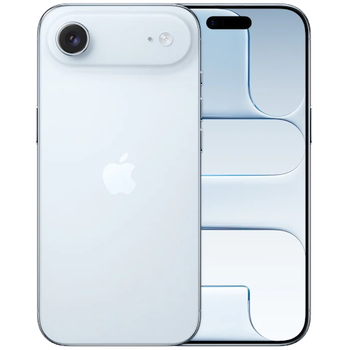
Güvenli buluta senkronizasyon için mevcut kılavuzlar
Desteklenen işlevler
- Kişiler senkronizasyonu
- Takvim senkronizasyonu
- fotoğraf senkronizasyonu
- video senkronizasyonu
- Otomatik senkronizasyon

kişiler, takvim, fotoğraflar ve videolar verilerinizi Apple iPhone Air cihazından çevrimiçi bir depolama alanına ve geri aktararak güvende ve güncel tutun.
Apple iPhone Air cihazını PhoneCopy desteklenmektedir.
Lütfen aşağıdaki ayarların ürün yazılımı sürümüne bağlı olarak biraz değişebileceğini unutmayın.
Haberler
- 25.10.2026
- Bu telefon modeli, Danimarka ülkesindeki bir PhoneCopy kullanıcısı tarafından az önce senkronize edildi. kişiler verilerini aktardı.
- 3.10.2026
- Tunus ülkesinde bu modelin ilk kullanıcısına az önce ulaştık! Birisi az önce kişiler verilerini yedekledi.
- 22.09.2026
- Romanya ülkesinde bu modelin ilk kullanıcısına az önce ulaştık! Birisi az önce kişiler verilerini yedekledi.
- 3.07.2026
- İngiltere ülkesindeki ilk kullanıcı, kişiler verilerini az önce Apple iPhone Air telefonunda senkronize etti.
- 18.04.2026
- Bu telefon modeli, Kanada ülkesindeki bir PhoneCopy kullanıcısı tarafından az önce senkronize edildi. kişiler ve medya verilerini aktardı.
dünya genelindeki Apple iPhone Air kullanıcıları
Apple iPhone Air, PhoneCopy kullanıcıları tarafından Çekya (Czech Republic, Česká republika) - 45.37%, İspanya (España, Espanya, Espainia, Espanha) - 23.90%, Almanya (Deutschland) - 13.33%, Suudi Arabistan (Al-Mamlaka Al-‘Arabiyyah as Sa‘ūdiyyah, المملكة العربية السعودية) - 9.36%, Amerika Birleşik Devletleri (Estados Unidos, États-Unis, ‘Amelika Hui Pū ‘ia) - 2.53%, Hollanda (Nederland, Nederlân) - 1.87%, İngiltere (Y Deyrnas Unedig, Unitit Kinrick, Rìoghachd Aonaichte, Ríocht Aontaithe, An Rywvaneth Unys) - 1.65%, Danimarka (Danmark) - 0.77%, Tunus (Tunes, ⵜⵓⵏⵙ, Tūns, تونس) - 0.66%, Kanada - 0.33%, Romanya (România) - 0.11%, Hong Kong (Heung Gong, 香港) - 0.11% gibi ülkelerde sıklıkla kullanılmaktadır.
Haritada
Aşağıdaki ısı haritası, dünya genelinde PhoneCopy kullanarak Apple iPhone Air ile yapılan kişi senkronizasyonlarını göstermektedir.
Talimat metni - Nasıl yedekleme yapılır
Apple iPhone Air ile
- PhoneCopy for iPhone / iPad'i App Store'dan yükleyin.
- Uygulamayı başlatın ve görüntülenen sihirbazı izleyin. Zaten bir PhoneCopy hesabınız varsa giriş yapın, yeni bir hesap oluşturmak istiyorsanız kaydolun.
- Kişilere erişimi yetkilendirin ve ardından senkronize etmek istediğiniz kaynakları (hesapları) seçin. Ardından medyaya erişimi yetkilendirin ve fotoğraf ve/veya videoları senkronize etmek isteyip istemediğinizi seçin. PhoneCopy'ye medyanıza erişim izni vermezseniz, yalnızca kişileriniz senkronize edilecektir.
- PhoneCopy hesabınızda zaten medya varsa, bunları bu cihaza senkronize etmeyi (indirmeyi) tercih edebilirsiniz.
- Son olarak, tam senkronizasyonu gerçekleştirmek için Synchronize öğesine dokunun.
Takvimi senkronize etmeniz gerekiyorsa, iOS cihazlarıyla takvim senkronizasyonu kılavuzumuza bakın.
Senkronizasyon esnasında herhangi bir problemle karşılaşırsanız Yardım İsteyin
Kullanıcı yorumları
- The iPhone application need not to be associated with profile as for other phones, all is automatic.
- The application for iPhone cannot synchronize SMS and notes, because the Apple does not allow application access to them.
- You can synchronize your calendars using CalDAV protocol.
Yorum yazmak için lütfen Giriş yapın
-
Ankit valvitarsing34, 20.10.2026
