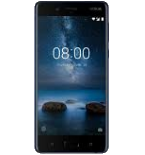
Sauvegarder contacts, photos, vidéos, SMS et journaux d'appels depuis Nokia 8 Sirocco
Guides disponibles pour la synchronisation vers le cloud sécurisé
Fonctions prises en charge
- synchronisation des contacts
- synchronisation des sms
- sauvegarde du journal d'appels
- synchronisation des photos
- synchronisation des vidéos
- synchronisation automatique


Transférez vos contacts, photos, vidéos, SMS et journaux d'appels de Nokia 8 Sirocco vers un espace de stockage en ligne et inversement pour les garder en sécurité et à jour.
Nokia 8 Sirocco est pris en charge avec PhoneCopy.
Veuillez noter que les paramètres suivants peuvent varier légèrement en fonction de la version du micrologiciel.
Modèles confirmés
Versions confirmées
- Android 10
- Android 9.0 Pie
- Android 8.1 Oreo
- Android 8.0 Oreo
Nouvelles
- 08/07/2024
- Un téléphone Nokia 8 Sirocco a été synchronisé par un utilisateur de PhoneCopy dans le pays Suisse. Ses contacts, SMS et journaux d'appels ont été transférés.
- 26/12/2021
- Récemment, nous avons également eu un nouvel utilisateur de Nokia 8 Sirocco dans le pays Australie. Il utilise PhoneCopy pour sauvegarder ses contacts.
- 07/07/2021
- Ce modèle de téléphone vient d'être synchronisé par un utilisateur de PhoneCopy dans le pays Finlande. Il a transféré contacts.
- 05/11/2020
- Quelqu'un a utilisé PhoneCopy pour sauvegarder ce modèle de téléphone dans le pays Inde. Ses contacts ont été transférés.
- 01/09/2020
- Nous avons détecté l'application PhoneCopy sur un téléphone Nokia 8 Sirocco dans le pays Pays-Bas. Tous les contacts ont été sauvegardés.
versions Android fonctionnant sur Nokia 8 Sirocco
Lors de la synchronisation, les utilisateurs de PhoneCopy disposaient des versions Android suivantes sur leur Nokia 8 Sirocco: Android 8.1 Oreo (60.50%), Android 9.0 Pie (35.07%), Android 10 (3.66%), Android 8.0 Oreo (0.77%).
Le graphique montre l'utilisation des versions Nokia 8 Sirocco et Android pour la sauvegarde des contacts avec PhoneCopy dans le monde entier.
Nokia 8 Sirocco utilisateurs dans le monde
D'après nos statistiques, les utilisateurs de PhoneCopy utilisent Nokia 8 Sirocco pour la sauvegarde des données dans les pays Royaume-Uni (Y Deyrnas Unedig, Unitit Kinrick, Rìoghachd Aonaichte, Ríocht Aontaithe, An Rywvaneth Unys) - 43.48%, Inde (Bharôt, ভাৰত, ভারত, Bhārat, ભારત, भारत, Bhārata, ಭಾರತ, Bhāratam, ഭാരതം, Bharôtô, ଭାରତ, ਭਾਰਤ, भारतम्, Bārata, பாரதம், Bhāratadēsam, భారత దేశం) - 17.39%, Pays-Bas (Nederland, Nederlân) - 13.04%, Afrique du Sud (Suid-Afrika, iNingizimu Afrika, uMzantsi Afrika, Afrika-Borwa, Afrika Borwa, Aforika Borwa, Afurika Tshipembe, Afrika Dzonga, iSewula Afrika) - 8.70%, Allemagne (Deutschland) - 4.35%, Suisse (Schweiz, Suisse, Svizzera, Svizra) - 4.35%, Australie - 4.35%, Finlande (Suomi) - 4.35%.
La carte montre l'utilisation de Nokia 8 Sirocco pour la sauvegarde des contacts avec PhoneCopy dans le monde entier.
Guide textuel - Comment sauvegarder
Avec Nokia 8 Sirocco
- Téléchargez notre application PhoneCopy pour Android sur votre appareil mobile.
- Après avoir lancé l'application, créez un nouveau compte depuis celle-ci. Si vous avez déjà créé un compte sur le site web www.phonecopy.com, connectez-vous à ce compte existant dans l'application.
- Après une connexion réussie, suivez l'assistant de configuration de l'application, puis sélectionnez Synchroniser (pour un compte disposant déjà d'une sauvegarde) / Sauvegarder (pour un compte vide), ou appuyez sur le bouton Plus tard puis sélectionnez l'option correspondante dans le menu latéral Sauvegarder les contacts / Restaurer les contacts pour une synchronisation à sens unique.
Pour plus d'informations sur notre application, consultez notre page PhoneCopy pour Android.
En cas de problèmes dans la synchronisation, veuillez nous contacter.
Commentaires des utilisateurs
Pour laisser un commentaire identifiez-vous.
-
-
Hi, I am sorry but the current version doesn't support automatic synchronization. But the next version which will be launched soon will allow it.
-

I have synchronized manually, but I would like to avoid having to open the app and manually click on the synchronize menu option? arthurquinlan, 07/09/2021