Fazer cópia de segurança de contactos, fotografias, vídeos, mensagens SMS e registos de chamadas de Samsung Galaxy Z Flip7 FE (SM-F761b)
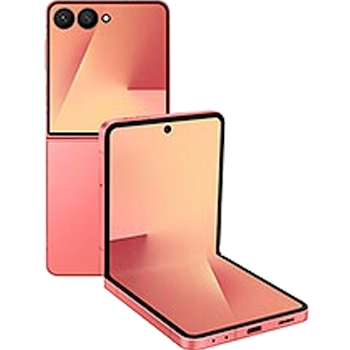
Guias disponíveis para sincronização com a nuvem segura
Para o dispositivo
Para Samsung Galaxy Z Flip7 FE (SM-F761b)Para Samsung Galaxy Z Flip7 FE (SM-F761b)
Funções suportadas
- sincronização de contactos
- cópia de segurança de SMS
- cópia de segurança do registo de chamadas
- sincronização de fotografias
- sincronização de vídeos
- sincronização automática


Transfira os seus contactos, fotografias, vídeos, mensagens SMS e registos de chamadas de Samsung Galaxy Z Flip7 FE (SM-F761b) para um armazenamento online e vice-versa para os manter seguros e atualizados.
Samsung Galaxy Z Flip7 FE (SM-F761b) é suportado pelo PhoneCopy.
Por favor, tenha em conta que as definições seguintes podem variar ligeiramente consoante a versão do firmware.
Modelos confirmados
Versões confirmadas
- Android 16
Novidades
- 07/06/26
- Testámos o novo Android 16 no Samsung Galaxy Z Flip7 FE (SM-F761b) com a nossa aplicação PhoneCopy e está completamente funcional.
- 04/06/26
- Acabámos de ter o primeiro utilizador do Samsung Galaxy Z Flip7 FE (SM-F761b) em Estados Unidos! Alguém acabou de fazer cópia de segurança dos seus contactos, multimédia, mensagens SMS e registos de chamadas a partir de um novo telemóvel.
versões do Android a executar no Samsung Galaxy Z Flip7 FE (SM-F761b)
Ao sincronizar, os utilizadores do PhoneCopy tinham as seguintes versões do Android no seu Samsung Galaxy Z Flip7 FE (SM-F761b): Android 16 (100.00%).
utilizadores do Samsung Galaxy Z Flip7 FE (SM-F761b) em todo o mundo
De acordo com as nossas estatísticas, os utilizadores do PhoneCopy usam o Samsung Galaxy Z Flip7 FE (SM-F761b) para cópia de segurança de dados nos países Estados Unidos (Estados Unidos, États-Unis, ‘Amelika Hui Pū ‘ia) - 100.00%.
O mapa de calor seguinte mostra as sincronizações de contactos com o Samsung Galaxy Z Flip7 FE (SM-F761b) usando o PhoneCopy em todo o mundo.
Guia de texto - Como fazer a cópia de segurança
Com Samsung Galaxy Z Flip7 FE (SM-F761b)
- Descarregue a nossa aplicação PhoneCopy for Android para o seu dispositivo móvel.
- Depois de iniciar a aplicação, crie uma nova conta a partir da aplicação. Se já criou uma conta nas páginas web www.phonecopy.com, inicie sessão nesta conta existente na aplicação.
- Após um início de sessão bem-sucedido, siga o assistente de configuração da aplicação e depois selecione Synchronize (para uma conta com uma cópia de segurança existente) / Backup (para uma conta vazia) ou clique no botão Later e depois selecione a opção no menu lateral Back up contacts / Restore contacts para sincronização unidirecional.
Para mais informações sobre a nossa aplicação, visite a nossa página do PhoneCopy for Android.
Em caso de problemas com a sincronização, contacte-nos.
Comentários de utilizadores
Para deixar um comentário, inicie sessão.
-
-
Hello, PhoneCopy backs up all SMS on the phone, there is no need to set anything else. Our records show a backup of 1818 SMS firstly and then adding of two more SMS (one by one) during consequent backups. Are you sure that the other messages that were not backed up are also SMS?
-

I don't see where to add more. Can anyone help me figure this out?
adolph1960, 01/08/22