Fazer cópia de segurança de contactos, fotografias, vídeos, mensagens SMS e registos de chamadas de Samsung Galaxy Z Fold8 5G (SM-F971b)
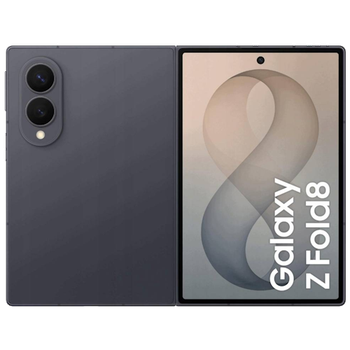
Guias disponíveis para sincronização com a nuvem segura
Para o dispositivo
Para Samsung Galaxy Z Fold8 5G (SM-F971b)Para Samsung Galaxy Z Fold8 5G (SM-F971b)
Funções suportadas
- sincronização de contactos
- cópia de segurança de SMS
- cópia de segurança do registo de chamadas
- sincronização de fotografias
- sincronização de vídeos
- sincronização automática


Transfira os seus contactos, fotografias, vídeos, mensagens SMS e registos de chamadas de Samsung Galaxy Z Fold8 5G (SM-F971b) para um armazenamento online e vice-versa para os manter seguros e atualizados.
Samsung Galaxy Z Fold8 5G (SM-F971b) é suportado pelo PhoneCopy.
Por favor, tenha em conta que as definições seguintes podem variar ligeiramente consoante a versão do firmware.
Modelos confirmados
Versões confirmadas
- Android 17
Novidades
- 04/10/26
- Testámos o novo Android 17 no Samsung Galaxy Z Fold8 5G (SM-F971b) com a nossa aplicação PhoneCopy e está completamente funcional.
- 27/09/26
- Acabámos de ter o primeiro utilizador deste modelo em Emirados Árabes Unidos! Alguém acabou de fazer cópia de segurança dos seus contactos.
versões do Android a executar no Samsung Galaxy Z Fold8 5G (SM-F971b)
Ao sincronizar, os utilizadores do PhoneCopy tinham as seguintes versões do Android no seu Samsung Galaxy Z Fold8 5G (SM-F971b): Android 17 (100.00%).
utilizadores do Samsung Galaxy Z Fold8 5G (SM-F971b) em todo o mundo
O Samsung Galaxy Z Fold8 5G (SM-F971b) é frequentemente usado pelos utilizadores do PhoneCopy em países como Emirados Árabes Unidos (Al-’Imārat Al-‘Arabiyyah Al-Muttaḥidah, الإمارات العربيّة المتّحدة) - 100.00%.
O mapa de calor seguinte mostra as sincronizações de contactos com o Samsung Galaxy Z Fold8 5G (SM-F971b) usando o PhoneCopy em todo o mundo.
Guia de texto - Como fazer a cópia de segurança
Com Samsung Galaxy Z Fold8 5G (SM-F971b)
- Descarregue a nossa aplicação PhoneCopy for Android para o seu dispositivo móvel.
- Depois de iniciar a aplicação, crie uma nova conta a partir da aplicação. Se já criou uma conta nas páginas web www.phonecopy.com, inicie sessão nesta conta existente na aplicação.
- Após um início de sessão bem-sucedido, siga o assistente de configuração da aplicação e depois selecione Synchronize (para uma conta com uma cópia de segurança existente) / Backup (para uma conta vazia) ou clique no botão Later e depois selecione a opção no menu lateral Back up contacts / Restore contacts para sincronização unidirecional.
Para mais informações sobre a nossa aplicação, visite a nossa página do PhoneCopy for Android.
Em caso de problemas com a sincronização, contacte-nos.
Comentários de utilizadores
Para deixar um comentário, inicie sessão.
-
-
It sounds like the cloud version still holds your old contacts. Try deleting the extra contacts directly from your PhoneCopy cloud account, then force a manual sync from your device. If that doesn’t work, you might need to reset the sync or re-link your account. Hope this helps!
-
Hello,
the number of contacts online is what matters. So please remove unnecessary contacts on the web. After that, the synchronization will be allowed again.-
So, though I did all the cleanup locally in my phone's contacts, and though the App DOES see the local number as less than 500 it will not initiate uploading the information as for the deletions? Because if it replicated the deletions, then there would not be a sync problem.
-
Hello,
the limit works this way. It is stated in the email user receives when the limit is exceeded.-
I realize the limitation of the platform, and since it is not capable of synchronizing in the traditional technical meaning of the term, could you suggest a workaround?
Perhaps if I deleted my account, removed my app and started over in a suggested sequence so that my less than 500 contacts would be then uploaded?-
If you have blocked an account because of exceeding limits, you just need to delete some contacts on the server to fit the limit of 500 and your account will be unlocked.
-
there is much overhead to re-do the same thing I already did locally a few months ago.
Do you think, considering all I have previously mentioned, that there is a different work-around to the platform not being able to two-say sync the information?-
It seems we are discussing several contacts which have to be deleted from your online profile to make it free again. We explained to you that contacts online are what matters. If you don't want to follow our recommendation you can delete the whole account and create it as a new profile with the number of contacts stored in your mobile phone.
-
-
-
-
-
-
-

But on Phonecopy on the cloud there is a different amount of Contacts, much more than 600. On the app I see that it recognizes that I do have less than 500 contacts on my device.
But of course it does not sync. What do I have to do to make this work? kanoyati, 03/01/24