Fazer cópia de segurança de contactos, fotografias, vídeos, mensagens SMS e registos de chamadas de Samsung Galaxy Z Fold 5 5G (SM-F946b)
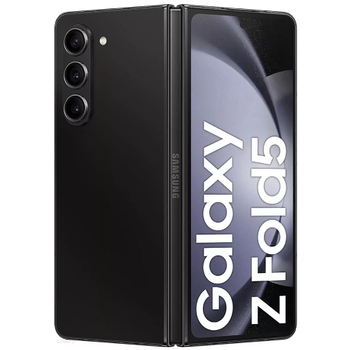
Guias disponíveis para sincronização com a nuvem segura
Para o dispositivo
Para Samsung Galaxy Z Fold 5 5G (SM-F946b)Para Samsung Galaxy Z Fold 5 5G (SM-F946b)
Funções suportadas
- sincronização de contactos
- cópia de segurança de SMS
- cópia de segurança do registo de chamadas
- sincronização de fotografias
- sincronização de vídeos
- sincronização automática


Transfira os seus contactos, fotografias, vídeos, mensagens SMS e registos de chamadas de Samsung Galaxy Z Fold 5 5G (SM-F946b) para um armazenamento online e vice-versa para os manter seguros e atualizados.
Samsung Galaxy Z Fold 5 5G (SM-F946b) é suportado pelo PhoneCopy.
Por favor, tenha em conta que as definições seguintes podem variar ligeiramente consoante a versão do firmware.
Modelos confirmados
Versões confirmadas
- Android 16
- Android 15
- Android 14
- Android 13
Novidades
- 17/10/26
- Um novo utilizador de telemóvel sincronizou os seus contactos com o PhoneCopy a partir de Brasil.
- 18/09/26
- Acabámos de ter o primeiro utilizador do Samsung Galaxy Z Fold 5 5G (SM-F946b) em Canadá! Alguém acabou de fazer cópia de segurança dos seus contactos a partir de um novo telemóvel.
- 08/03/26
- O primeiro utilizador de Chéquia acabou de sincronizar os seus contactos no telemóvel Samsung Galaxy Z Fold 5 5G (SM-F946b).
- 10/11/25
- Acabámos de ter o primeiro utilizador deste modelo em França! Alguém acabou de fazer cópia de segurança dos seus contactos.
- 07/11/25
- O Android 16 já pode ser oficialmente atualizado até no Samsung Galaxy Z Fold 5 5G (SM-F946b).
- 10/10/25
- Este modelo de telemóvel acabou de ser sincronizado por um utilizador do PhoneCopy em África do Sul. Transferiu contactos e multimédia.
- 28/05/25
- Update Samsung Galaxy Z Fold 5 5G (SM-F946b) to Android 15 is available including the fully working contact, SMS, photo, and video backup to PhoneCopy Cloud.
- 13/12/23
- We noticed the update possibility of Samsung Galaxy Z Fold 5 5G (SM-F946b) to a new Android operating system version 14.
- 21/08/23
- Personal data backup from Samsung Galaxy Z Fold 5 5G (SM-F946b) with Android 13 is now officially supported with our PhoneCopy mobile app.
versões do Android a executar no Samsung Galaxy Z Fold 5 5G (SM-F946b)
A aplicação PhoneCopy para Android suporta várias versões do Android. Os nossos utilizadores sincronizaram os seus Samsung Galaxy Z Fold 5 5G (SM-F946b) com Android 14 (50.27%), Android 13 (29.22%), Android 16 (13.00%), Android 15 (7.51%).
O gráfico mostra a cópia de segurança do Samsung Galaxy Z Fold 5 5G (SM-F946b) com o PhoneCopy, a executar várias versões do Android.
utilizadores do Samsung Galaxy Z Fold 5 5G (SM-F946b) em todo o mundo
O Samsung Galaxy Z Fold 5 5G (SM-F946b) é preferido para a cópia de segurança de contactos pelos utilizadores do PhoneCopy em todo o mundo - Índia (Bharôt, ভাৰত, ভারত, Bhārat, ભારત, भारत, Bhārata, ಭಾರತ, Bhāratam, ഭാരതം, Bharôtô, ଭାରତ, ਭਾਰਤ, भारतम्, Bārata, பாரதம், Bhāratadēsam, భారత దేశం) - 40.23%, Reino Unido (Y Deyrnas Unedig, Unitit Kinrick, Rìoghachd Aonaichte, Ríocht Aontaithe, An Rywvaneth Unys) - 14.91%, Moldávia - 11.11%, Indonésia - 9.85%, Finlândia (Suomi) - 6.05%, Irlanda (Éire) - 5.63%, Estados Unidos (Estados Unidos, États-Unis, ‘Amelika Hui Pū ‘ia) - 3.52%, Emirados Árabes Unidos (Al-’Imārat Al-‘Arabiyyah Al-Muttaḥidah, الإمارات العربيّة المتّحدة) - 2.81%, África do Sul (Suid-Afrika, iNingizimu Afrika, uMzantsi Afrika, Afrika-Borwa, Afrika Borwa, Aforika Borwa, Afurika Tshipembe, Afrika Dzonga, iSewula Afrika) - 1.83%, França - 1.13% e mais 8 países.
O histograma mostra a cópia de segurança do Samsung Galaxy Z Fold 5 5G (SM-F946b) com o PhoneCopy em todo o mundo.
Guia de texto - Como fazer a cópia de segurança
Com Samsung Galaxy Z Fold 5 5G (SM-F946b)
- Descarregue a nossa aplicação PhoneCopy for Android para o seu dispositivo móvel.
- Depois de iniciar a aplicação, crie uma nova conta a partir da aplicação. Se já criou uma conta nas páginas web www.phonecopy.com, inicie sessão nesta conta existente na aplicação.
- Após um início de sessão bem-sucedido, siga o assistente de configuração da aplicação e depois selecione Synchronize (para uma conta com uma cópia de segurança existente) / Backup (para uma conta vazia) ou clique no botão Later e depois selecione a opção no menu lateral Back up contacts / Restore contacts para sincronização unidirecional.
Para mais informações sobre a nossa aplicação, visite a nossa página do PhoneCopy for Android.
Em caso de problemas com a sincronização, contacte-nos.
Comentários de utilizadores
Para deixar um comentário, inicie sessão.
-
-
Hello, answered via private email.
-

Phonecopy App on Android phone sees only Phone contacts and Google Account contacts. But if the phone has Exchange Account (and contacts), Phonecopy App does not see this account and cannot add it as source of data (contacts). comsync, 08/07/22