Backup контакты, photos, videos, sms messages and call logs from Infinix Note 40 x6853
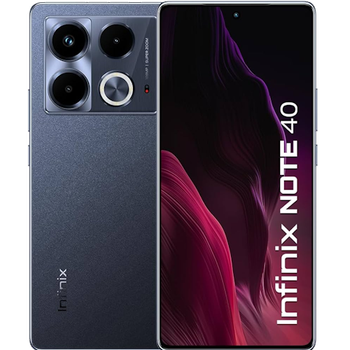
Available guides for synchronization to the secure cloud
Supported functions
- contact synchronization
- sms backup
- call log backup
- photo synchronization
- video synchronization
- automatic sync


Transfer your контакты, photos, videos, sms messages and call logs from Infinix Note 40 x6853 to an online storage and back to keep them safe and up to date.
Infinix Note 40 x6853 is supported on PhoneCopy.
Please note that following settings may vary a little depending on the firmware version.
Confirmed models
Confirmed versions
- Android 16
- Android 15
- Android 14
News
- 19.09.2026
- We tested the functionality of the PhoneCopy app on Infinix Note 40 x6853 device after the Android 16 update.
- 09.05.2026
- First user from Bangladesh just synced his контакты and media on Infinix Note 40 x6853 phone.
- 17.07.2025
- PhoneCopy app is fully working after updating the Infinix Note 40 x6853 to Android 15.
- 27.01.2025
- We just added Infinix Note 40 x6853 to supported devices with the Android 14 operating system. We allow synchronization and backup of contacts, SMSes, call log, photos, and videos to a secure PhoneCopy Cloud.
- 29.10.2024
- A new phone user has synchronized his контакты and sms messages to PhoneCopy from Pakistan.
- 22.07.2024
- Someone just used PhoneCopy for backup of Infinix Note 40 x6853 in country Indonesia. His контакты, media, sms messages and call logs were backed up.
Android versions running on Infinix Note 40 x6853
PhoneCopy for Android app supports various Android versions. Our users synchronized their Infinix Note 40 x6853 running Android 15 (50.00%), Android 14 (45.00%), Android 16 (5.00%).
The chart depicts Infinix Note 40 x6853 backup with PhoneCopy, running on various versions of Android.
Infinix Note 40 x6853 users around the world
Infinix Note 40 x6853 is often used by PhoneCopy users in countries like Bangladesh (বাংলাদেশ) - 60.00%, Indonesia - 33.33%, Pakistan (Pākistān, پاکستان) - 6.67%.
Histogram depicts Infinix Note 40 x6853 backup with PhoneCopy around the world.
Text guideline - How to backup
With Infinix Note 40 x6853
- Скачайте приложение PhoneCopy для Android
- После запуска приложения, войдите в свой аккаунт или создайте новую учетную запись.
- Выполните синхронизацию при помощи приложения. Синхронизированные контакты можно просмотреть на сайте www.phonecopy.com.
In the case of problems with synchronization, please contact us.
Комментарии пользователей
To leave a comment please sign in.

ntuenabraham2, 09.09.2026