Backup контакты, photos, videos, sms messages and call logs from Motorola Moto E7i Power
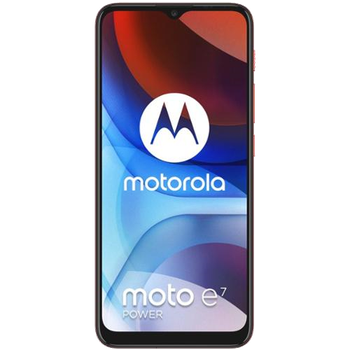
Available guides for synchronization to the secure cloud
Supported functions
- contact synchronization
- sms backup
- call log backup
- photo synchronization
- video synchronization
- automatic sync


Transfer your контакты, photos, videos, sms messages and call logs from Motorola Moto E7i Power to an online storage and back to keep them safe and up to date.
Motorola Moto E7i Power is supported on PhoneCopy.
Please note that following settings may vary a little depending on the firmware version.
Confirmed models
Confirmed versions
- Android 10
News
- 20.11.2023
- User from United States has synchronized контакты with his phone.
- 06.11.2022
- Recently we got new user of Motorola Moto E7i Power also in Denmark. He is using PhoneCopy for backup of контакты and sms messages.
- 11.09.2022
- User from Mexico has synchronized контакты and sms messages with his phone.
- 29.07.2022
- Even in American Samoa we have a user with Motorola Moto E7i Power phone. He backs up his контакты.
- 05.05.2022
- Motorola Moto E7i Power phone was synchronized by PhoneCopy user in Argentina. His контакты were transferred.
- 19.07.2021
- We just added Motorola Moto E7i Power to supported devices with the Android 10 operating system. We allow synchronization and backup of contacts, SMSes, photos, call logs and videos to a secure PhoneCopy Cloud.
Android versions running on Motorola Moto E7i Power
When synchronizing, PhoneCopy users had following Android versions on their Motorola Moto E7i Power: Android 10 (100.00%).
Motorola Moto E7i Power users around the world
Motorola Moto E7i Power is preffered for contact backup by PhoneCopy users in several countries around the world - United Kingdom (Y Deyrnas Unedig, Unitit Kinrick, Rìoghachd Aonaichte, Ríocht Aontaithe, An Rywvaneth Unys) - 70.25%, Mexico (México, Mēxihco) - 19.01%, Canada - 3.31%, Denmark (Danmark) - 3.31%, American Samoa (Amerika Sāmoa) - 1.65%, Pakistan (Pākistān, پاکستان) - 0.83%, United States (Estados Unidos, États-Unis, ‘Amelika Hui Pū ‘ia) - 0.83%, Argentina - 0.83%.
The map shows usage of Motorola Moto E7i Power for contact backup with PhoneCopy around the world.
Text guideline - How to backup
With Motorola Moto E7i Power
- Скачайте приложение PhoneCopy для Android
- После запуска приложения, войдите в свой аккаунт или создайте новую учетную запись.
- Выполните синхронизацию при помощи приложения. Синхронизированные контакты можно просмотреть на сайте www.phonecopy.com.
In the case of problems with synchronization, please contact us.
Комментарии пользователей
To leave a comment please sign in.
-
-
What do I need to download my photos
-
Please check our guide https://www.phonecopy.com/en/pages/how_to_synchronize_contacts_to_android
-
-
abbas
-
When you synchronize your photos to PhoneCopy.com you can download them from your profile or you can synchronize them directly to your Windows PC via PhoneCopy for Windows. https://www.phonecopy.com/discussion/?comment_id=7263&category_id=237
-

jakeabobich, 22.10.2021