Backup контакты, photos, videos, sms messages and call logs from Samsung Galaxy F36 5G SM-E366b
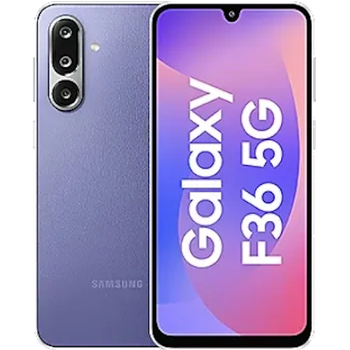
Available guides for synchronization to the secure cloud
Supported functions
- contact synchronization
- sms backup
- call log backup
- photo synchronization
- video synchronization
- automatic sync


Transfer your контакты, photos, videos, sms messages and call logs from Samsung Galaxy F36 5G SM-E366b to an online storage and back to keep them safe and up to date.
Samsung Galaxy F36 5G SM-E366b is supported on PhoneCopy.
Please note that following settings may vary a little depending on the firmware version.
Confirmed models
Confirmed versions
- Android 16
- Android 15
News
- 22.01.2026
- Recently we got new user of Samsung Galaxy F36 5G SM-E366b also in Australia. He is using PhoneCopy for backup of контакты.
- 01.12.2025
- We added Samsung Galaxy F36 5G SM-E366b to supported devices with Android 15.
- PhoneCopy app is fully working after updating the Samsung Galaxy F36 5G SM-E366b to Android 16.
- 08.10.2025
- We just got first user of Samsung Galaxy F36 5G SM-E366b in India! Someone just backed up his контакты and media from a new phone.
Android versions running on Samsung Galaxy F36 5G SM-E366b
When synchronizing, PhoneCopy users had following Android versions on their Samsung Galaxy F36 5G SM-E366b: Android 16 (84.86%), Android 15 (15.14%).
The chart shows usage of Samsung Galaxy F36 5G SM-E366b and Android versions for contact backup with PhoneCopy around the world.
Samsung Galaxy F36 5G SM-E366b users around the world
Samsung Galaxy F36 5G SM-E366b is preffered for contact backup by PhoneCopy users in several countries around the world - India (Bharôt, ভাৰত, ভারত, Bhārat, ભારત, भारत, Bhārata, ಭಾರತ, Bhāratam, ഭാരതം, Bharôtô, ଭାରତ, ਭਾਰਤ, भारतम्, Bārata, பாரதம், Bhāratadēsam, భారత దేశం) - 63.35%, Australia - 36.65%.
The map shows usage of Samsung Galaxy F36 5G SM-E366b for contact backup with PhoneCopy around the world.
Text guideline - How to backup
With Samsung Galaxy F36 5G SM-E366b
- Скачайте приложение PhoneCopy для Android
- После запуска приложения, войдите в свой аккаунт или создайте новую учетную запись.
- Выполните синхронизацию при помощи приложения. Синхронизированные контакты можно просмотреть на сайте www.phonecopy.com.
In the case of problems with synchronization, please contact us.
Комментарии пользователей
To leave a comment please sign in.
-
v1sqs35h.58-10-8-5 (unknown/mbm-3.0-eqs-36ab776a002-251119-ssq3s2hv-v1-st19.1-40ea8) arnishahridoy, 13.03.2026
