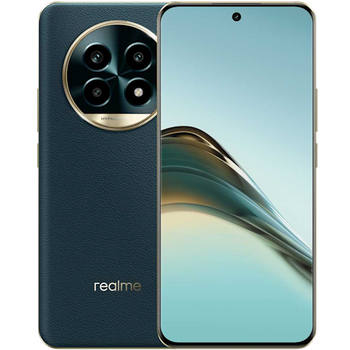
Sauvegarder contacts, photos, vidéos, SMS et journaux d'appels depuis Realme 13 Pro+ 5G RMX3921
Guides disponibles pour la synchronisation vers le cloud sécurisé
Fonctions prises en charge
- synchronisation des contacts
- synchronisation des sms
- sauvegarde du journal d'appels
- synchronisation des photos
- synchronisation des vidéos
- synchronisation automatique


Transférez vos contacts, photos, vidéos, SMS et journaux d'appels de Realme 13 Pro+ 5G RMX3921 vers un espace de stockage en ligne et inversement pour les garder en sécurité et à jour.
Realme 13 Pro+ 5G RMX3921 est pris en charge avec PhoneCopy.
Veuillez noter que les paramètres suivants peuvent varier légèrement en fonction de la version du micrologiciel.
Modèles confirmés
Versions confirmées
- Android 15
Nouvelles
- 05/08/2025
- Même dans le pays Inde, nous avons un utilisateur avec un téléphone Realme 13 Pro+ 5G RMX3921. Il sauvegarde ses contacts, SMS et journaux d'appels.
- 06/01/2025
- Personal data backup from Realme 13 Pro+ 5G RMX3921 with Android 15 is now officially supported with our PhoneCopy mobile app.
- 02/01/2025
- Ce modèle de téléphone vient d'être synchronisé par un utilisateur de PhoneCopy dans le pays Indonésie. Il a transféré contacts.
versions Android fonctionnant sur Realme 13 Pro+ 5G RMX3921
Lors de la synchronisation, les utilisateurs de PhoneCopy disposaient des versions Android suivantes sur leur Realme 13 Pro+ 5G RMX3921: Android 15 (100.00%).
Realme 13 Pro+ 5G RMX3921 utilisateurs dans le monde
Realme 13 Pro+ 5G RMX3921 est souvent utilisé par les utilisateurs de PhoneCopy dans des pays comme Inde (Bharôt, ভাৰত, ভারত, Bhārat, ભારત, भारत, Bhārata, ಭಾರತ, Bhāratam, ഭാരതം, Bharôtô, ଭାରତ, ਭਾਰਤ, भारतम्, Bārata, பாரதம், Bhāratadēsam, భారత దేశం) - 50.00%, Indonésie - 50.00%.
La carte de chaleur suivante montre les synchronisations des contacts avec Realme 13 Pro+ 5G RMX3921 à l'aide de PhoneCopy dans le monde entier.
Guide textuel - Comment sauvegarder
Avec Realme 13 Pro+ 5G RMX3921
- Téléchargez notre application PhoneCopy pour Android sur votre appareil mobile.
- Après avoir lancé l'application, créez un nouveau compte depuis celle-ci. Si vous avez déjà créé un compte sur le site web www.phonecopy.com, connectez-vous à ce compte existant dans l'application.
- Après une connexion réussie, suivez l'assistant de configuration de l'application, puis sélectionnez Synchroniser (pour un compte disposant déjà d'une sauvegarde) / Sauvegarder (pour un compte vide), ou appuyez sur le bouton Plus tard puis sélectionnez l'option correspondante dans le menu latéral Sauvegarder les contacts / Restaurer les contacts pour une synchronisation à sens unique.
Pour plus d'informations sur notre application, consultez notre page PhoneCopy pour Android.
En cas de problèmes dans la synchronisation, veuillez nous contacter.
Commentaires des utilisateurs
Pour laisser un commentaire identifiez-vous.
-
Hi, please since the day I have been using my Tecno spark 3 I yve not enjoy my personal video coverage, I mean whenever I make videos coverage then when I try to play the video, the video won't play very well, the picture in the video won't move the way a normal video suppose to move(skipping) please what can I do? abiolaolatubosun16, 08/06/2021
-
Sorry, we are a backup and synchronization service and not Tecno support.
-
