Sauvegarder contacts, photos, vidéos, SMS et journaux d'appels depuis Samsung Galaxy A20e sm-a202f
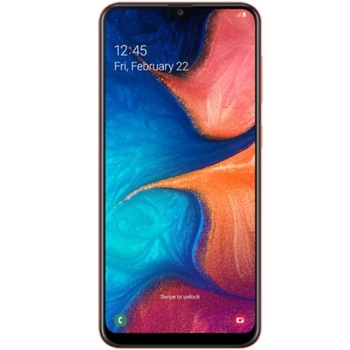
Guides disponibles pour la synchronisation vers le cloud sécurisé
Fonctions prises en charge
- synchronisation des contacts
- synchronisation des sms
- sauvegarde du journal d'appels
- synchronisation des photos
- synchronisation des vidéos
- synchronisation automatique


Transférez vos contacts, photos, vidéos, SMS et journaux d'appels de Samsung Galaxy A20e sm-a202f vers un espace de stockage en ligne et inversement pour les garder en sécurité et à jour.
Samsung Galaxy A20e sm-a202f est pris en charge avec PhoneCopy.
Veuillez noter que les paramètres suivants peuvent varier légèrement en fonction de la version du micrologiciel.
Modèles confirmés
Versions confirmées
- Android 11
- Android 10
- Android 9.0 Pie
Nouvelles
- 28/08/2025
- Le premier utilisateur dans le pays Suède vient de synchroniser ses contacts, SMS et journaux d'appels sur son téléphone Samsung Galaxy A20e sm-a202f.
- 08/06/2024
- Quelqu'un a utilisé PhoneCopy pour sauvegarder ce modèle de téléphone dans le pays République du Congo. Ses contacts, fichiers multimédias, SMS et journaux d'appels ont été transférés.
- 03/01/2024
- Le premier utilisateur dans le pays Cameroun vient de synchroniser ses contacts, fichiers multimédias et SMS sur son téléphone Samsung Galaxy A20e sm-a202f.
- 22/05/2023
- Un téléphone Samsung Galaxy A20e sm-a202f a été synchronisé par un utilisateur de PhoneCopy dans le pays Groenland. Ses contacts et SMS ont été transférés.
- 08/03/2023
- Récemment, nous avons également eu un nouvel utilisateur de Samsung Galaxy A20e sm-a202f dans le pays Russie. Il utilise PhoneCopy pour sauvegarder ses contacts.
- 17/11/2022
- Nous avons testé le système d'exploitation Android et les Huawei Mobile Services sur Samsung Galaxy A20e sm-a202f avec notre application PhoneCopy et cela fonctionne parfaitement.
- 24/06/2021
- We added Samsung Galaxy A20e sm-a202f to supported devices with Android 11.
versions Android fonctionnant sur Samsung Galaxy A20e sm-a202f
L'application PhoneCopy pour Android prend en charge diverses versions de Android. Nos utilisateurs ont synchronisé leur Samsung Galaxy A20e sm-a202f avec Android 11 (66.03%), Android 10 (27.33%), Android 9.0 Pie (6.64%).
Le diagramme circulaire suivant illustre la part entre les versions Android sur Samsung Galaxy A20e sm-a202f lors de la synchronisation avec PhoneCopy.
Samsung Galaxy A20e sm-a202f utilisateurs dans le monde
Samsung Galaxy A20e sm-a202f est souvent utilisé par les utilisateurs de PhoneCopy dans des pays comme Tchéquie (Czech Republic, Česká republika) - 35.44%, Allemagne (Deutschland) - 20.86%, Royaume-Uni (Y Deyrnas Unedig, Unitit Kinrick, Rìoghachd Aonaichte, Ríocht Aontaithe, An Rywvaneth Unys) - 16.92%, Italie (Italia) - 5.96%, Roumanie (România) - 4.05%, Lettonie (Latvija) - 3.50%, Pays-Bas (Nederland, Nederlân) - 2.43%, Irlande (Éire) - 2.26%, Slovaquie (Slovensko) - 1.82%, Belgique (België, Belgique, Belgien) - 1.62% et 25 autres pays.
La carte de chaleur suivante illustre le partage entre les utilisateurs du monde entier synchronisant leur Samsung Galaxy A20e sm-a202f à l'aide de PhoneCopy.
Guide textuel - Comment sauvegarder
À partir de Samsung Galaxy A20e sm-a202f
- Download our PhoneCopy for Huawei application to your mobile device.
- After launching the application, create a new account from the application. If you have already created an account on web pages www.phonecopy.com, log in to this existing account in the application.
- After succesful login press "Synchronize" for complete synchronization, or press "Advanced & Account", select "One-way sync" and after choose "This device >> server" for one-way sync.
More detailed information and instructions include screenshots: how to backup and synchronize contacts from Huawei
For more information about our app, visit our PhoneCopy for Huawei page.
Let us just remind you, that for now PhoneCopy for Android transfers to server contacts, photos, videos, Call Logs and SMS.
En cas de problèmes dans la synchronisation, veuillez nous contacter.
Vers Samsung Galaxy A20e sm-a202f
- Download our PhoneCopy for Huawei application to your mobile device.
- After launching the application, create a new account from the application. If you have already created an account on web pages www.phonecopy.com, log in to this existing account in the application.
- After succesful login press "Synchronize" for complete synchronization, or press "Advanced & Account", select "One-way sync" and after choose "Server >> this device" for one-way sync.
More detailed information and instructions include screenshots: how transfer contacts to Huawei
For more information about our app, visit our PhoneCopy for Huawei page.
Let us just remind you, that for now PhoneCopy for Android transfers to server contacts, photos, videos, Call Logs and SMS.
En cas de problèmes dans la synchronisation, veuillez nous contacter.
Commentaires des utilisateurs
Pour laisser un commentaire identifiez-vous.
-
-
Hello, PhoneCopy backs up all SMS on the phone, there is no need to set anything else. Our records show a backup of 1818 SMS firstly and then adding of two more SMS (one by one) during consequent backups. Are you sure that the other messages that were not backed up are also SMS?
-

I don't see where to add more. Can anyone help me figure this out?
adolph1960, 01/08/2022