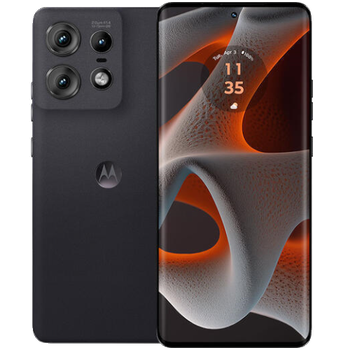
Backup contactos, photos, videos, sms messages and call logs from Motorola Edge 50 Pro
Available guides for synchronization to the secure cloud
Supported functions
- contact synchronization
- sms backup
- call log backup
- photo synchronization
- video synchronization
- automatic sync


Transfer your contactos, photos, videos, sms messages and call logs from Motorola Edge 50 Pro to an online storage and back to keep them safe and up to date.
Motorola Edge 50 Pro is supported on PhoneCopy.
Please note that following settings may vary a little depending on the firmware version.
Confirmed models
Confirmed versions
- Android 16
- Android 15
- Android 14
News
- 13/01/26
- Even in Norway we have a user with Motorola Edge 50 Pro phone. He backs up his contactos, sms messages and call logs.
- 07/01/26
- We noticed the update possibility of Motorola Edge 50 Pro to a new Android operating system version 16.
- 12/04/25
- Recently we got new user of Motorola Edge 50 Pro also in United Kingdom. He is using PhoneCopy for backup of contactos and media.
- 14/03/25
- Motorola Edge 50 Pro now offers an Android 15 update.
- 10/10/24
- Someone just used PhoneCopy for backup of Motorola Edge 50 Pro in country India. His contactos were backed up.
- 14/05/24
- We just added Motorola Edge 50 Pro to supported devices with the Android 14 operating system. We allow synchronization and backup of contacts, SMSes, call log, photos, and videos to a secure PhoneCopy Cloud.
- 12/05/24
- A new phone user has synchronized his contactos, sms messages and call logs to PhoneCopy from Germany.
- 06/05/24
- First user from Czechia just synced his contactos, sms messages and call logs on Motorola Edge 50 Pro phone.
Android versions running on Motorola Edge 50 Pro
PhoneCopy for Android app supports various Android versions. Our users synchronized their Motorola Edge 50 Pro running Android 14 (92.16%), Android 15 (3.92%), Android 16 (3.92%).
The chart depicts Motorola Edge 50 Pro backup with PhoneCopy, running on various versions of Android.
Motorola Edge 50 Pro users around the world
Motorola Edge 50 Pro is preffered for contact backup by PhoneCopy users in several countries around the world - Czechia (Czech Republic, Česká republika) - 64.91%, Germany (Deutschland) - 24.56%, India (Bharôt, ভাৰত, ভারত, Bhārat, ભારત, भारत, Bhārata, ಭಾರತ, Bhāratam, ഭാരതം, Bharôtô, ଭାରତ, ਭਾਰਤ, भारतम्, Bārata, பாரதம், Bhāratadēsam, భారత దేశం) - 5.26%, Norway (Norge, Noreg) - 3.51%, United Kingdom (Y Deyrnas Unedig, Unitit Kinrick, Rìoghachd Aonaichte, Ríocht Aontaithe, An Rywvaneth Unys) - 1.75%.
Histogram depicts Motorola Edge 50 Pro backup with PhoneCopy around the world.
Text guideline - How to backup
With Motorola Edge 50 Pro
- Download our PhoneCopy for Android application to your mobile device.
- After launching the application, create a new account from the application. If you have already created an account on web pages www.phonecopy.com, log in to this existing account in the application.
- After successful login, go through the application setup wizard and then select Synchronize (for an account with an existing backup) / Backup (for an empty account) or press the Later button and then select option in the side menu Back up contacts / Restore contacts for one-way synchronization.
For more information about our app, visit our PhoneCopy for Android page.
In the case of problems with synchronization, please contact us.
Comentários de utilizador
To leave a comment please sign in.
-
-
It sounds like the cloud version still holds your old contacts. Try deleting the extra contacts directly from your PhoneCopy cloud account, then force a manual sync from your device. If that doesn’t work, you might need to reset the sync or re-link your account. Hope this helps!
-
Hello,
the number of contacts online is what matters. So please remove unnecessary contacts on the web. After that, the synchronization will be allowed again.-
So, though I did all the cleanup locally in my phone's contacts, and though the App DOES see the local number as less than 500 it will not initiate uploading the information as for the deletions? Because if it replicated the deletions, then there would not be a sync problem.
-
Hello,
the limit works this way. It is stated in the email user receives when the limit is exceeded.-
I realize the limitation of the platform, and since it is not capable of synchronizing in the traditional technical meaning of the term, could you suggest a workaround?
Perhaps if I deleted my account, removed my app and started over in a suggested sequence so that my less than 500 contacts would be then uploaded?-
If you have blocked an account because of exceeding limits, you just need to delete some contacts on the server to fit the limit of 500 and your account will be unlocked.
-
there is much overhead to re-do the same thing I already did locally a few months ago.
Do you think, considering all I have previously mentioned, that there is a different work-around to the platform not being able to two-say sync the information?-
It seems we are discussing several contacts which have to be deleted from your online profile to make it free again. We explained to you that contacts online are what matters. If you don't want to follow our recommendation you can delete the whole account and create it as a new profile with the number of contacts stored in your mobile phone.
-
-
-
-
-
-
-

But on Phonecopy on the cloud there is a different amount of Contacts, much more than 600. On the app I see that it recognizes that I do have less than 500 contacts on my device.
But of course it does not sync. What do I have to do to make this work? kanoyati, 03/01/24