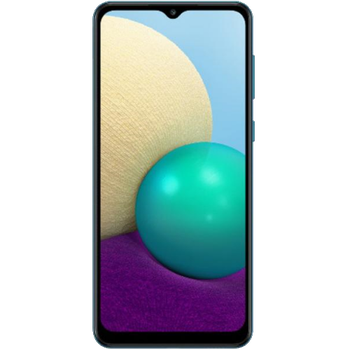
Backup контакты, photos, videos, sms messages and call logs from Samsung Galaxy A02 (SM-A022f)
Available guides for synchronization to the secure cloud
Supported functions
- contact synchronization
- sms backup
- call log backup
- photo synchronization
- video synchronization
- automatic sync


Transfer your контакты, photos, videos, sms messages and call logs from Samsung Galaxy A02 (SM-A022f) to an online storage and back to keep them safe and up to date.
Samsung Galaxy A02 (SM-A022f) is supported on PhoneCopy.
Please note that following settings may vary a little depending on the firmware version.
Confirmed models
Confirmed versions
- Android 11
- Android 10
News
- 02.03.2026
- User from Hong Kong has synchronized контакты and media with his phone.
- 01.03.2026
- We just got first user of this model in United States! Someone just backed up his контакты and media.
- 23.01.2026
- User from Eswatini has synchronized контакты, media, sms messages and call logs with his phone.
- 29.10.2025
- We just got first user of this model in Jordan! Someone just backed up his контакты, media, sms messages and call logs.
- A new phone user has synchronized his контакты and media to PhoneCopy from Mauritius.
- 30.12.2021
- Update Samsung Galaxy A02 (SM-A022f) to Android 11 is available including the fully working contact, SMS, photo, and video backup to PhoneCopy Cloud.
- 18.04.2021
- PhoneCopy app is fully supported on Samsung Galaxy A02 (SM-A022f) with Android version 10.
Android versions running on Samsung Galaxy A02 (SM-A022f)
PhoneCopy for Android app supports various Android versions. Our users synchronized their Samsung Galaxy A02 (SM-A022f) running Android 11 (73.33%), Android 10 (26.67%).
Following pie chart illustrates share between Android versions on Samsung Galaxy A02 (SM-A022f) when syncing with PhoneCopy.
Samsung Galaxy A02 (SM-A022f) users around the world
Samsung Galaxy A02 (SM-A022f) is often used by PhoneCopy users in countries like Nigeria (Nijeriya, Naigeria, Nàìjíríà) - 23.13%, Ivory Coast (Côte d'Ivoire) - 22.17%, Pakistan (Pākistān, پاکستان) - 13.25%, Papua New Guinea (Papua Niugini) - 8.92%, Fiji (Viti, फ़िजी) - 5.54%, Kenya - 5.30%, United States (Estados Unidos, États-Unis, ‘Amelika Hui Pū ‘ia) - 4.82%, South Africa (Suid-Afrika, iNingizimu Afrika, uMzantsi Afrika, Afrika-Borwa, Afrika Borwa, Aforika Borwa, Afurika Tshipembe, Afrika Dzonga, iSewula Afrika) - 4.34%, Ethiopia (Ityop'ia, ኢትዮጵያ) - 1.69%, Hong Kong (Heung Gong, 香港) - 1.69% and 20 other countries.
Following heat map illustrates share between users around the world synchronizing their Samsung Galaxy A02 (SM-A022f) using PhoneCopy.
Text guideline - How to backup
With Samsung Galaxy A02 (SM-A022f)
- Скачайте приложение PhoneCopy для Android
- После запуска приложения, войдите в свой аккаунт или создайте новую учетную запись.
- Выполните синхронизацию при помощи приложения. Синхронизированные контакты можно просмотреть на сайте www.phonecopy.com.
In the case of problems with synchronization, please contact us.
Комментарии пользователей
To leave a comment please sign in.
-
15 zuberymsiri9, 19.08.2026
