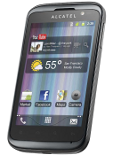
kişiler, fotoğraflar, videolar ve sms mesajları verilerinizi Alcatel One Touch OT-991 cihazından çevrimiçi bir depolama alanına ve geri aktararak güvende ve güncel tutun.
Alcatel One Touch OT-991 cihazını PhoneCopy desteklenmektedir.
Lütfen aşağıdaki ayarların ürün yazılımı sürümüne bağlı olarak biraz değişebileceğini unutmayın.
Onaylanan modeller
alcatel one touch 991: one_touch_991_alde/one_touch_991_gsm (mt6573/one_touch_991_alde)
alcatel one touch 991: one_touch_991_aleu/one_touch_991_gsm (mt6573/one_touch_991_aleu)
alcatel one touch 991: one_touch_991_alrs/one_touch_991_gsm (mt6573/one_touch_991_alrs)
alcatel one touch 991: one_touch_991_cfmk/one_touch_991_gsm (mt6573/one_touch_991_cfmk)
alcatel one touch 991: one_touch_991_kpnl/one_touch_991_gsm (mt6573/one_touch_991_kpnl)
alcatel one touch 991: one_touch_991_mleg/one_touch_991_gsm (mt6573/one_touch_991_mleg)
alcatel one touch 991: one_touch_991_msru/one_touch_991_gsm (mt6573/one_touch_991_msru)
alcatel one touch 991: one_touch_991_rgro/one_touch_991_gsm (mt6573/one_touch_991_rgro)
alcatel one touch 991: one_touch_991_s7rs/one_touch_991_gsm (mt6573/one_touch_991_s7rs)
alcatel one touch 991: one_touch_991_spph/one_touch_991_gsm (mt6573/one_touch_991_spph)
alcatel one touch 991: one_touch_991_tbal/one_touch_991_gsm (mt6573/one_touch_991_tbal)
alcatel one touch 991: one_touch_991_tbbg/one_touch_991_gsm (mt6573/one_touch_991_tbbg)
alcatel one touch 991: one_touch_991_tbme/one_touch_991_gsm (mt6573/one_touch_991_tbme)
alcatel one touch 991: one_touch_991_tehr/one_touch_991_gsm (mt6573/one_touch_991_tehr)
alcatel one touch 991: one_touch_991_tmcz/one_touch_991_gsm (mt6573/one_touch_991_tmcz)
alcatel one touch 991: one_touch_991_tmgr/one_touch_991_gsm (mt6573/one_touch_991_tmgr)
alcatel one touch 991: one_touch_991_tmhu/one_touch_991_gsm (mt6573/one_touch_991_tmhu)
alcatel one touch 991: one_touch_991_tmmk/one_touch_991_gsm (mt6573/one_touch_991_tmmk)
alcatel one touch 991: one_touch_991_vdmk/one_touch_991_gsm (mt6573/one_touch_991_vdmk)
alcatel one touch 991: one_touch_991_vnrs/one_touch_991_gsm (mt6573/one_touch_991_vnrs)
alcatel one touch 991d: one_touch_991d_alap/one_touch_991d_gsm (mt6573/one_touch_991d_alap)
alcatel one touch 991d: one_touch_991d_alcz/one_touch_991d_gsm (mt6573/one_touch_991d_alcz)
alcatel one touch 991d: one_touch_991d_alde/one_touch_991d_gsm (mt6573/one_touch_991d_alde)
alcatel one touch 991d: one_touch_991d_algr/one_touch_991d_gsm (mt6573/one_touch_991d_algr)
alcatel one touch 991d: one_touch_991d_alit/one_touch_991d_gsm (mt6573/one_touch_991d_alit)
alcatel one touch 991d: one_touch_991d_alke/one_touch_991d_gsm (mt6573/one_touch_991d_alke)
alcatel one touch 991d: one_touch_991d_allk/one_touch_991d_gsm (mt6573/one_touch_991d_allk)
alcatel one touch 991d: one_touch_991d_alph/one_touch_991d_gsm (mt6573/one_touch_991d_alph)
alcatel one touch 991d: one_touch_991d_tbpl/one_touch_991d_gsm (mt6573/one_touch_991d_tbpl)
alcatel one touch 991t: one_touch_991t_tmde/one_touch_991t_gsm (mt6573/one_touch_991t_tmde)
moche smart a8: one_touch_991d_tmpt/one_touch_991d_gsm (mt6573/one_touch_991d_tmpt)
telenor_smart_pro: one_touch_991_tnrs/one_touch_991_gsm (mt6573/one_touch_991_tnrs)
show all
Onaylanan sürümler
- Android 4.1 Jelly Bean
grk39f (6573/unknown)
show all
- Android 2.3 Gingerbread
grj90 (6573/unknown)
show all
Alcatel One Touch OT-991 üzerinde çalışan Android sürümleri
Senkronizasyon sırasında, PhoneCopy kullanıcılarının Alcatel One Touch OT-991 cihazlarında şu Android sürümleri vardı: Android 2.3 Gingerbread (99.24%), Android 4.1 Jelly Bean (0.76%).
Alcatel One Touch OT-991 üzerindeki Android sürümleri
Aşağıdaki grafik, farklı Android sürümlerini çalıştıran Alcatel One Touch OT-991 ile kişi senkronizasyonlarını göstermektedir.
Talimat metni - Nasıl yedekleme yapılır
Alcatel One Touch OT-991 ile
- PhoneCopy for Android uygulamamızı mobil cihazınıza indirin.
- Uygulamayı başlattıktan sonra, uygulama üzerinden yeni bir hesap oluşturun. www.phonecopy.com web sayfalarında zaten bir hesap oluşturduysanız, bu mevcut hesapla uygulamada giriş yapın.
- Başarılı bir girişten sonra, uygulamanın kurulum sihirbazını takip edin ve ardından (mevcut bir yedeği olan hesaplar için) Synchronize / (boş bir hesap için) Backup öğesini seçin veya Later düğmesine basıp tek yönlü senkronizasyon için yan menüden Back up contacts / Restore contacts seçeneğini belirleyin.
Uygulamamız hakkında daha fazla bilgi için, PhoneCopy for Android sayfamızı.
Senkronizasyon esnasında herhangi bir problemle karşılaşırsanız Yardım İsteyin
Kullanıcı yorumları
Tüm tartışmayı gör