Google Pixel 9 Pro XL dan yedeklenen kişiler, fotoğraflar, videolar, sms mesajları ve arama günlükleri
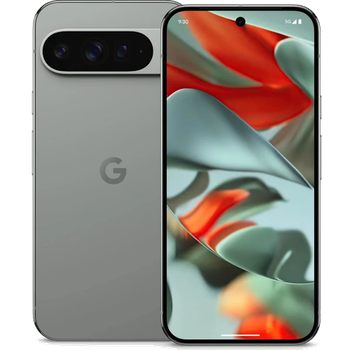
Güvenli buluta senkronizasyon için mevcut kılavuzlar
Desteklenen işlevler
- Kişiler senkronizasyonu
- SMS yedeklemesi
- arama günlüğü yedeklemesi
- fotoğraf senkronizasyonu
- video senkronizasyonu
- Otomatik senkronizasyon


kişiler, fotoğraflar, videolar, sms mesajları ve arama günlükleri verilerinizi Google Pixel 9 Pro XL cihazından çevrimiçi bir depolama alanına ve geri aktararak güvende ve güncel tutun.
Google Pixel 9 Pro XL cihazını PhoneCopy desteklenmektedir.
Lütfen aşağıdaki ayarların ürün yazılımı sürümüne bağlı olarak biraz değişebileceğini unutmayın.
Onaylanan modeller
Onaylanan sürümler
- Android 16
- Android 15
- Android 14
Haberler
- 5.11.2025
- We just got first user of Google Pixel 9 Pro XL in Norveç! Someone just backed up his kişiler ve medya from a new phone.
- 30.06.2025
- We just got first user of Google Pixel 9 Pro XL in Malezya! Someone just backed up his kişiler, sms mesajları ve arama günlükleri from a new phone.
- 11.06.2025
- Google Pixel 9 Pro XL cihazının Android 16'ya güncellemesi, PhoneCopy Cloud'a tam olarak çalışan kişi, SMS, fotoğraf ve video yedeklemesi dahil olmak üzere mevcuttur.
- 1.06.2025
- User from İspanya has synchronized kişiler, sms mesajları ve arama günlükleri with his phone.
- 30.03.2025
- Google Pixel 9 Pro XL phone was synchronized by PhoneCopy user in Almanya. His kişiler were transferred.
- 22.01.2025
- A new phone user has synchronized his kişiler ve sms mesajları to PhoneCopy from Romanya.
- 27.11.2024
- Android 15 can be officially updated even on Google Pixel 9 Pro XL.
- 29.09.2024
- PhoneCopy app is fully supported on Google Pixel 9 Pro XL with Android version 14.
Google Pixel 9 Pro XL üzerinde çalışan Android sürümleri
Senkronizasyon sırasında, PhoneCopy kullanıcılarının Google Pixel 9 Pro XL cihazlarında şu Android sürümleri vardı: Android 15 (40.83%), Android 16 (36.70%), Android 14 (22.48%).
Grafik, dünya genelinde PhoneCopy ile kişi yedeklemesi için Google Pixel 9 Pro XL ve Android sürümlerinin kullanımını göstermektedir.
dünya genelindeki Google Pixel 9 Pro XL kullanıcıları
Google Pixel 9 Pro XL, dünya genelindeki birçok ülkede PhoneCopy kullanıcıları tarafından kişi yedeklemesi için tercih edilmektedir - Slovakya (Slovensko) - 60.45%, Amerika Birleşik Devletleri (Estados Unidos, États-Unis, ‘Amelika Hui Pū ‘ia) - 24.55%, Almanya (Deutschland) - 10.00%, Çekya (Czech Republic, Česká republika) - 1.36%, Avusturya (Österreich) - 0.91%, Romanya (România) - 0.91%, İspanya (España, Espanya, Espainia, Espanha) - 0.45%, Norveç (Norge, Noreg) - 0.45%, İngiltere (Y Deyrnas Unedig, Unitit Kinrick, Rìoghachd Aonaichte, Ríocht Aontaithe, An Rywvaneth Unys) - 0.45%, Malezya (Mǎláixīyà, 马来西亚, Malēṣiyā, மலேசியா) - 0.45%.
Harita, dünya genelinde PhoneCopy ile kişi yedeklemesi için Google Pixel 9 Pro XL kullanımını göstermektedir.
Talimat metni - Nasıl yedekleme yapılır
Google Pixel 9 Pro XL ile
- PhoneCopy for Android uygulamamızı mobil cihazınıza indirin.
- Uygulamayı başlattıktan sonra, uygulama üzerinden yeni bir hesap oluşturun. www.phonecopy.com web sayfalarında zaten bir hesap oluşturduysanız, bu mevcut hesapla uygulamada giriş yapın.
- Başarılı bir girişten sonra, uygulamanın kurulum sihirbazını takip edin ve ardından (mevcut bir yedeği olan hesaplar için) Synchronize / (boş bir hesap için) Backup öğesini seçin veya Later düğmesine basıp tek yönlü senkronizasyon için yan menüden Back up contacts / Restore contacts seçeneğini belirleyin.
Uygulamamız hakkında daha fazla bilgi için, PhoneCopy for Android sayfamızı.
Senkronizasyon esnasında herhangi bir problemle karşılaşırsanız Yardım İsteyin
Kullanıcı yorumları
Yorum yazmak için lütfen Giriş yapın
-
-
It sounds like the cloud version still holds your old contacts. Try deleting the extra contacts directly from your PhoneCopy cloud account, then force a manual sync from your device. If that doesn’t work, you might need to reset the sync or re-link your account. Hope this helps!
-
Hello,
the number of contacts online is what matters. So please remove unnecessary contacts on the web. After that, the synchronization will be allowed again.-
So, though I did all the cleanup locally in my phone's contacts, and though the App DOES see the local number as less than 500 it will not initiate uploading the information as for the deletions? Because if it replicated the deletions, then there would not be a sync problem.
-
Hello,
the limit works this way. It is stated in the email user receives when the limit is exceeded.-
I realize the limitation of the platform, and since it is not capable of synchronizing in the traditional technical meaning of the term, could you suggest a workaround?
Perhaps if I deleted my account, removed my app and started over in a suggested sequence so that my less than 500 contacts would be then uploaded?-
If you have blocked an account because of exceeding limits, you just need to delete some contacts on the server to fit the limit of 500 and your account will be unlocked.
-
there is much overhead to re-do the same thing I already did locally a few months ago.
Do you think, considering all I have previously mentioned, that there is a different work-around to the platform not being able to two-say sync the information?-
It seems we are discussing several contacts which have to be deleted from your online profile to make it free again. We explained to you that contacts online are what matters. If you don't want to follow our recommendation you can delete the whole account and create it as a new profile with the number of contacts stored in your mobile phone.
-
-
-
-
-
-
-

But on Phonecopy on the cloud there is a different amount of Contacts, much more than 600. On the app I see that it recognizes that I do have less than 500 contacts on my device.
But of course it does not sync. What do I have to do to make this work? kanoyati, 3.01.2024