Motorola Moto G35 5G dan yedeklenen kişiler, fotoğraflar, videolar, sms mesajları ve arama günlükleri
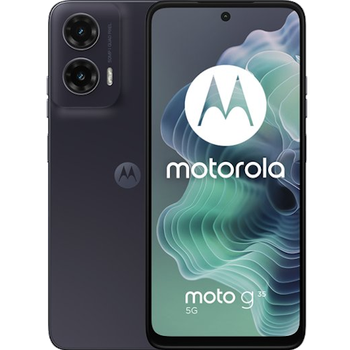
Güvenli buluta senkronizasyon için mevcut kılavuzlar
Desteklenen işlevler
- Kişiler senkronizasyonu
- SMS yedeklemesi
- arama günlüğü yedeklemesi
- fotoğraf senkronizasyonu
- video senkronizasyonu
- Otomatik senkronizasyon


kişiler, fotoğraflar, videolar, sms mesajları ve arama günlükleri verilerinizi Motorola Moto G35 5G cihazından çevrimiçi bir depolama alanına ve geri aktararak güvende ve güncel tutun.
Motorola Moto G35 5G cihazını PhoneCopy desteklenmektedir.
Lütfen aşağıdaki ayarların ürün yazılımı sürümüne bağlı olarak biraz değişebileceğini unutmayın.
Onaylanan modeller
Onaylanan sürümler
- Android 16
- Android 14
Haberler
- 8.07.2026
- Motorola Moto G35 5G cihazını Android 16 işletim sistemine sahip desteklenen cihazlara az önce ekledik. Kişilerin, SMS'lerin, arama günlüğünün, fotoğrafların ve videoların güvenli PhoneCopy Cloud'a senkronize edilmesine ve yedeklenmesine izin veriyoruz.
- 7.07.2026
- User from Litvanya has synchronized kişiler with his phone.
- 17.02.2026
- Recently we got new user of Motorola Moto G35 5G also in Çekya. He is using PhoneCopy for backup of kişiler.
- 6.10.2025
- Someone used PhoneCopy for backup of this phone model in Suudi Arabistan. His kişiler were transferred.
- 27.06.2025
- User from Slovakya has synchronized kişiler with his phone.
- 7.06.2025
- Someone just used PhoneCopy for backup of Motorola Moto G35 5G in country Birleşik Arap Emirlikleri. His kişiler were backed up.
- 30.03.2025
- We freshly support Motorola Moto G35 5G with Android 14 OS for photo, video, SMS, call log and contact backup.
Motorola Moto G35 5G üzerinde çalışan Android sürümleri
Senkronizasyon sırasında, PhoneCopy kullanıcılarının Motorola Moto G35 5G cihazlarında şu Android sürümleri vardı: Android 14 (91.57%), Android 16 (8.43%).
Grafik, dünya genelinde PhoneCopy ile kişi yedeklemesi için Motorola Moto G35 5G ve Android sürümlerinin kullanımını göstermektedir.
dünya genelindeki Motorola Moto G35 5G kullanıcıları
Motorola Moto G35 5G, PhoneCopy kullanıcıları tarafından Hindistan (Bharôt, ভাৰত, ভারত, Bhārat, ભારત, भारत, Bhārata, ಭಾರತ, Bhāratam, ഭാരതം, Bharôtô, ଭାରତ, ਭਾਰਤ, भारतम्, Bārata, பாரதம், Bhāratadēsam, భారత దేశం) - 81.25%, Litvanya (Lietuva) - 8.52%, Bulgaristan (Bulgariya, Bălgarija, България) - 5.11%, Çekya (Czech Republic, Česká republika) - 1.14%, Slovakya (Slovensko) - 1.14%, Birleşik Arap Emirlikleri (Al-’Imārat Al-‘Arabiyyah Al-Muttaḥidah, الإمارات العربيّة المتّحدة) - 1.14%, Katar (Qaṭar, قطر) - 0.57%, Suudi Arabistan (Al-Mamlaka Al-‘Arabiyyah as Sa‘ūdiyyah, المملكة العربية السعودية) - 0.57%, Amerika Birleşik Devletleri (Estados Unidos, États-Unis, ‘Amelika Hui Pū ‘ia) - 0.57% gibi ülkelerde sıklıkla kullanılmaktadır.
Harita, dünya genelinde PhoneCopy ile kişi yedeklemesi için Motorola Moto G35 5G kullanımını göstermektedir.
Talimat metni - Nasıl yedekleme yapılır
Motorola Moto G35 5G ile
- PhoneCopy for Android uygulamamızı mobil cihazınıza indirin.
- Uygulamayı başlattıktan sonra, uygulama üzerinden yeni bir hesap oluşturun. www.phonecopy.com web sayfalarında zaten bir hesap oluşturduysanız, bu mevcut hesapla uygulamada giriş yapın.
- Başarılı bir girişten sonra, uygulamanın kurulum sihirbazını takip edin ve ardından (mevcut bir yedeği olan hesaplar için) Synchronize / (boş bir hesap için) Backup öğesini seçin veya Later düğmesine basıp tek yönlü senkronizasyon için yan menüden Back up contacts / Restore contacts seçeneğini belirleyin.
Uygulamamız hakkında daha fazla bilgi için, PhoneCopy for Android sayfamızı.
Senkronizasyon esnasında herhangi bir problemle karşılaşırsanız Yardım İsteyin
Kullanıcı yorumları
Yorum yazmak için lütfen Giriş yapın
-
15 zuberymsiri9, 19.08.2026
