Samsung Galaxy A56 5G sm-a566b dan yedeklenen kişiler, fotoğraflar, videolar, sms mesajları ve arama günlükleri
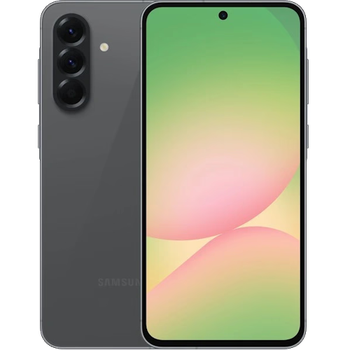
Güvenli buluta senkronizasyon için mevcut kılavuzlar
Desteklenen işlevler
- Kişiler senkronizasyonu
- SMS yedeklemesi
- arama günlüğü yedeklemesi
- fotoğraf senkronizasyonu
- video senkronizasyonu
- Otomatik senkronizasyon


kişiler, fotoğraflar, videolar, sms mesajları ve arama günlükleri verilerinizi Samsung Galaxy A56 5G sm-a566b cihazından çevrimiçi bir depolama alanına ve geri aktararak güvende ve güncel tutun.
Samsung Galaxy A56 5G sm-a566b cihazını PhoneCopy desteklenmektedir.
Lütfen aşağıdaki ayarların ürün yazılımı sürümüne bağlı olarak biraz değişebileceğini unutmayın.
Onaylanan modeller
Onaylanan sürümler
- Android 16
- Android 15
Haberler
- 10.08.2026
- We detected PhoneCopy app on Samsung Galaxy A56 5G sm-a566b phone in Brezilya. All kişiler were backed up.
- 11.07.2026
- Samsung Galaxy A56 5G sm-a566b phone was synchronized by PhoneCopy user in Polonya. His kişiler were transferred.
- 6.07.2026
- Samsung Galaxy A56 5G sm-a566b phone was synchronized by PhoneCopy user in Fransa. His kişiler, sms mesajları ve arama günlükleri were transferred.
- 10.06.2026
- Someone used PhoneCopy for backup of this phone model in Kuveyt. His kişiler were transferred.
- 16.05.2026
- We detected PhoneCopy app on Samsung Galaxy A56 5G sm-a566b phone in Hollanda. All kişiler were backed up.
- 4.10.2025
- Android 16, Samsung Galaxy A56 5G sm-a566b cihazında bile resmi olarak güncellenebilir.
- 19.05.2025
- Personal data backup from Samsung Galaxy A56 5G sm-a566b with Android 15 is now officially supported with our PhoneCopy mobile app.
Samsung Galaxy A56 5G sm-a566b üzerinde çalışan Android sürümleri
Senkronizasyon sırasında, PhoneCopy kullanıcılarının Samsung Galaxy A56 5G sm-a566b cihazlarında şu Android sürümleri vardı: Android 16 (82.10%), Android 15 (17.90%).
Grafik, dünya genelinde PhoneCopy ile kişi yedeklemesi için Samsung Galaxy A56 5G sm-a566b ve Android sürümlerinin kullanımını göstermektedir.
dünya genelindeki Samsung Galaxy A56 5G sm-a566b kullanıcıları
İstatistiklerimize göre, PhoneCopy kullanıcıları Samsung Galaxy A56 5G sm-a566b cihazını Çekya (Czech Republic, Česká republika) - 28.74%, İsrail (Yisra'el, ישראל, Israʼiyl, إسرائيل) - 17.41%, Bahreyn (Al-Baḥrayn, البحرين) - 9.72%, İrlanda (Éire) - 8.91%, Hollanda (Nederland, Nederlân) - 8.50%, Amerika Birleşik Devletleri (Estados Unidos, États-Unis, ‘Amelika Hui Pū ‘ia) - 5.26%, Avustralya - 4.86%, İngiltere (Y Deyrnas Unedig, Unitit Kinrick, Rìoghachd Aonaichte, Ríocht Aontaithe, An Rywvaneth Unys) - 4.45%, Almanya (Deutschland) - 3.24%, Brezilya (Brasil) - 2.02% ülkelerinde ve 11 ülkede daha veri yedeklemesi için kullanmaktadır.
Harita, dünya genelinde PhoneCopy ile kişi yedeklemesi için Samsung Galaxy A56 5G sm-a566b kullanımını göstermektedir.
Talimat metni - Nasıl yedekleme yapılır
Samsung Galaxy A56 5G sm-a566b ile
- PhoneCopy for Android uygulamamızı mobil cihazınıza indirin.
- Uygulamayı başlattıktan sonra, uygulama üzerinden yeni bir hesap oluşturun. www.phonecopy.com web sayfalarında zaten bir hesap oluşturduysanız, bu mevcut hesapla uygulamada giriş yapın.
- Başarılı bir girişten sonra, uygulamanın kurulum sihirbazını takip edin ve ardından (mevcut bir yedeği olan hesaplar için) Synchronize / (boş bir hesap için) Backup öğesini seçin veya Later düğmesine basıp tek yönlü senkronizasyon için yan menüden Back up contacts / Restore contacts seçeneğini belirleyin.
Uygulamamız hakkında daha fazla bilgi için, PhoneCopy for Android sayfamızı.
Senkronizasyon esnasında herhangi bir problemle karşılaşırsanız Yardım İsteyin
Kullanıcı yorumları
Yorum yazmak için lütfen Giriş yapın
-
Thanks for all. bikorimanasamuel, 24.07.2026
