Samsung Galaxy S24+ 5G sm-s926b dan yedeklenen kişiler, fotoğraflar, videolar, sms mesajları ve arama günlükleri
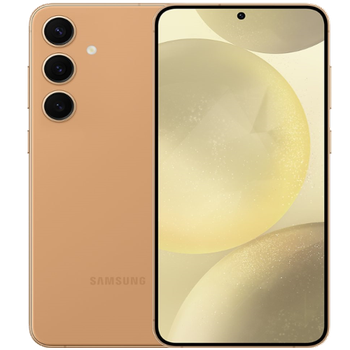
Güvenli buluta senkronizasyon için mevcut kılavuzlar
Desteklenen işlevler
- Kişiler senkronizasyonu
- SMS yedeklemesi
- arama günlüğü yedeklemesi
- fotoğraf senkronizasyonu
- video senkronizasyonu
- Otomatik senkronizasyon


kişiler, fotoğraflar, videolar, sms mesajları ve arama günlükleri verilerinizi Samsung Galaxy S24+ 5G sm-s926b cihazından çevrimiçi bir depolama alanına ve geri aktararak güvende ve güncel tutun.
Samsung Galaxy S24+ 5G sm-s926b cihazını PhoneCopy desteklenmektedir.
Lütfen aşağıdaki ayarların ürün yazılımı sürümüne bağlı olarak biraz değişebileceğini unutmayın.
Onaylanan modeller
Onaylanan sürümler
- Android 16
- Android 15
- Android 14
Haberler
- 27.08.2026
- We just got first user of Samsung Galaxy S24+ 5G sm-s926b in Amerika Birleşik Devletleri! Someone just backed up his kişiler from a new phone.
- 10.08.2026
- This phone model was just synchronized by PhoneCopy user in Fransa. It transferred kişiler, sms mesajları ve arama günlükleri.
- 6.07.2026
- Someone just used PhoneCopy for backup of Samsung Galaxy S24+ 5G sm-s926b in country Yunanistan. His kişiler were backed up.
- 4.02.2026
- A new phone user has synchronized his kişiler to PhoneCopy from Avusturya.
- 29.12.2025
- Someone used PhoneCopy for backup of this phone model in Norveç. His kişiler were transferred.
- 20.10.2025
- Samsung Galaxy S24+ 5G sm-s926b artık bir Android 16 güncellemesi sunuyor.
- 3.05.2025
- We noticed the update possibility of Samsung Galaxy S24+ 5G sm-s926b to a new Android operating system version 15.
- 5.02.2024
- PhoneCopy app is fully supported on Samsung Galaxy S24+ 5G sm-s926b with Android version 14.
Samsung Galaxy S24+ 5G sm-s926b üzerinde çalışan Android sürümleri
PhoneCopy for Android uygulaması çeşitli Android sürümlerini desteklemektedir. Kullanıcılarımız Android 15 (37.74%), Android 16 (34.27%), Android 14 (27.98%) çalıştıran Samsung Galaxy S24+ 5G sm-s926b cihazlarını senkronize etti.
Aşağıdaki pasta grafiği, PhoneCopy ile senkronize edilirken Samsung Galaxy S24+ 5G sm-s926b üzerindeki Android sürümleri arasındaki payı göstermektedir.
dünya genelindeki Samsung Galaxy S24+ 5G sm-s926b kullanıcıları
İstatistiklerimize göre, PhoneCopy kullanıcıları Samsung Galaxy S24+ 5G sm-s926b cihazını Çekya (Czech Republic, Česká republika) - 90.06%, Danimarka (Danmark) - 2.16%, Sırbistan (Srbija, Србија) - 1.73%, Birleşik Arap Emirlikleri (Al-’Imārat Al-‘Arabiyyah Al-Muttaḥidah, الإمارات العربيّة المتّحدة) - 1.30%, İtalya (Italia) - 1.08%, İngiltere (Y Deyrnas Unedig, Unitit Kinrick, Rìoghachd Aonaichte, Ríocht Aontaithe, An Rywvaneth Unys) - 1.08%, Yunanistan (Hellas, Ελλάς, Ellada, Ελλάδα) - 0.65%, Hırvatistan (Hrvatska) - 0.22%, Fransa - 0.22%, Hollanda (Nederland, Nederlân) - 0.22% ülkelerinde ve 6 ülkede daha veri yedeklemesi için kullanmaktadır.
Aşağıdaki ısı haritası, PhoneCopy kullanarak Samsung Galaxy S24+ 5G sm-s926b cihazlarını senkronize eden dünya genelindeki kullanıcılar arasındaki payı göstermektedir.
Talimat metni - Nasıl yedekleme yapılır
Samsung Galaxy S24+ 5G sm-s926b ile
- PhoneCopy for Android uygulamamızı mobil cihazınıza indirin.
- Uygulamayı başlattıktan sonra, uygulama üzerinden yeni bir hesap oluşturun. www.phonecopy.com web sayfalarında zaten bir hesap oluşturduysanız, bu mevcut hesapla uygulamada giriş yapın.
- Başarılı bir girişten sonra, uygulamanın kurulum sihirbazını takip edin ve ardından (mevcut bir yedeği olan hesaplar için) Synchronize / (boş bir hesap için) Backup öğesini seçin veya Later düğmesine basıp tek yönlü senkronizasyon için yan menüden Back up contacts / Restore contacts seçeneğini belirleyin.
Uygulamamız hakkında daha fazla bilgi için, PhoneCopy for Android sayfamızı.
Senkronizasyon esnasında herhangi bir problemle karşılaşırsanız Yardım İsteyin
Kullanıcı yorumları
Yorum yazmak için lütfen Giriş yapın
-
Convart to readmagic shakilsharifbd9, 24.04.2026
