Samsung Galaxy S25 sm-s931u1 dan yedeklenen kişiler, fotoğraflar, videolar, sms mesajları ve arama günlükleri
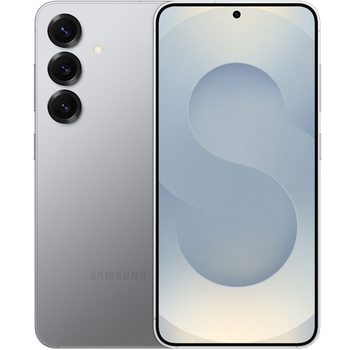
Güvenli buluta senkronizasyon için mevcut kılavuzlar
Desteklenen işlevler
- Kişiler senkronizasyonu
- SMS yedeklemesi
- arama günlüğü yedeklemesi
- fotoğraf senkronizasyonu
- video senkronizasyonu
- Otomatik senkronizasyon


kişiler, fotoğraflar, videolar, sms mesajları ve arama günlükleri verilerinizi Samsung Galaxy S25 sm-s931u1 cihazından çevrimiçi bir depolama alanına ve geri aktararak güvende ve güncel tutun.
Samsung Galaxy S25 sm-s931u1 cihazını PhoneCopy desteklenmektedir.
Lütfen aşağıdaki ayarların ürün yazılımı sürümüne bağlı olarak biraz değişebileceğini unutmayın.
Onaylanan modeller
Onaylanan sürümler
- Android 16
- Android 15
Haberler
- 25.12.2025
- We tested the functionality of the PhoneCopy app on Samsung Galaxy S25 sm-s931u1 device after the Android 16 update.
- 7.09.2025
- We freshly support Samsung Galaxy S25 sm-s931u1 with Android 15 OS for photo, video, SMS, call log and contact backup.
- 2.09.2025
- A new phone user has synchronized his kişiler, sms mesajları ve arama günlükleri to PhoneCopy from Amerika Birleşik Devletleri.
Samsung Galaxy S25 sm-s931u1 üzerinde çalışan Android sürümleri
PhoneCopy for Android uygulaması çeşitli Android sürümlerini desteklemektedir. Kullanıcılarımız Android 15 (50.00%), Android 16 (50.00%) çalıştıran Samsung Galaxy S25 sm-s931u1 cihazlarını senkronize etti.
Grafik, çeşitli Android sürümlerinde çalışan Samsung Galaxy S25 sm-s931u1 cihazının PhoneCopy ile yedeklenmesini göstermektedir.
dünya genelindeki Samsung Galaxy S25 sm-s931u1 kullanıcıları
İstatistiklerimize göre, PhoneCopy kullanıcıları Samsung Galaxy S25 sm-s931u1 cihazını Amerika Birleşik Devletleri (Estados Unidos, États-Unis, ‘Amelika Hui Pū ‘ia) - 100.00% ülkelerinde veri yedeklemesi için kullanmaktadır.
Histogram, dünya genelinde PhoneCopy ile Samsung Galaxy S25 sm-s931u1 yedeklemesini göstermektedir.
Talimat metni - Nasıl yedekleme yapılır
Samsung Galaxy S25 sm-s931u1 ile
- Download our PhoneCopy for Android application to your mobile device.
- After launching the application, create a new account from the application. If you have already created an account on web pages www.phonecopy.com, log in to this existing account in the application.
- After successful login, go through the application setup wizard and then select Synchronize (for an account with an existing backup) / Backup (for an empty account) or press the Later button and then select option in the side menu Back up contacts / Restore contacts for one-way synchronization.
For more information about our app, visit our PhoneCopy for Android page.
Senkronizasyon esnasında herhangi bir problemle karşılaşırsanız Yardım İsteyin
Kullanıcı yorumları
Yorum yazmak için lütfen Giriş yapın
-
Convart to readmagic shakilsharifbd9, 24.04.2026
