Samsung Galaxy S26 sm-s942u dan yedeklenen kişiler, fotoğraflar, videolar, sms mesajları ve arama günlükleri
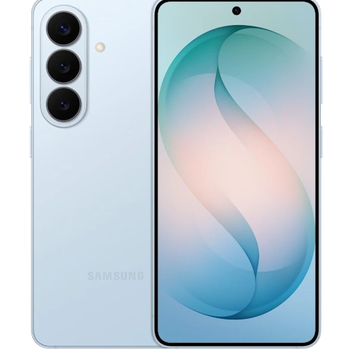
Güvenli buluta senkronizasyon için mevcut kılavuzlar
Desteklenen işlevler
- Kişiler senkronizasyonu
- SMS yedeklemesi
- arama günlüğü yedeklemesi
- fotoğraf senkronizasyonu
- video senkronizasyonu
- Otomatik senkronizasyon


kişiler, fotoğraflar, videolar, sms mesajları ve arama günlükleri verilerinizi Samsung Galaxy S26 sm-s942u cihazından çevrimiçi bir depolama alanına ve geri aktararak güvende ve güncel tutun.
Samsung Galaxy S26 sm-s942u cihazını PhoneCopy desteklenmektedir.
Lütfen aşağıdaki ayarların ürün yazılımı sürümüne bağlı olarak biraz değişebileceğini unutmayın.
Onaylanan modeller
Onaylanan sürümler
- Android 16
Haberler
- 22.06.2026
- We just added Samsung Galaxy S26 sm-s942u to supported devices with the Android 16 operating system. We allow synchronization and backup of contacts, SMSes, call log, photos, and videos to a secure PhoneCopy Cloud.
- 20.06.2026
- We just got first user of Samsung Galaxy S26 sm-s942u in Amerika Birleşik Devletleri! Someone just backed up his kişiler ve medya from a new phone.
Samsung Galaxy S26 sm-s942u üzerinde çalışan Android sürümleri
Senkronizasyon sırasında, PhoneCopy kullanıcılarının Samsung Galaxy S26 sm-s942u cihazlarında şu Android sürümleri vardı: Android 16 (100.00%).
dünya genelindeki Samsung Galaxy S26 sm-s942u kullanıcıları
İstatistiklerimize göre, PhoneCopy kullanıcıları Samsung Galaxy S26 sm-s942u cihazını Amerika Birleşik Devletleri (Estados Unidos, États-Unis, ‘Amelika Hui Pū ‘ia) - 100.00% ülkelerinde veri yedeklemesi için kullanmaktadır.
Harita, dünya genelinde PhoneCopy ile kişi yedeklemesi için Samsung Galaxy S26 sm-s942u kullanımını göstermektedir.
Talimat metni - Nasıl yedekleme yapılır
Samsung Galaxy S26 sm-s942u ile
- Download our PhoneCopy for Android application to your mobile device.
- After launching the application, create a new account from the application. If you have already created an account on web pages www.phonecopy.com, log in to this existing account in the application.
- After successful login, go through the application setup wizard and then select Synchronize (for an account with an existing backup) / Backup (for an empty account) or press the Later button and then select option in the side menu Back up contacts / Restore contacts for one-way synchronization.
For more information about our app, visit our PhoneCopy for Android page.
Senkronizasyon esnasında herhangi bir problemle karşılaşırsanız Yardım İsteyin
Kullanıcı yorumları
Yorum yazmak için lütfen Giriş yapın
-
How can I send contacts, photos, sms messages from a Samsung Galaxy A11... to a windows 10 pc as a back up in case my samsung phone crashes? alexoxox1970, 21.12.2021
-
Hi, set your android first https://www.phonecopy.com/en/pages/how_to_backup_contacts_from_android
Then, please, download PhoneCopy for Windows and install it to your PC https://www.phonecopy.com/en/pages/how_to_synchronize_data_to_windows_10
-
