Xiaomi 14T Pro dan yedeklenen kişiler, fotoğraflar, videolar, sms mesajları ve arama günlükleri
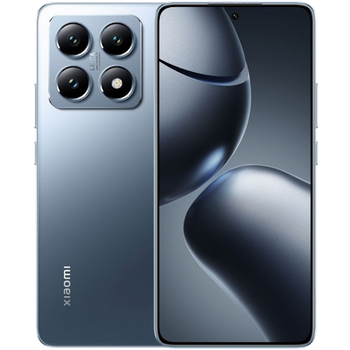
Güvenli buluta senkronizasyon için mevcut kılavuzlar
Desteklenen işlevler
- Kişiler senkronizasyonu
- SMS yedeklemesi
- arama günlüğü yedeklemesi
- fotoğraf senkronizasyonu
- video senkronizasyonu
- Otomatik senkronizasyon


kişiler, fotoğraflar, videolar, sms mesajları ve arama günlükleri verilerinizi Xiaomi 14T Pro cihazından çevrimiçi bir depolama alanına ve geri aktararak güvende ve güncel tutun.
Xiaomi 14T Pro cihazını PhoneCopy desteklenmektedir.
Lütfen aşağıdaki ayarların ürün yazılımı sürümüne bağlı olarak biraz değişebileceğini unutmayın.
Onaylanan modeller
Onaylanan sürümler
- Android 16
- Android 15
- Android 14
Haberler
- 4.08.2026
- Someone just used PhoneCopy for backup of Xiaomi 14T Pro in country Tunus. His kişiler were backed up.
- 23.06.2026
- This phone model was just synchronized by PhoneCopy user in Mısır. It transferred kişiler.
- 28.02.2026
- First user from Slovakya just synced his kişiler on Xiaomi 14T Pro phone.
- 28.01.2026
- Xiaomi 14T Pro cihazının Android 16'ya güncellemesi, PhoneCopy Cloud'a tam olarak çalışan kişi, SMS, fotoğraf ve video yedeklemesi dahil olmak üzere mevcuttur.
- 19.11.2025
- We detected PhoneCopy app on Xiaomi 14T Pro phone in Tayland. All kişiler ve medya were backed up.
- 12.07.2025
- First user from Almanya just synced his kişiler, medya ve arama günlükleri on Xiaomi 14T Pro phone.
- 2.12.2024
- PhoneCopy app is fully working after updating the Xiaomi 14T Pro to Android 15.
- 20.10.2024
- We added Xiaomi 14T Pro to supported devices with Android 14.
Xiaomi 14T Pro üzerinde çalışan Android sürümleri
PhoneCopy for Android uygulaması çeşitli Android sürümlerini desteklemektedir. Kullanıcılarımız Android 16 (67.77%), Android 14 (17.22%), Android 15 (15.02%) çalıştıran Xiaomi 14T Pro cihazlarını senkronize etti.
Aşağıdaki pasta grafiği, PhoneCopy ile senkronize edilirken Xiaomi 14T Pro üzerindeki Android sürümleri arasındaki payı göstermektedir.
dünya genelindeki Xiaomi 14T Pro kullanıcıları
İstatistiklerimize göre, PhoneCopy kullanıcıları Xiaomi 14T Pro cihazını Çekya (Czech Republic, Česká republika) - 92.39%, Mısır (Misr, Masr, مصر) - 2.90%, Slovakya (Slovensko) - 2.17%, Tunus (Tunes, ⵜⵓⵏⵙ, Tūns, تونس) - 1.09%, Tayland (Thai, Prathet Thai, Ratcha-anachak Thai, ไทย, ประเทศไทย, ราชอาณาจักรไทย) - 0.36%, Litvanya (Lietuva) - 0.36%, Almanya (Deutschland) - 0.36%, Malezya (Mǎláixīyà, 马来西亚, Malēṣiyā, மலேசியா) - 0.36% ülkelerinde veri yedeklemesi için kullanmaktadır.
Aşağıdaki ısı haritası, PhoneCopy kullanarak Xiaomi 14T Pro cihazlarını senkronize eden dünya genelindeki kullanıcılar arasındaki payı göstermektedir.
Talimat metni - Nasıl yedekleme yapılır
Xiaomi 14T Pro ile
- PhoneCopy for Android uygulamamızı mobil cihazınıza indirin.
- Uygulamayı başlattıktan sonra, uygulama üzerinden yeni bir hesap oluşturun. www.phonecopy.com web sayfalarında zaten bir hesap oluşturduysanız, bu mevcut hesapla uygulamada giriş yapın.
- Başarılı bir girişten sonra, uygulamanın kurulum sihirbazını takip edin ve ardından (mevcut bir yedeği olan hesaplar için) Synchronize / (boş bir hesap için) Backup öğesini seçin veya Later düğmesine basıp tek yönlü senkronizasyon için yan menüden Back up contacts / Restore contacts seçeneğini belirleyin.
Uygulamamız hakkında daha fazla bilgi için, PhoneCopy for Android sayfamızı.
Senkronizasyon esnasında herhangi bir problemle karşılaşırsanız Yardım İsteyin
Kullanıcı yorumları
Yorum yazmak için lütfen Giriş yapın
-
-
Hi, did you download PhoneCopy application from Google Play or Huawei AppGallery?
-
Hi, on Windowsphone it was from Google Play, on new P40 plus, I honestly don't remember, but THINK it was from H AppGalley. I even paid for a month's premium upgrade. Having a look around 'tinternet' I've seen one version of PhoneCopy with the red/black background and another with a pale blue background. Both mine are red/black. Should I delete both phones and start again? Can't actually find the 'pale-blue-one' in a store? Is the blue one the newer version? Regards, Trevor L
-
Hi, Windows mobile (Lumia) has older design because we keep it working until Microsoft will keep live their store. That step don't need to be repeated. Huawei P40 application is the same like on the following guide https://www.phonecopy.com/en/pages/how_to_synchronize_contacts_to_android . We found your phone contacting our servers but still not synchronized. Our technical team will contact you on Monday to check what should be wrong.
-
Hello again, and thank you for your prompt response. I will be patient and wait 'till Monday then. Trevor L
-
Hello,
your Huawei does not support Google Play Services.
In this case, please, install PhoneCopy for Huawei:
https://appgallery7.huawei.com/#/app/C102701109-
-
My Huawei DOES support Google Play Services...., what it will NOT do is respond to the link that you've sent me. I think I may have to write-off the £1:92 I've paid to PhoneCopy. I still have the same problem! I've successfully uploaded my contacts from my Lumia 640 LTE to your 'Cloud'. But cannot download anything to my Huawei P40 pro. In the app, the P40 Think I want to UPload, but says there is nothing to upload. Is there anything else you can suggest please?
-
Hello again, sorry, but official Huawei documentation says that Huawei P40 does not contain Google Services and running on Android 10.
In our logs, generated by communication with your phone is named as P40 pro, but running on Android 4.4.2 KITKAT with older type of processor, what is very unusual.
We will send you more informaction to your private mail.-
Thank you for this information. I've had this handset for less than a week. It came unlocked, apparently 'sealed', boxed, with the usual very small instruction leaflet, from a usually reliable source that I've used for a long time. I do now wonder though, if it is a genuine Huawei product? I have not owned any Huawei products before, so cannot compare. It is advertised variously at between £695:00 and £875:00 approx. I am very careful about buying things on the internet, but there's always a first time to be conned. I'm SURE that your information is correct. I'll await your further contact with interest. Thanks again, Trevor L
-
-
-
-
-
Answered via private mail.
-
Hello again PhoneCopy team,
Just wanted to say a really big thank you. After a complete week of communication to/fro between us, I have finally synchronised my Lumia 640 LTE with my new (highly suspect P40 pro) You even built a version of your app specifically for my use.
I now have all 87 contacts and hundreds of diary entries on the Android P40 pro. Sorted all the contacts; now just looking around for a decent calendar📅diary for other content.
Upgraded to premium at the start of this 'adventure' and have just paid for a bit😊more storage, (not that I'll need it) by way of a Thank You. Kind Regards, Trevor L
-
Thanks
-
-
-
-
-
-
-

I have uploaded my contacts+diary etc, from my Lumia 640 LTE (windows phone) successfully, but I don't seem to be able to download (from your cloud) to my new Huawei P40 Pro..., (previously known as the P40 els-nx9) which your systems say is supported. Spent hours so far..., even losing weight now! Help PLEASE...., REGARDS, Trev. trevor.lidbury, 29.08.2020