Sauvegarder contacts, photos, vidéos, SMS et journaux d'appels depuis Motorola Moto G73 5G
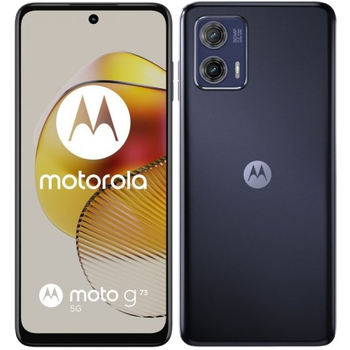
Guides disponibles pour la synchronisation vers le cloud sécurisé
Fonctions prises en charge
- synchronisation des contacts
- synchronisation des sms
- sauvegarde du journal d'appels
- synchronisation des photos
- synchronisation des vidéos
- synchronisation automatique


Transférez vos contacts, photos, vidéos, SMS et journaux d'appels de Motorola Moto G73 5G vers un espace de stockage en ligne et inversement pour les garder en sécurité et à jour.
Motorola Moto G73 5G est pris en charge avec PhoneCopy.
Veuillez noter que les paramètres suivants peuvent varier légèrement en fonction de la version du micrologiciel.
Modèles confirmés
Versions confirmées
- Android 14
Nouvelles
- 20/11/2025
- Un nouvel utilisateur de téléphone a synchronisé ses contacts avec PhoneCopy depuis le pays Espagne.
- 09/05/2025
- Nous avons détecté l'application PhoneCopy sur un téléphone Motorola Moto G73 5G dans le pays Royaume-Uni. Tous les contacts, fichiers multimédias, SMS et journaux d'appels ont été sauvegardés.
- 20/08/2024
- We freshly support Motorola Moto G73 5G with Android 14 OS for photo, video, SMS, call log and contact backup.
- 06/08/2024
- Un utilisateur dans le pays Danemark a synchronisé ses contacts et SMS avec son téléphone.
versions Android fonctionnant sur Motorola Moto G73 5G
Lors de la synchronisation, les utilisateurs de PhoneCopy disposaient des versions Android suivantes sur leur Motorola Moto G73 5G: Android 14 (100.00%).
Motorola Moto G73 5G utilisateurs dans le monde
Motorola Moto G73 5G est privilégié pour la sauvegarde des contacts par les utilisateurs de PhoneCopy dans plusieurs pays du monde - Royaume-Uni (Y Deyrnas Unedig, Unitit Kinrick, Rìoghachd Aonaichte, Ríocht Aontaithe, An Rywvaneth Unys) - 57.14%, Espagne (España, Espanya, Espainia, Espanha) - 28.57%, Danemark (Danmark) - 14.29%.
La carte montre l'utilisation de Motorola Moto G73 5G pour la sauvegarde des contacts avec PhoneCopy dans le monde entier.
Guide textuel - Comment sauvegarder
Avec Motorola Moto G73 5G
- Téléchargez notre application PhoneCopy pour Android sur votre appareil mobile.
- Après avoir lancé l'application, créez un nouveau compte depuis celle-ci. Si vous avez déjà créé un compte sur le site web www.phonecopy.com, connectez-vous à ce compte existant dans l'application.
- Après une connexion réussie, suivez l'assistant de configuration de l'application, puis sélectionnez Synchroniser (pour un compte disposant déjà d'une sauvegarde) / Sauvegarder (pour un compte vide), ou appuyez sur le bouton Plus tard puis sélectionnez l'option correspondante dans le menu latéral Sauvegarder les contacts / Restaurer les contacts pour une synchronisation à sens unique.
Pour plus d'informations sur notre application, consultez notre page PhoneCopy pour Android.
En cas de problèmes dans la synchronisation, veuillez nous contacter.
Commentaires des utilisateurs
Pour laisser un commentaire identifiez-vous.
-
-
Hello, 96,486 is really big count of SMS. It is possible that the processing of such a number of items takes a long time and it is possible that server terminate the communication due to a long time without response from the device.
We are curently working on optimalization of application, which may solve issue like yours. We will release new version of app asap, within a few days at the latest. We will contact you. Please, be patient.
Thank you-
Hello,
we developed a promised new beta version (3.4.3) of app. This optimized version should solve your reported issue. Please, download and install new version and try to sync again with it.
I recommend, plug in charger during sync, because sync of big count of items take long time and it is possible that Android system will try to limit the app due to battery life.
Download link: https://www.phonecopy.com/android/download/phonecopy.apk
Please, send us feedback, if it works now or not.
Thank you for your patience and cooperation.
-
-

My phone has 96,486 SMS that has to be backed up but the process keeps terminating due to "internet connection lost". My fiber internet access is quite stable so I don't think disruption is the cause. Is there a way I can back up the sms in parts? mebacal1960, 19/10/2020