Sauvegarder contacts, photos, vidéos, SMS et journaux d'appels depuis Samsung Galaxy A54 5G SM-A546b
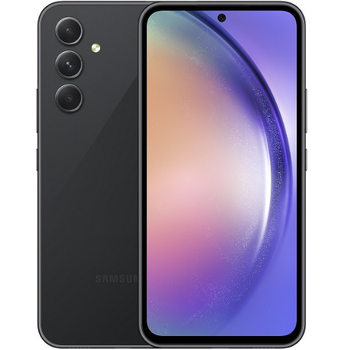
Guides disponibles pour la synchronisation vers le cloud sécurisé
Depuis l'appareil
À partir de Samsung Galaxy A54 5G SM-A546bÀ partir de Samsung Galaxy A54 5G SM-A546b
Fonctions prises en charge
- synchronisation des contacts
- synchronisation des sms
- sauvegarde du journal d'appels
- synchronisation des photos
- synchronisation des vidéos
- synchronisation automatique


Transférez vos contacts, photos, vidéos, SMS et journaux d'appels de Samsung Galaxy A54 5G SM-A546b vers un espace de stockage en ligne et inversement pour les garder en sécurité et à jour.
Samsung Galaxy A54 5G SM-A546b est pris en charge avec PhoneCopy.
Veuillez noter que les paramètres suivants peuvent varier légèrement en fonction de la version du micrologiciel.
Modèles confirmés
Versions confirmées
- Android 16
- Android 15
- Android 14
- Android 13
Nouvelles
- 31/03/2026
- Le premier utilisateur dans le pays Brésil vient de synchroniser ses contacts sur son téléphone Samsung Galaxy A54 5G SM-A546b.
- 04/02/2026
- Ce modèle de téléphone vient d'être synchronisé par un utilisateur de PhoneCopy dans le pays Nouvelle-Zélande. Il a transféré contacts.
- 24/11/2025
- Ce modèle de téléphone vient d'être synchronisé par un utilisateur de PhoneCopy dans le pays Estonie. Il a transféré contacts, fichiers multimédias, SMS et journaux d'appels.
- 16/10/2025
- Samsung Galaxy A54 5G SM-A546b propose désormais une mise à jour vers Android 16.
- 21/08/2025
- Nous avons ajouté Samsung Galaxy A54 5G SM-A546b aux appareils pris en charge avec le système d'exploitation Android et les Huawei Mobile Services.
- 12/06/2025
- Update Samsung Galaxy A54 5G SM-A546b to Android 15 is available including the fully working contact, SMS, photo, and video backup to PhoneCopy Cloud.
- 29/03/2025
- Nous venons d'avoir le premier utilisateur de ce modèle dans le pays Espagne ! Quelqu'un vient de sauvegarder ses contacts.
- 07/03/2025
- Ce modèle de téléphone vient d'être synchronisé par un utilisateur de PhoneCopy dans le pays Pologne. Il a transféré contacts, fichiers multimédias, SMS et journaux d'appels.
- 09/12/2023
- We tested the functionality of the PhoneCopy app on Samsung Galaxy A54 5G SM-A546b device after the Android 14 update.
- 23/05/2023
- We freshly support Samsung Galaxy A54 5G SM-A546b with Android 13 OS for photo, video, call log, SMS and contact backup.
versions Android fonctionnant sur Samsung Galaxy A54 5G SM-A546b
Lors de la synchronisation, les utilisateurs de PhoneCopy disposaient des versions Android suivantes sur leur Samsung Galaxy A54 5G SM-A546b: Android 14 (60.59%), Android 15 (14.48%), Android 13 (12.78%), Android 16 (12.15%).
Le tableau suivant montre les synchronisations des contacts avec Samsung Galaxy A54 5G SM-A546b évoluant sous différentes versions de Android.
Samsung Galaxy A54 5G SM-A546b utilisateurs dans le monde
D'après nos statistiques, les utilisateurs de PhoneCopy utilisent Samsung Galaxy A54 5G SM-A546b pour la sauvegarde des données dans les pays Tchéquie (Czech Republic, Česká republika) - 84.98%, Royaume-Uni (Y Deyrnas Unedig, Unitit Kinrick, Rìoghachd Aonaichte, Ríocht Aontaithe, An Rywvaneth Unys) - 4.70%, Danemark (Danmark) - 3.79%, États-Unis (Estados Unidos, États-Unis, ‘Amelika Hui Pū ‘ia) - 1.33%, Suisse (Schweiz, Suisse, Svizzera, Svizra) - 0.98%, Autriche (Österreich) - 0.63%, Italie (Italia) - 0.49%, Slovaquie (Slovensko) - 0.42%, Hongrie (Magyarország) - 0.42%, Lituanie (Lietuva) - 0.35% ainsi que dans 12 autres.
La carte de chaleur suivante montre les synchronisations des contacts avec Samsung Galaxy A54 5G SM-A546b à l'aide de PhoneCopy dans le monde entier.
Guide textuel - Comment sauvegarder
À partir de Samsung Galaxy A54 5G SM-A546b
- Download our PhoneCopy for Huawei application to your mobile device.
- After launching the application, create a new account from the application. If you have already created an account on web pages www.phonecopy.com, log in to this existing account in the application.
- After succesful login press "Synchronize" for complete synchronization, or press "Advanced & Account", select "One-way sync" and after choose "This device >> server" for one-way sync.
More detailed information and instructions include screenshots: how to backup and synchronize contacts from Huawei
For more information about our app, visit our PhoneCopy for Huawei page.
Let us just remind you, that for now PhoneCopy for Android transfers to server contacts, photos, videos, Call Logs and SMS.
En cas de problèmes dans la synchronisation, veuillez nous contacter.
Vers Samsung Galaxy A54 5G SM-A546b
- Download our PhoneCopy for Huawei application to your mobile device.
- After launching the application, create a new account from the application. If you have already created an account on web pages www.phonecopy.com, log in to this existing account in the application.
- After succesful login press "Synchronize" for complete synchronization, or press "Advanced & Account", select "One-way sync" and after choose "Server >> this device" for one-way sync.
More detailed information and instructions include screenshots: how transfer contacts to Huawei
For more information about our app, visit our PhoneCopy for Huawei page.
Let us just remind you, that for now PhoneCopy for Android transfers to server contacts, photos, videos, Call Logs and SMS.
En cas de problèmes dans la synchronisation, veuillez nous contacter.
Commentaires des utilisateurs
Pour laisser un commentaire identifiez-vous.
-
-
It sounds like the cloud version still holds your old contacts. Try deleting the extra contacts directly from your PhoneCopy cloud account, then force a manual sync from your device. If that doesn’t work, you might need to reset the sync or re-link your account. Hope this helps!
-
Hello,
the number of contacts online is what matters. So please remove unnecessary contacts on the web. After that, the synchronization will be allowed again.-
So, though I did all the cleanup locally in my phone's contacts, and though the App DOES see the local number as less than 500 it will not initiate uploading the information as for the deletions? Because if it replicated the deletions, then there would not be a sync problem.
-
Hello,
the limit works this way. It is stated in the email user receives when the limit is exceeded.-
I realize the limitation of the platform, and since it is not capable of synchronizing in the traditional technical meaning of the term, could you suggest a workaround?
Perhaps if I deleted my account, removed my app and started over in a suggested sequence so that my less than 500 contacts would be then uploaded?-
If you have blocked an account because of exceeding limits, you just need to delete some contacts on the server to fit the limit of 500 and your account will be unlocked.
-
there is much overhead to re-do the same thing I already did locally a few months ago.
Do you think, considering all I have previously mentioned, that there is a different work-around to the platform not being able to two-say sync the information?-
It seems we are discussing several contacts which have to be deleted from your online profile to make it free again. We explained to you that contacts online are what matters. If you don't want to follow our recommendation you can delete the whole account and create it as a new profile with the number of contacts stored in your mobile phone.
-
-
-
-
-
-
-

But on Phonecopy on the cloud there is a different amount of Contacts, much more than 600. On the app I see that it recognizes that I do have less than 500 contacts on my device.
But of course it does not sync. What do I have to do to make this work? kanoyati, 03/01/2024