Sauvegarder contacts, photos, vidéos, SMS et journaux d'appels depuis Samsung Galaxy S26 Ultra sm-s948b
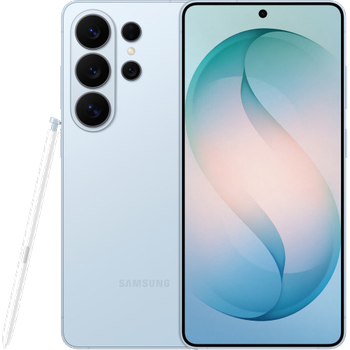
Guides disponibles pour la synchronisation vers le cloud sécurisé
Depuis l'appareil
À partir de Samsung Galaxy S26 Ultra sm-s948bÀ partir de Samsung Galaxy S26 Ultra sm-s948b
Fonctions prises en charge
- synchronisation des contacts
- synchronisation des sms
- sauvegarde du journal d'appels
- synchronisation des photos
- synchronisation des vidéos
- synchronisation automatique


Transférez vos contacts, photos, vidéos, SMS et journaux d'appels de Samsung Galaxy S26 Ultra sm-s948b vers un espace de stockage en ligne et inversement pour les garder en sécurité et à jour.
Samsung Galaxy S26 Ultra sm-s948b est pris en charge avec PhoneCopy.
Veuillez noter que les paramètres suivants peuvent varier légèrement en fonction de la version du micrologiciel.
Modèles confirmés
Versions confirmées
- Android 17
- Android 16
Nouvelles
- 24/10/2026
- La mise à jour de Samsung Galaxy S26 Ultra sm-s948b vers Android 17 est disponible, avec une sauvegarde des contacts, SMS, photos et vidéos entièrement fonctionnelle vers PhoneCopy Cloud.
- 20/08/2026
- Quelqu'un vient d'utiliser PhoneCopy pour sauvegarder Samsung Galaxy S26 Ultra sm-s948b dans le pays Singapour. Ses contacts ont été sauvegardés.
- 28/07/2026
- Nous avons détecté l'application PhoneCopy sur un téléphone Samsung Galaxy S26 Ultra sm-s948b dans le pays Grèce. Tous les contacts ont été sauvegardés.
- 28/06/2026
- Un téléphone Samsung Galaxy S26 Ultra sm-s948b a été synchronisé par un utilisateur de PhoneCopy dans le pays Croatie. Ses contacts ont été transférés.
- 27/06/2026
- Quelqu'un a utilisé PhoneCopy pour sauvegarder ce modèle de téléphone dans le pays États-Unis. Ses contacts et fichiers multimédias ont été transférés.
- 18/05/2026
- Quelqu'un vient d'utiliser PhoneCopy pour sauvegarder Samsung Galaxy S26 Ultra sm-s948b dans le pays Royaume-Uni. Ses contacts ont été sauvegardés.
- 16/03/2026
- Nous avons testé le nouvel Android 16 sur Samsung Galaxy S26 Ultra sm-s948b avec notre application PhoneCopy et cela fonctionne parfaitement.
versions Android fonctionnant sur Samsung Galaxy S26 Ultra sm-s948b
Lors de la synchronisation, les utilisateurs de PhoneCopy disposaient des versions Android suivantes sur leur Samsung Galaxy S26 Ultra sm-s948b: Android 16 (99.05%), Android 17 (0.95%).
Le graphique montre l'utilisation des versions Samsung Galaxy S26 Ultra sm-s948b et Android pour la sauvegarde des contacts avec PhoneCopy dans le monde entier.
Samsung Galaxy S26 Ultra sm-s948b utilisateurs dans le monde
Samsung Galaxy S26 Ultra sm-s948b est privilégié pour la sauvegarde des contacts par les utilisateurs de PhoneCopy dans plusieurs pays du monde - Tchéquie (Czech Republic, Česká republika) - 68.54%, Grèce (Hellas, Ελλάς, Ellada, Ελλάδα) - 8.92%, Australie - 8.92%, Belgique (België, Belgique, Belgien) - 7.04%, Croatie (Hrvatska) - 2.35%, Singapour (Singapura, Xīnjiāpō, 新加坡, Singapur, சிங்கப்பூர்) - 1.88%, Suisse (Schweiz, Suisse, Svizzera, Svizra) - 0.94%, États-Unis (Estados Unidos, États-Unis, ‘Amelika Hui Pū ‘ia) - 0.47%, Pologne (Polska) - 0.47%, Royaume-Uni (Y Deyrnas Unedig, Unitit Kinrick, Rìoghachd Aonaichte, Ríocht Aontaithe, An Rywvaneth Unys) - 0.47%.
La carte montre l'utilisation de Samsung Galaxy S26 Ultra sm-s948b pour la sauvegarde des contacts avec PhoneCopy dans le monde entier.
Guide textuel - Comment sauvegarder
Avec Samsung Galaxy S26 Ultra sm-s948b
- Téléchargez notre application PhoneCopy pour Android sur votre appareil mobile.
- Après avoir lancé l'application, créez un nouveau compte depuis celle-ci. Si vous avez déjà créé un compte sur le site web www.phonecopy.com, connectez-vous à ce compte existant dans l'application.
- Après une connexion réussie, suivez l'assistant de configuration de l'application, puis sélectionnez Synchroniser (pour un compte disposant déjà d'une sauvegarde) / Sauvegarder (pour un compte vide), ou appuyez sur le bouton Plus tard puis sélectionnez l'option correspondante dans le menu latéral Sauvegarder les contacts / Restaurer les contacts pour une synchronisation à sens unique.
Pour plus d'informations sur notre application, consultez notre page PhoneCopy pour Android.
En cas de problèmes dans la synchronisation, veuillez nous contacter.
Commentaires des utilisateurs
Pour laisser un commentaire identifiez-vous.
-
Convart to readmagic shakilsharifbd9, 24/04/2026
