Sauvegarder contacts, photos, vidéos, SMS et journaux d'appels depuis Samsung Galaxy S21 FE 5G sm-g990b2
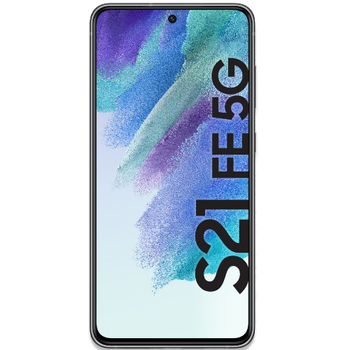
Guides disponibles pour la synchronisation vers le cloud sécurisé
Depuis l'appareil
À partir de Samsung Galaxy S21 FE 5G sm-g990b2À partir de Samsung Galaxy S21 FE 5G sm-g990b2
Fonctions prises en charge
- synchronisation des contacts
- synchronisation des sms
- sauvegarde du journal d'appels
- synchronisation des photos
- synchronisation des vidéos
- synchronisation automatique


Transférez vos contacts, photos, vidéos, SMS et journaux d'appels de Samsung Galaxy S21 FE 5G sm-g990b2 vers un espace de stockage en ligne et inversement pour les garder en sécurité et à jour.
Samsung Galaxy S21 FE 5G sm-g990b2 est pris en charge avec PhoneCopy.
Veuillez noter que les paramètres suivants peuvent varier légèrement en fonction de la version du micrologiciel.
Modèles confirmés
Versions confirmées
- Android 16
- Android 15
- Android 14
- Android 13
- Android 12
Nouvelles
- 11/06/2026
- Nous venons d'avoir le premier utilisateur de ce modèle dans le pays Italie ! Quelqu'un vient de sauvegarder ses contacts.
- 16/03/2026
- Nous venons d'avoir le premier utilisateur de Samsung Galaxy S21 FE 5G sm-g990b2 dans le pays Espagne ! Quelqu'un vient de sauvegarder ses contacts depuis un nouveau téléphone.
- 26/11/2025
- La mise à jour de Samsung Galaxy S21 FE 5G sm-g990b2 vers Android 16 est disponible, avec une sauvegarde des contacts, SMS, photos et vidéos entièrement fonctionnelle vers PhoneCopy Cloud.
- 17/11/2025
- Nous venons d'ajouter Samsung Galaxy S21 FE 5G sm-g990b2 aux appareils pris en charge avec le système d'exploitation Android et les Huawei Mobile Services. Nous permettons la synchronisation et la sauvegarde des contacts, SMS, photos et vidéos vers un PhoneCopy Cloud sécurisé.
- 16/11/2025
- Quelqu'un vient d'utiliser PhoneCopy pour sauvegarder Samsung Galaxy S21 FE 5G sm-g990b2 dans le pays Autriche. Ses contacts et SMS ont été sauvegardés.
- 11/06/2025
- We noticed the update possibility of Samsung Galaxy S21 FE 5G sm-g990b2 to a new Android operating system version 15.
- 16/05/2025
- Nous venons d'avoir le premier utilisateur de ce modèle dans le pays Belgique ! Quelqu'un vient de sauvegarder ses contacts, SMS et journaux d'appels.
- 01/04/2025
- Un utilisateur dans le pays Thaïlande a synchronisé ses contacts avec son téléphone.
- 16/12/2023
- We noticed the update possibility of Samsung Galaxy S21 FE 5G sm-g990b2 to a new Android operating system version 14.
- 07/06/2023
- We tested new Android 12 on Samsung Galaxy S21 FE 5G sm-g990b2 with our PhoneCopy app and it's completely working.
- We noticed the update possibility of Samsung Galaxy S21 FE 5G sm-g990b2 to a new Android operating system version 13.
versions Android fonctionnant sur Samsung Galaxy S21 FE 5G sm-g990b2
Lors de la synchronisation, les utilisateurs de PhoneCopy disposaient des versions Android suivantes sur leur Samsung Galaxy S21 FE 5G sm-g990b2: Android 14 (59.27%), Android 13 (30.85%), Android 15 (6.99%), Android 16 (2.74%), Android 12 (0.15%).
Le tableau suivant montre les synchronisations des contacts avec Samsung Galaxy S21 FE 5G sm-g990b2 évoluant sous différentes versions de Android.
Samsung Galaxy S21 FE 5G sm-g990b2 utilisateurs dans le monde
Samsung Galaxy S21 FE 5G sm-g990b2 est souvent utilisé par les utilisateurs de PhoneCopy dans des pays comme Tchéquie (Czech Republic, Česká republika) - 45.69%, France - 34.64%, Inde (Bharôt, ভাৰত, ভারত, Bhārat, ભારત, भारत, Bhārata, ಭಾರತ, Bhāratam, ഭാരതം, Bharôtô, ଭାରତ, ਭਾਰਤ, भारतम्, Bārata, பாரதம், Bhāratadēsam, భారత దేశం) - 5.60%, États-Unis (Estados Unidos, États-Unis, ‘Amelika Hui Pū ‘ia) - 4.99%, Royaume-Uni (Y Deyrnas Unedig, Unitit Kinrick, Rìoghachd Aonaichte, Ríocht Aontaithe, An Rywvaneth Unys) - 2.72%, Pays-Bas (Nederland, Nederlân) - 1.36%, Chili - 0.61%, Slovénie (Slovenija) - 0.61%, Danemark (Danmark) - 0.45%, Belgique (België, Belgique, Belgien) - 0.45% et 10 autres pays.
La carte de chaleur suivante montre les synchronisations des contacts avec Samsung Galaxy S21 FE 5G sm-g990b2 à l'aide de PhoneCopy dans le monde entier.
Guide textuel - Comment sauvegarder
À partir de Samsung Galaxy S21 FE 5G sm-g990b2
- Download our PhoneCopy for Huawei application to your mobile device.
- After launching the application, create a new account from the application. If you have already created an account on web pages www.phonecopy.com, log in to this existing account in the application.
- After succesful login press "Synchronize" for complete synchronization, or press "Advanced & Account", select "One-way sync" and after choose "This device >> server" for one-way sync.
More detailed information and instructions include screenshots: how to backup and synchronize contacts from Huawei
For more information about our app, visit our PhoneCopy for Huawei page.
Let us just remind you, that for now PhoneCopy for Android transfers to server contacts, photos, videos, Call Logs and SMS.
En cas de problèmes dans la synchronisation, veuillez nous contacter.
Vers Samsung Galaxy S21 FE 5G sm-g990b2
- Download our PhoneCopy for Huawei application to your mobile device.
- After launching the application, create a new account from the application. If you have already created an account on web pages www.phonecopy.com, log in to this existing account in the application.
- After succesful login press "Synchronize" for complete synchronization, or press "Advanced & Account", select "One-way sync" and after choose "Server >> this device" for one-way sync.
More detailed information and instructions include screenshots: how transfer contacts to Huawei
For more information about our app, visit our PhoneCopy for Huawei page.
Let us just remind you, that for now PhoneCopy for Android transfers to server contacts, photos, videos, Call Logs and SMS.
En cas de problèmes dans la synchronisation, veuillez nous contacter.
Commentaires des utilisateurs
Pour laisser un commentaire identifiez-vous.
-
Hi, please since the day I have been using my Tecno spark 3 I yve not enjoy my personal video coverage, I mean whenever I make videos coverage then when I try to play the video, the video won't play very well, the picture in the video won't move the way a normal video suppose to move(skipping) please what can I do? abiolaolatubosun16, 08/06/2021
-
Sorry, we are a backup and synchronization service and not Tecno support.
-
